
Create custom software image in OCI console

Introduction:
A software image in Oracle Base Database Cloud Service serves as a preconfigured template containing a specific Oracle Database and Grid Infrastructure Release Update. By creating and managing software images, organizations can ensure consistent database provisioning, simplify patch management, and maintain compliance across their database environments.
Benefits of Custom Software Images
Using custom software images in Oracle Base Database Cloud Service provides several advantages when provisioning and maintaining databases at scale:
- Consistency: Every database provisioned from the same image has an identical Oracle Database and Grid Infrastructure Release Update, eliminating version drift across environments.
- Faster provisioning: New databases can be created directly from a pre-built, pre-patched image instead of installing and patching software after deployment.
- Simplified patch management: One-off patches and Release Updates are baked into the image once, so they don’t need to be reapplied manually on every new node or database.
- Compliance: Standardized images make it easier to demonstrate that all databases meet the organization’s approved patch and security baseline.
- Reduced deployment errors: Since the image is pre-validated, the chance of human error during manual patching is significantly reduced.
Where Software Images Can Be Used
A custom software image, once created, can be used in the following scenarios:
- Provisioning new DB systems on Oracle Base Database Service using the custom image instead of a standard Oracle-provided image.
- Creating new Exadata Cloud Service or Exadata Cloud@Customer database homes from an approved image.
- Adding a new database home to an existing DB system or VM cluster using the same standardized image.
- Cloning or duplicating databases where consistent software versions must be maintained between source and target.
- Disaster recovery and standby builds, ensuring the standby environment runs the exact same Release Update and patch level as production.
Prerequisites
Before creating a custom software image in the OCI console, ensure the following prerequisites are met:
- Appropriate IAM policies/permissions are in place to allow the user or group to manage software images in the target compartment.
- A compartment has been identified/created where the software image will be stored.
- The required base Oracle Database Release Update and any one-off patches to be included are identified in advance and are available/downloadable to Oracle Cloud.
- Network and service limits for Oracle Base Database Service have been verified to support the image creation and subsequent provisioning activities.
- Access to My Oracle Support (MOS) is available, in case specific one-off patch numbers need to be confirmed or downloaded.
Supported Database Versions
Custom software images can be created for the following supported Oracle Database releases (verify current certification on Oracle Cloud documentation, as supported versions are periodically updated):
- Oracle Database 19c
- Oracle Database 21c
- Oracle Database 23ai
Each supported release can be combined with the applicable Grid Infrastructure version and any certified one-off patches to build the final custom image.
Steps to create custom software image in OCI console.
Navigation path
Home –> Oracle AI Database –> Oracle Base Database Service –> Software images –>
Step 1: Select the image type
Step 2: Provide basic information for the database software image
Display name : Provide the appropriate name
Compartment : Select the appropriate compartment

Step 3: Configure the database software image
Database release : Select the needed database release
Database version : Select the needed database version
Enter one-off patch numbers : Enter the custom patches to be build
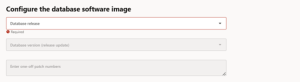
Step 4: Once completed, select the create button.
Limitations
The following limitations should be considered when working with custom software images:
- A software image is tied to a specific Oracle Database version and Release Update; it cannot be used to provision a different major database version.
- Once a software image is created, its contents (base Release Update and one-off patches) cannot be modified in place; a new image must be created to include additional patches.
- Software images are specific to a compartment and region; they must be copied or recreated to be used in another region.
- There are service limits on the number of software images that can be created per tenancy/compartment, which should be checked before large-scale use.
- Deleting a software image that is still referenced by existing DB systems or in-progress provisioning jobs is not permitted until those dependencies are cleared.
Best Practice
Always create software images from fully tested and approved Release Updates before deploying to production.
Additional recommended practices include:
- Validate the Release Update and one-off patches in a non-production environment before building the software image.
- Maintain a clear naming convention for images (for example, including the database version, Release Update, and patch date) to make identification easier.
- Document the exact patch numbers included in each image for audit and troubleshooting purposes.
- Periodically review and retire outdated software images that are no longer aligned with the organization’s approved patch baseline.