
SQL Server TempDB Log Growth: Finding the Root Cause
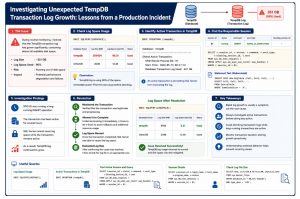
Introduction
TempDB is one of the busiest databases in SQL Server. It supports temporary objects, sorting operations, version stores, hash operations, and many internal engine activities. Because of this constant activity, unexpected growth in the TempDB transaction log can quickly become a concern for database administrators.
During one of my routine health checks, I noticed that the TempDB transaction log had grown significantly larger than expected, consuming most of the available disk space allocated to the drive. Although the SQL Server instance was still functioning normally and no application issues had been reported, continued log growth had the potential to impact database operations if left unchecked.
Instead of immediately shrinking the transaction log, I wanted to understand why SQL Server wasn’t able to reuse the existing log space. This blog walks through the investigation process, the diagnostic queries I used, and the lessons learned while identifying the root cause.
Understanding the Symptoms
The first indication came from routine database health monitoring.
The TempDB transaction log had expanded considerably, and log utilization was much higher than expected.
At this stage, several possibilities needed to be considered:
- Was there an unusually large workload?
- Was a transaction preventing log truncation?
- Was TempDB experiencing blocking?
- Was SQL Server waiting on storage?
- Was the log file simply oversized?
Rather than making assumptions, I began collecting evidence.
Step 1 – Verify Transaction Log Usage
The first step was to determine how much of the transaction log was actually being used.
DBCC SQLPERF(LOGSPACE);
Why this command?
This command provides:
- Current log size
- Percentage of log space in use
- Overall log utilization across all databases
The output confirmed that TempDB’s transaction log was consuming an unusually high percentage of available space, making it clear that further investigation was required.
Step 2 – Identify the Oldest Active Transaction
One of the most common reasons SQL Server cannot reuse transaction log space is because an active transaction is still open.
To verify this, I ran:
DBCC OPENTRAN (‘tempdb’);
Why this command?
DBCC OPENTRAN helps identify:
- Whether an active transaction exists
- The oldest active transaction
- The SPID associated with it
- When the transaction started
The results confirmed that a transaction had been running for an extended period.
This immediately shifted the investigation toward identifying the session responsible.
Step 3 – Find the Session Responsible
Once I knew an active transaction existed, the next step was identifying exactly what SQL Server was executing

Why this query?
This query reveals:
- Active sessions
- Running commands
- Wait types
- Blocking information
- The SQL statement currently executing
During the investigation, I identified a long-running database operation that had remained active for several hours.
The session wasn’t blocked, nor was it idle. It continued making progress.
Step 4 – Understand the Wait Type
Knowing what was running wasn’t enough.
The next question was:
Was the session actually progressing, or was it stuck?
I reviewed the wait type reported by SQL Server.
In this case, the wait indicated ongoing I/O activity rather than a blocked or stalled transaction.
That distinction was important because an active transaction performing legitimate work should usually be allowed to complete instead of being terminated prematurely.
Step 5 – Verify Transaction Progress
Long-running operations aren’t always problematic.
Before considering any intervention, I monitored the session over time to determine whether it was still progressing.
Some of the values I monitored included:
- Elapsed execution time
- Reads
- Writes
- Wait time
- Percent complete (where applicable)
The execution statistics continued changing, indicating that SQL Server was actively processing the workload.
That gave me confidence that the transaction was progressing normally rather than hanging.
Step 6 – Why I Didn’t Shrink the Log Immediately
One of the most common responses to a large transaction log is to execute DBCC SHRINKFILE.
However, shrinking the log while a transaction is still active rarely solves the underlying problem.
Since SQL Server cannot truncate log records that are still required by an active transaction, shrinking at this stage would only result in the log growing again almost immediately.
Instead, I focused on resolving the underlying cause before considering any maintenance activities.
Step 7 – Resolution
After confirming that the transaction represented legitimate database activity and was continuing to make progress, I allowed it to complete naturally.
Once the transaction finished, SQL Server automatically began reusing transaction log space.
After verifying that log utilization had stabilized and no additional active transactions were preventing truncation, I evaluated whether reclaiming unused disk space through log maintenance was necessary.
By addressing the root cause first, I avoided unnecessary intervention and reduced the risk of disrupting an active workload.
Challenges During the Investigation
The most difficult part of this incident wasn’t identifying the large transaction log—it was deciding whether action was actually required.
Several factors made the decision less straightforward:
- The SQL Server instance remained healthy.
- Applications continued functioning normally.
- The long-running session was legitimate.
- The transaction continued making measurable progress.
- Interrupting it could have triggered an expensive rollback.
This reinforced an important lesson:
Not every long-running session is a problem, and not every large transaction log needs to be shrunk immediately.
Lessons Learned
This investigation reinforced several best practices that are worth remembering.
- Treat transaction log growth as a symptom, not the root cause.
- Always investigate active transactions before performing maintenance.
- Review execution progress before terminating long-running sessions.
- Use wait statistics to understand what SQL Server is actually doing.
- Shrink transaction logs only after confirming that active transactions have completed.
- Routine monitoring helps identify storage issues before they become production incidents.
Useful SQL Queries
Check Transaction Log Usage

View Active Requests

Monitor Running Sessions

Conclusion
Unexpected TempDB transaction log growth can be alarming, but it is often the result of normal SQL Server behavior responding to long-running transactions.
In this case, the investigation demonstrated the importance of understanding why the transaction log was growing before attempting to reclaim disk space. By working through the evidence step by step—reviewing log utilization, identifying active transactions, monitoring session progress, and evaluating wait statistics—I was able to determine that the safest course of action was to let the transaction complete.
Production troubleshooting is rarely about finding the quickest solution. More often, it’s about asking the right questions, validating assumptions with evidence, and choosing the approach that minimizes risk while resolving the underlying issue.
Hopefully, this walkthrough provides a practical reference for anyone investigating unexpected TempDB transaction log growth in their own SQL Server environments.