Blog / Oracle Application Blog
Fixing Incomplete AP Open Balance on the Oracle ECC Supplier Balance Dashboard
Introduction/Issue:
- Even though supplier setup in Oracle Payables was correct, the “Supplier Balance” dashboard on the Oracle Enterprise Command Center (ECC) was not showing the correct total AP open balance.
- Instead of reflecting the full outstanding balance across all open invoices, the dashboard was only showing the past-due (overdue) balance , a much smaller number than the actual total exposure.
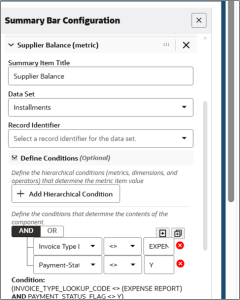
Actual Supplier Balance setup

Why we need to do / Cause of the issue:
- The ECC Payables dashboards are populated by the “Payables Command Center Data Load” concurrent program, which loads open installments from Oracle Payables into the ECC data set. As part of this load, every open installment is assigned to an aging bucket based on the active aging template defined at the site level through the AP: ECC Aging Template profile option.
- The profile option was set to the “Overdue Invoices” aging template, which only defines buckets for amounts that are already past due (e.g., 1–15, 16–30, 31–60, 61–90, and 90+ days). It does not define any buckets for invoices that are open but not yet due.
- As a result, any open installment with a due date still in the future had no bucket to be loaded into during the data refresh. Because ECC could not place these installments into any aging bucket, they were silently excluded from the ECC data set entirely , they never appeared on the Supplier Balance dashboard, the Total AP Aging figure, or the Past-Due Invoices figure.
- This meant the dashboard was structurally under-reporting the true open balance, not just displaying a filtered view of it. In this case, the gap amounted to a significant portion of total AP exposure that was completely missing from the dashboard, even though it existed correctly in the underlying Oracle Payables data (ap_invoices_all and ap_payment_schedules_all).
How do we solve:
The fix was to update the site-level profile option AP: ECC Aging Template from “Overdue Invoices” to an aging template that covers the full range of open invoices — current, past-due, and not-yet-due (“All Invoices”). This ensures every open installment, regardless of its due date, falls into a valid aging bucket during the data load.
Steps followed:
- Navigate to the System Administrator responsibility >> Profile >> System.
- Query the AP: ECC Aging Template

- And update the AP: ECC Aging Template profile option from “Overdue Invoices” to “All Invoices.”


- Confirm the new aging template does not have overlapping bucket definitions, since ECC does not support overlapping buckets and this can cause data load failures.
- Re-run the Payables Command Centre Data Load concurrent program with the Full Load option, so that all payables data is reloaded into ECC using the updated aging template.
- Monitor the load through the Data Load Tracking page (ECC Developer responsibility) to confirm it completes without errors.
- Validate the results by comparing the ECC dashboard total against a direct reconciliation query against ap_invoices_all and ap_payment_schedules_all.
- This worked, after the profile change and full data reload, the dashboard total reconciled closely with the source-table calculation.
Conclusion:
- The root cause was not a data or query issue, but a configuration gap: the aging template driving the ECC data load only accounted for past-due buckets, causing all not-yet-due open instalments to be silently dropped from the dashboard’s underlying data set.
- By switching the AP: ECC Aging Template profile option to a template covering the full aging range and performing a Full Load refresh, the Supplier Balance dashboard now accurately reflects the complete AP open balance, matching against Oracle Payables source tables.