Blog / Application Development
Creating Workers Oracle Fusion HCM API
Creating and Managing Workers in Oracle Fusion HCM Using REST APIs Instead of the Guided UI Flow
Introduction / Issue
Onboarding a worker in Oracle Fusion HCM usually means clicking through the “Add a Person” guided UI. That flow moves you through several dependent screens: personal details, legislative data, work relationship, assignment, contact details, identifiers, and documents. For a single hire, this is manageable. However, for bulk hiring, migrations, acquisitions, or ATS integrations, repeating the same steps over and over becomes slow and inefficient.
Fortunately, these UI screens are simply a front end for underlying REST resources. So instead of clicking through the Fusion UI, you can create and maintain the full hire process—core profile, work relationship, assignment, and optional personal details—through API calls.
Why We Need to Do This / Cause of the Issue
Today, the manual, UI-driven process forces HR operations users to:
- Navigate the guided “Add a Person” flow screen by screen for every single worker
- Manually search and select the correct country, business unit, department, job, and location from on-screen pickers
- Re-enter the same legal employer, business unit, and legislative details for every hire in the same batch
- Wait for each screen to validate and save before the next screen becomes available
- Separately navigate into each personal-detail area (addresses, emails, phones, national identifiers, citizenships, visas, passports, driver licenses) after the initial hire is saved
- Re-run the entire multi-screen flow again just to correct a single field, such as a date of birth or country of birth
- Manually cross-check that a worker’s work relationship, assignment, and identifiers all agree with one another
The root problem is simple: a worker’s core profile, employment data, and reference-data lookups (countries, business units, jobs, departments, locations, blood types, correspondence languages) all live behind separate screens. There’s no single, combined entry point. As a result, every hire repeats the same navigation. And when the process runs at volume, small mistakes — an unresolved LOV value, a missed required field — slip in easily.
How Do We Solve It
Solving this is straightforward: bypass the guided UI and drive worker creation, enrichment, updates, and verification through the Oracle Fusion HCM REST API instead. A single root resource, workers, exposes the entire record. Every UI screen becomes either a field on the payload or a child resource nested underneath it. Meanwhile, the dropdown pickers you’d normally click through are exposed as their own list-of-values (LOV) endpoints, which you can query, filter, and cache independently of any single hire.
For reference, Oracle’s official documentation covers the full workers resource in detail. Every call in this guide targets the same base path, /hcmRestApi/resources/11.13.18.05/, and uses standard HTTP methods, basic authentication, plus the REST-Framework-Version and Metadata-Context headers Fusion expects on every request. Below, you’ll find every endpoint involved in a full worker lifecycle, listed in the order teams typically use them. If you’re scoping a broader integration, our Oracle Fusion Cloud Application team can help.
1. The Core Worker Resource
Everything else in this guide builds on this one resource. When you create a worker, Fusion returns a PersonId and PersonNumber. Every later call — every child resource, every update — is addressed against these two IDs.
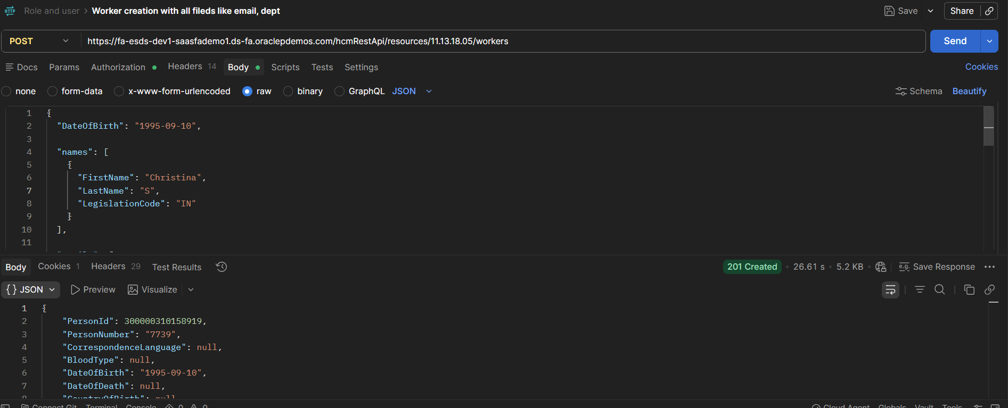
1.1 Create a Worker
This call creates a brand-new worker in one shot: the person record, their name, their work relationship, and their first assignment. In other words, it’s the direct API equivalent of completing the entire “Add a Person” hire flow.
Request headers:
- Effective-Of — sets the effective date range the create should be processed against
- Metadata-Context — passes metadata context for the request
- REST-Framework-Version — the REST framework version to use (Fusion examples use 4)
- Upsert-Mode — controls whether the call should update an existing record if a match is found instead of always inserting
Request body fields:
addresses, ApplicantNumber, BloodType, citizenships, CorrespondenceLanguage, CountryOfBirth, DateOfBirth, DateOfDeath, disabilities, driverLicenses, emails, ethnicities, externalIdentifiers, legislativeInfo, messages, names, nationalIdentifiers, otherCommunicationAccounts, passports, PersonId, PersonNumber, phones, photos, RegionOfBirth, religions, TownOfBirth, visasPermits, workersDFF, workersEFF, workRelationships. Of these, only names and workRelationships (containing at least one assignment) are required to complete a hire — everything else is optional and can be supplied at create time or added afterward as a child resource.
Example payload — minimum viable hire:
“names”: [
{
“LastName”: “AAA”,
“LegislationCode”: “US”
}
],
“workRelationships”: [
{
“LegalEmployerName”: “GBI HCM Widgets USA”,
“WorkerType”: “E”,
“assignments”: [
{
“ActionCode”: “HIRE”,
“BusinessUnitName”: “GBI HCM-Financials USA BU”
}
]
}
]
}
Example cURL call:
-H “Content-Type: application/vnd.oracle.adf.resourceitem+json” \
-H “REST-Framework-Version: 4” \
-H “Effective-Of:RangeStartDate=2018-01-01” \
-X POST -d <payload> \
“https://<host>:<port>/hcmRestApi/resources/11.13.18.05/workers”
A successful call returns HTTP 201 Created along with the full worker representation. This includes the system-generated PersonId, PersonNumber, and timestamps. It also includes every nested child collection — names.items, workRelationships.items, and, inside each work relationship, assignments.items — each fully populated with its own generated IDs, such as PersonNameId, PeriodOfServiceId, AssignmentId, and AssignmentNumber.
1.2 Update a Worker
This call updates fields on an existing worker’s core profile. workersUniqID is a required path parameter here, and Fusion accepts the worker’s PersonId, PersonNumber, or its encoded unique key. Importantly, you only need to include the fields you’re changing in the payload — everything else on the record stays untouched.
Request headers: Effective-Of, Metadata-Context, REST-Framework-Version
Request body fields:
Accepts the same set of fields as the create call (addresses, ApplicantNumber, BloodType, citizenships, CorrespondenceLanguage, CountryOfBirth, DateOfBirth, DateOfDeath, disabilities, driverLicenses, emails, ethnicities, externalIdentifiers, legislativeInfo, messages, names, nationalIdentifiers, otherCommunicationAccounts, passports, PersonNumber, phones, photos, RegionOfBirth, religions, TownOfBirth, visasPermits, workersDFF, workersEFF, workRelationships) — PersonId is not accepted here since the worker already exists and is identified by the path parameter.
Example payload — correcting date and country of birth:
“DateOfBirth”: “1987-01-01”,
“CountryOfBirth”: “US”
}
In response, Fusion returns HTTP 200 OK along with the full, refreshed worker representation. This is exactly what replaces re-running the entire guided flow just to fix one field.
Fields returned on both the create and update response (workers-item-response):
| Field | Description |
|---|---|
| PersonId | System-generated unique identifier for the person |
| PersonNumber | Human-readable worker number, used as the path key for later calls |
| DisplayName / FullName / ListName | Derived name representations |
| BloodTypeMeaning | Decoded meaning of the BloodType lookup code |
| CorrLanguageMeaning | Decoded meaning of the CorrespondenceLanguage lookup code |
| CountryOfBirthName | Decoded country name for CountryOfBirth |
| CreatedBy / CreationDate | Audit fields for record creation |
| LastUpdatedBy / LastUpdateDate | Audit fields for the most recent update |
| links | Hypermedia links to every child resource described in section 3 |
2. Reference Data (List of Values) APIs
Several fields on the worker payload — legislation, business unit, department, job, location, country, blood type, correspondence language — are constrained to values Fusion already knows about. Rather than guessing or hardcoding these, the correct pattern is to query the matching LOV endpoint first and use the value it returns. For a broader overview of these patterns, see Oracle’s REST API guide for Human Resources. Every LOV endpoint below accepts the same standard query parameters: expand, fields, finder, limit, links, offset, onlyData, orderBy, q, totalResults, so results can be filtered (q) and trimmed (fields) instead of pulling entire lists on every call.
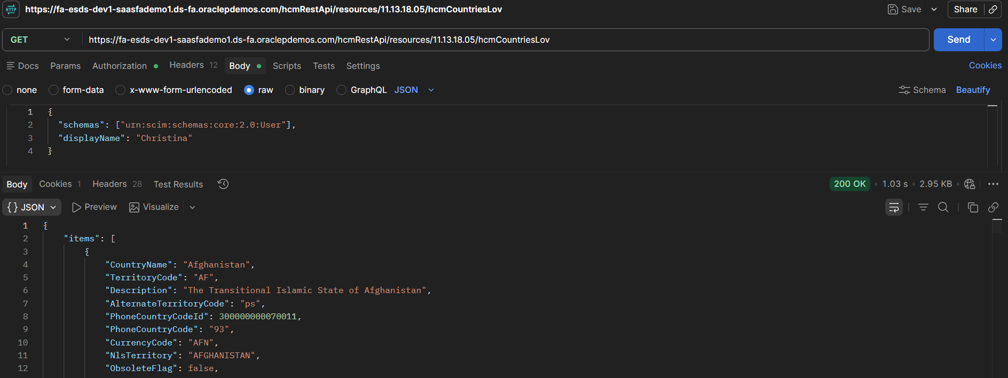
2.1 Get All Countries
This endpoint returns every country Fusion recognizes. Use it to resolve CountryOfBirth on the worker record, as well as country fields on addresses.
| Item Field | Description |
|---|---|
| CountryName | Full display name of the country |
| TerritoryCode | The short code (e.g. US, IN, GB) used as the actual field value |
| Description | Formal/legal name of the country |
| AlternateTerritoryCode | Locale-qualified alternate code, where defined |
| PhoneCountryCodeId / PhoneCountryCode | Identifier and dialing code for the country |
| CurrencyCode | ISO currency code associated with the country |
| NlsTerritory | NLS territory name, where applicable |
| ObsoleteFlag | Indicates whether the country value is obsolete |
2.2 Get All Business Units
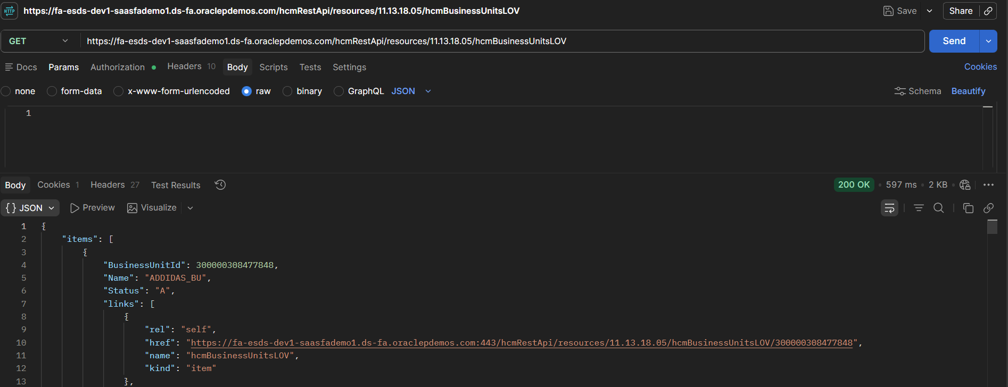
Similarly, this call returns every business unit. You can use it to resolve BusinessUnitName or BusinessUnitId on a worker’s assignment.
| Item Field | Description |
|---|---|
| BusinessUnitId | System-generated identifier for the business unit |
| Name | Display name of the business unit |
| Status | Active status of the business unit (e.g. A for active) |
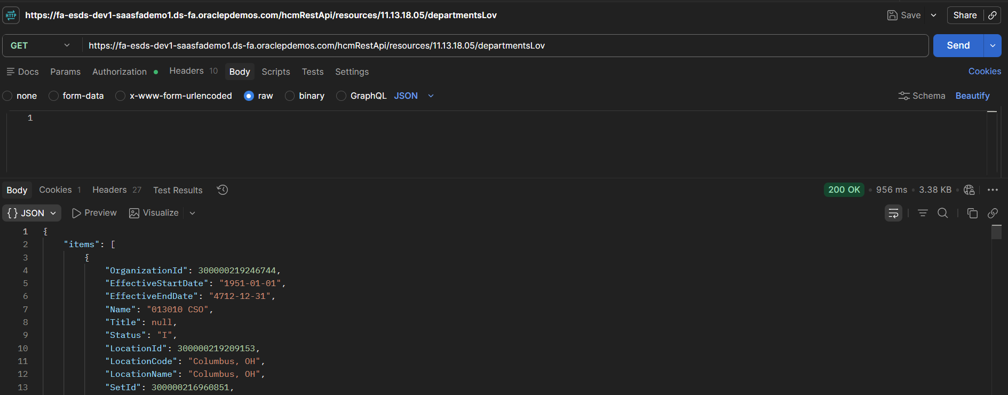
2.3 Get All Departments
For departments, this endpoint returns the full list so you can resolve the department tied to a worker’s assignment. It also accepts an effectiveDate query parameter and an Effective-Of request header.
| Item Field | Description |
|---|---|
| OrganizationId | System-generated identifier for the department |
| EffectiveStartDate / EffectiveEndDate | Date range the department record is effective for |
| Name | Display name of the department |
| Status | Active status of the department |
| LocationId / LocationCode / LocationName | The location associated with the department |
| SetId / SetCode / SetName | Reference data set the department belongs to |
2.4 Get All Jobs
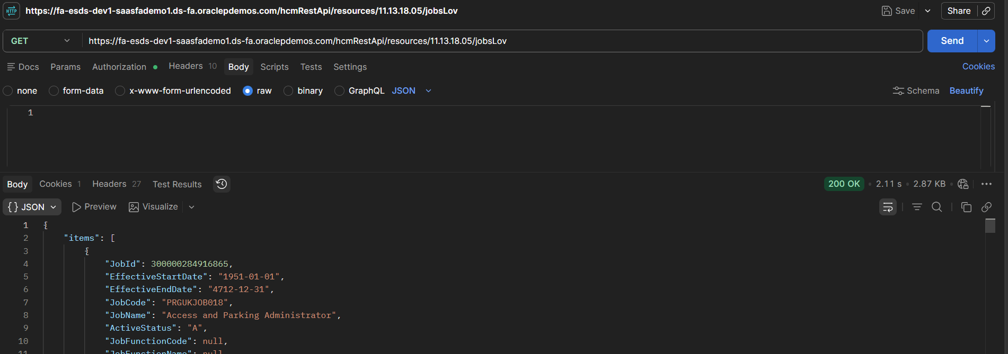
Next, the jobs endpoint returns every job so you can resolve JobCode on a worker’s assignment. Like departments, it also accepts an effectiveDate query parameter and an Effective-Of request header.
| Item Field | Description |
|---|---|
| JobId | System-generated identifier for the job |
| EffectiveStartDate / EffectiveEndDate | Date range the job record is effective for |
| JobCode / JobName | Code and display name of the job |
| ActiveStatus | Active status of the job |
| JobFunctionCode / JobFunctionName | Functional classification of the job |
| JobFamilyId / JobFamilyName | Job family classification |
| ManagerLevel | Manager level associated with the job, if defined |
| SetId / SetCode / SetName | Reference data set the job belongs to |
2.5 Get All Locations
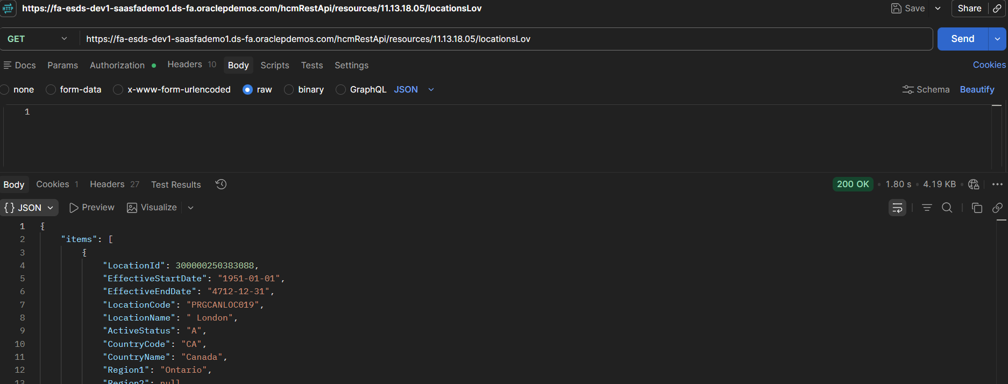
Finally, this call returns every work location, which resolves the location on a worker’s assignment. It too accepts an effectiveDate query parameter and an Effective-Of request header.
| Item Field | Description |
|---|---|
| LocationId | System-generated identifier for the location |
| EffectiveStartDate / EffectiveEndDate | Date range the location record is effective for |
| LocationCode / LocationName | Code and display name of the location |
| ActiveStatus | Active status of the location |
| CountryCode / CountryName | Country the location is in |
| Region1 / Region2 | State/province and county/region details |
| TownOrCity / PostalCode | City and postal code of the location |
| SetId / SetCode / SetName | Reference data set the location belongs to |
2.6 Common Lookups: Blood Type and Correspondence Language
The common-lookups resource supports smaller worker fields that do not have dedicated LOV endpoints:
- bloodTypesLov — uses LookupType=BLOOD_TYPE for BloodType
- correspondenceLanguagesLov — uses LookupType=PER_CORRESP_LANG for CorrespondenceLanguage
3. Worker Child Resources
Every one of these resources is a child of workers and follows the same address pattern: /hcmRestApi/resources/11.13.18.05/workers/{workersUniqID}/child/{resource}. You can include each one inline in the create/update payload, query it on its own with GET, or post to it individually once the worker already exists. By default, all of them return data as of the current date, unless you specify a different effective date.
| Child Resource | Description |
|---|---|
| addresses | All addresses of a worker as of the specified date. |
| citizenships | All citizenships of a worker as of the specified date. |
| disabilities | All worker disabilities as of the specified date. |
| driverLicenses | All driver licenses of a worker as of the specified date. |
| emails | All emails of a worker as of the specified date. |
| ethnicities | All ethnicities of a worker as of the specified date. |
| externalIdentifiers | All external identifiers of a worker as of the specified date. |
| legislativeInfo | The legislative information of a worker as of the specified date. |
| messages | All available messages for a worker. |
| names | All names of a worker as of the specified date. |
| nationalIdentifiers | All national identifiers of a worker as of the specified date. |
| otherCommunicationAccounts | All other communication accounts of a worker as of the specified date. |
| passports | All passports of a worker as of the specified date. |
| phones | All phones of a worker as of the specified date. |
| photos | All photos of a worker as of the specified date. |
| religions | All religions of a worker as of the specified date. |
| visasPermits | All visas and permits of a worker as of the specified date. |
| workRelationships | All work relationships of a worker as of the specified date. |
| workersDFF | Descriptive flexfield attributes for the worker. |
| workersEFF | Extensible flexfield attributes for the worker. |
| hcmCountriesLOV | List of values for countries (see section 2.1). |
| bloodTypesLov | List of values for blood type, filtered from commonLookupsLOV (see section 2.6). |
| correspondenceLanguagesLov | List of values for correspondence language, filtered from commonLookupsLOV (see section 2.6). |
3.1 Get All Worker Work Relationships (Worked Example)
This is the most commonly queried child resource. Teams use it to confirm a hire landed correctly, or to review a worker’s employment history. It accepts the standard dependency, expand, fields, finder, limit, links, offset, onlyData, orderBy, q, and totalResults query parameters, plus the Metadata-Context and REST-Framework-Version headers.
| Item Field | Description |
|---|---|
| PeriodOfServiceId | System-generated identifier for the work relationship |
| LegislationCode / LegalEntityId / LegalEmployerName | The legal employer the relationship is with |
| WorkerType | Type of worker (e.g. E for employee) |
| PrimaryFlag | Whether this is the worker’s primary work relationship |
| StartDate / TerminationDate / LastWorkingDate | Key employment dates |
| LegalEmployerSeniorityDate / EnterpriseSeniorityDate | Seniority dates |
| OnMilitaryServiceFlag | Whether the worker is on military service |
| WorkerNumber | Worker number for this relationship, if assigned |
| ReadyToConvertFlag | Whether the relationship is ready for conversion (e.g. contingent to employee) |
| NotificationDate | Date termination was notified |
| RevokeUserAccess | Whether user access should be revoked |
| RecommendedForRehire / RecommendationReason / RecommendationAuthorizedByPersonId | Rehire recommendation details |
| CreatedBy / CreationDate / LastUpdatedBy / LastUpdateDate | Audit fields |
Example cURL call:
-H “Content-Type: application/vnd.oracle.adf.resourceitem+json” \
-H “REST-Framework-Version: 4” \
-X GET \
“https://<host>:<port>/hcmRestApi/resources/11.13.18.05/workers/{workersUniqID}/child/workRelationships”
The Integration Is Built Around Seven Functional API Groups
- Worker Creation — POST /workers, submitting names and workRelationships (with a HIRE assignment) in one call
- Worker Update — PATCH /workers/{workersUniqID}, sending only the fields that changed
- Reference Data Resolution — GET calls to hcmCountriesLov, hcmBusinessUnitsLOV, departmentsLov, jobsLov, and locationsLov to translate source-system values into Fusion-recognized codes
- Common Lookup Resolution — GET calls to commonLookupsLOV for BloodType and CorrespondenceLanguage
- Personal Detail Enrichment — POST/GET calls to the addresses, emails, phones, nationalIdentifiers, citizenships, visasPermits, passports, driverLicenses, disabilities, ethnicities, religions, externalIdentifiers, otherCommunicationAccounts, legislativeInfo, messages, and photos child resources
- Employment Verification — GET /workers/{workersUniqID}/child/workRelationships to confirm the hire and review employment history
- Flexfield Enrichment — POST/GET calls to workersDFF and workersEFF for descriptive and extensible flexfield attributes
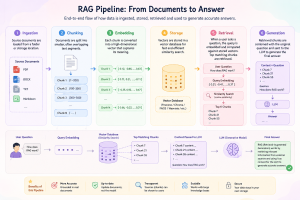
Overall Flow
Conclusion
In short, every screen in the “Add a Person” guided flow maps to a documented REST resource. The worker itself goes through POST and PATCH on /workers. Each reference-data picker has its own LOV endpoint: hcmCountriesLov, hcmBusinessUnitsLOV, departmentsLov, jobsLov, locationsLov, and the shared commonLookupsLOV. And every personal-detail screen becomes a child resource nested under the worker, from addresses and citizenships to passports, visasPermits, workRelationships, and the DFF/EFF flexfields.
Once you map these out, worker creation stops being a tedious, multi-screen, one-at-a-time process. Instead, it becomes a small, repeatable sequence of API calls — one you can drive from a custom onboarding portal, an integration platform reacting to ATS events, or a bulk-load migration script. For teams that also handle bulk hiring, our guide on loading workers with HCM Data Loader is a useful companion piece. Ultimately, this approach gives HR operations teams the freedom to build hiring workflows around Fusion, rather than being boxed in by its guided UI. Need a hand implementing this? Talk to our Oracle Fusion HCM team.