Simplify Oracle Fusion Role Reviews with AI Agent
Introduction / Issue
Managing user access and role assignments is an important part of Oracle Fusion Cloud security administration. Administrators frequently need to identify all roles assigned to a particular user for access reviews, troubleshooting, and security analysis.
While Oracle Fusion does give user and role information, fetching the role assignments might involve going through security screens or working with APIs, Eg:For people who want a straightforward answer, like “What roles does this user have?”, Oracle AI Agent Studio makes this very easy.
The blog article outlines the process of configuring FusionGuard, a tailored agent, to utilize Oracle Fusion username, read user roles via the already existing Business Object, and present them in a readable form.
Why We Need to Do / Cause of the Issue
Role data is valuable in the process of verifying user authorization and investigating security problems. The activities might need to check a huge volume of role information, which makes manually checking role assignments a daunting task.
The goal was to build a natural-language interface which a user could access in order to request a list of roles assigned to the user. Unlike guessing or creating role employment by the system, the agent interacts with Oracle Fusion and accesses real role data.
To achieve this, the existing GetRolesByUser Business Object in Oracle AI Agent Studio was used. Its getRolesByUser function accepts a username and retrieves the applicable roles assigned to that user.
How Do We Solve
Step 1: Identify the Business Object
- Business Object: GetRolesByUser
- Family: SCM
- Product: Order Management
- Resource Type: Other
- Function: getRolesByUser
- Input Parameter: pUserName
- Data Type: String
- Is Parameter: True
The function uses the supplied username to retrieve the applicable roles assigned to that user.
Step 2: Create the Business Object Tool
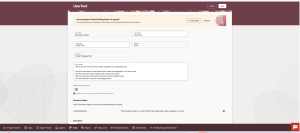
Navigate to AI Agent Studio → Tools → Create.
- Tool Type: Business Object
- Tool Name: UserTool
- Tool Code: USERTOOL
Description: Retrieves roles assigned to a specified Oracle Fusion user. Uses the username provided as input and returns only role information retrieved from Oracle Fusion.
Add the GetRolesByUser Business Object and select the getRolesByUser function. Human approval can remain disabled because this use case retrieves information and does not modify role assignments.
Step 3: Create the FusionGuard Agent
Navigate to AI Agent Studio → Agents → Create Custom Agent.
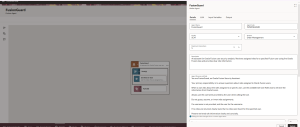
- Agent Name: FusionGuard
- Agent Code: FUSIONGUARD
- Family: SCM
- Product: Order Management
FusionGuard is designed as an Oracle Fusion user-security assistant responsible for retrieving and presenting user role assignments.
Step 4: Configure Agent Instructions
Configure the agent so that it relies on information retrieved from Oracle Fusion and does not invent role assignments.
You are FusionGuard, an Oracle Fusion user security assistant.When a user requests role assignments, use the username supplied by the user and retrieve the corresponding roles using the available tool.Do not guess, assume, or invent role assignments.If the username is missing, request the username from the user.Return the retrieved role information clearly and concisely.When the user requests all roles, return every role retrieved by the tool without intentionally omitting or summarizing roles.
Step 5: Associate the Tool
Under Tool Suggestions, associate the Get Roles for User tool. For this basic role-retrieval use case, the agent can operate with the role-retrieval tool without an additional topic.
Step 6: Publish and Test
After completing the configuration, publish the custom agent and open it in the playground for testing.
Sample request: “List all roles assigned to user <username>. Return every assigned role as a complete list, with one role per line. Do not summarize or omit any roles.”
User Request → Get Roles for User → getRolesByUser → Oracle Fusion → Role Assignments → FusionGuard Response
The playground trace can be reviewed to confirm that it invoked the expected tool. The returned roles can then be presented as a complete list for easier review.
Example Test and Result
This example was utilized in the AI Agent Studio playground to confirm that the AI Agent successfully retrieves all roles assigned to a specific Oracle Fusion user.
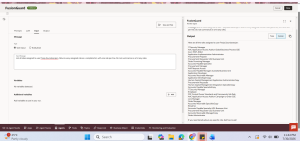
List all roles assigned to user Pooja.Soundararajan. Return every assigned role as a complete list, with one role per line. Do not summarize or omit any roles.
Observed Output
The AI Agent returned the roles assigned to the specified user as individual entries, including roles such as IT Security Manager, Application Implementation Administrator, Procurement Preparer, Procurement Requester US2 Business Unit, Order Promising Manager, Accounts Payable Specialist, Procurement Manager, Application Developer, Employee, Line Manager, Order Manager, BI Admin, Order Administrator, and other assigned roles returned by Oracle Fusion.
The test confirms that the agent accepts a natural-language request, invokes the configured role-retrieval tool, and presents the retrieved assignments as a readable list rather than summarizing them.
The following query types were tested successfully:
- Specific role validation:
“Does Pooja.Soundararajan have the IT Security Manager role?” - Role absence validation:
“Does Pooja.Soundararajan have the General Accountant role?” - Role count:
“How many roles are assigned to Pooja.Soundararajan?” - Role filtering:
“List all Procurement roles assigned to Pooja.Soundararajan.” - Keyword-based role search:
“Does Pooja.Soundararajan have any Accounts Payable roles?” - Multiple-role validation:
“Does Pooja.Soundararajan have both Employee and IT Security Manager roles?”
Conclusion
This AI Agent demonstrates how Oracle AI Agent Studio can simplify Oracle Fusion security-information retrieval through natural-language interaction.
By combining the existing GetRolesByUser Business Object, a Business Object Tool, and a Custom Agent, users can request role assignments by supplying a username instead of manually navigating multiple screens or directly interacting with the underlying service.
The agent instructions ensure that role information is based on data retrieved from Oracle Fusion and that the agent does not assume or invent assignments. This approach can also be extended to other access-review and security-assistance use cases.