
Prerequisites:
a. Oracle Linux 7.9
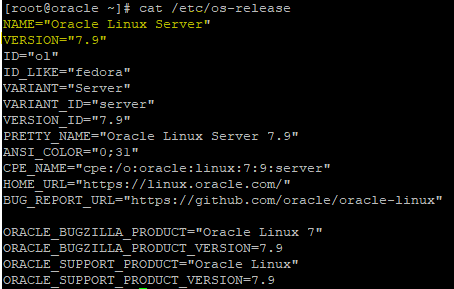
b. Oracle 19c database (should be 19.3 or higher version), Check using…
SELECT target_version AS RU_VERSION FROM dba_registry_sqlpatch WHERE action = 'APPLY' ORDER BY action_time DESC FETCH FIRST 1 ROW ONLY;
c. Leapp utility (Configuration is listed down)
d. Take Database full backup.
rman target /
BACKUP DATABASE PLUS ARCHIVELOG;
e. PFILE backup.
CREATE PFILE='/backup/init_preupgrade.ora' FROM SPFILE;
f. Backup of /boot, oraInventory and $ORACLE_HOME.
sudo tar -czvf /backup/os_preupgrade.tar.gz /etc /boot
sudo tar -czvf /backup/ora_inventory.tar.gz /u01/app/oraInventory
sudo tar -czvf /backup/oracle_home.tar.gz $ORACLE_HOME
Upgrade Steps:
1.Login as a root user and use the below command to enable the required repository.
sudo yum install -y oraclelinux-release-el7
sudo yum-config-manager --enable ol7_leapp
sudo yum-config-manager --enable ol7_optional_latest
sudo yum-config-manager --enable ol7_latest

Verify that required repositories are enabled by using,
yum repolist | grep leapp

2. Now, Install the Leapp Packages to the server.
sudo yum install -y leapp leapp-data

Verify the package using,
rpm -qa | grep leapp
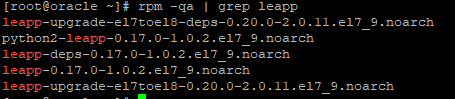
Alternatives to install Leapp Packages if above yum install is not available, use the below commands which will install directly.
sudo yum install -y https://yum.oracle.com/repo/OracleLinux/OL7/leapp/x86_64/getPackage/leapp-0.15.1-3.0.1.el7.x86_64.rpm
sudo yum install -y https://yum.oracle.com/repo/OracleLinux/OL7/leapp/x86_64/getPackage/leapp-data-0.15.1-3.0.1.el7.noarch.rpm
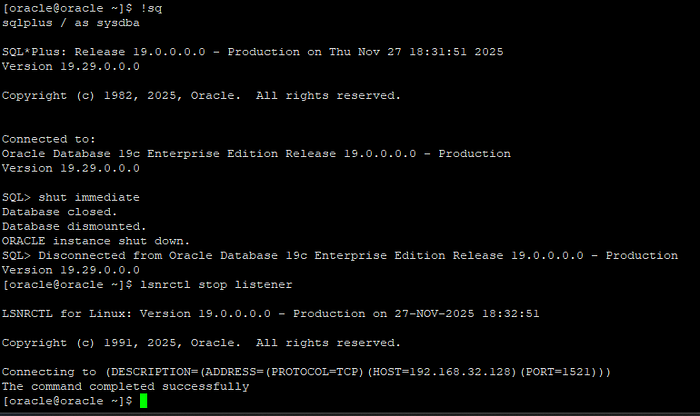
3. Now, Stop the Oracle Services.
sqlplus / as sysdba
shut immediate
lsnrctl stop listener
4. Now, as an root user, run the below command which will create text file that consists of inhibitors (i.e) the packages or modules which blocks the upgrade process.
sudo leapp preupgrade

The output text file will be generated at /var/log/leapp/leapp-report.txt, now fix that inhibitors and proceed for upgrade.
5. We have three Inhibitors which is the problem, so resolving can be done.
Inhibitor 1 — “No custom repositories have been delivered” :
Risk Factor: high (inhibitor)
Title: No custom repositories have been delivered.
Summary: Leapp is unable to detect any custom repositories for the target release
Related links:
    - Upgrading to OL 8: https://docs.oracle.com/en/operating-systems/oracle-linux/8/leapp
Remediation: [hint] Create the repository file according to instructions in the referred document on the following path with all repositories that should be used during the upgrade: "/etc/leapp/files/leapp_upgrade_repositories.repo".


Key: 58194c8f794f6c8bc9a33c6bdd9ebc8f7001af00
----------------------------------------
Solution:
a) Create the required repo file,
sudo vi /etc/yum.repos.d/leapp_upgrade_repositories.repo
Add the below entries,
[ol8_baseos_latest]
name=Oracle Linux 8 BaseOS Latest
baseurl=https://yum.oracle.com/repo/OracleLinux/OL8/baseos/latest/x86_64/
enabled=1
gpgcheck=0

[ol8_appstream]
name=Oracle Linux 8 AppStream
baseurl=https://yum.oracle.com/repo/OracleLinux/OL8/appstream/x86_64/
enabled=1
gpgcheck=0

[ol8_uek_latest]
name=Oracle Linux 8 UEK Latest
baseurl=https://yum.oracle.com/repo/OracleLinux/OL8/UEKR6/x86_64/
enabled=1
gpgcheck=0
Inhibitor 2 — “Multiple kernel-devel installed”:
Risk Factor: high (inhibitor)
Title: Multiple devel kernels installed
Summary: DNF cannot produce a valid upgrade transaction when multiple kernel-devel packages are installed.
Remediation: [hint] Remove all but one kernel-devel packages before running Leapp again.
[command] yum -y remove kernel-devel-3.10.0-1160.el7
Key: 8ceea81afbbb1a329b7d82ca7212b21509e5b256
----------------------------------------
Solution:
List the kernel-devel packages,
rpm -qa | grep kernel-devel

We have two packages, so remove anyone. Based on our report remove the kernel-devel-3.10.0–1160.el7 using,
sudo yum -y remove kernel-devel-3.10.0-1160.el7

Inhibitor 3 “Answer file requirement”:
Risk Factor: high (inhibitor)
Title: Missing required answers in the answer file
Summary: One or more sections in answerfile are missing user choices: remove_pam_pkcs11_module_check.confirm
For more information consult https://docs.oracle.com/en/operating-systems/oracle-linux/8/leapp/leapp-UpgradingtheSystem.html#preupgrade-report.
Remediation: [hint] Please register user choices with leapp answer cli command or by manually editing the answerfile.
[command] leapp answer --section remove_pam_pkcs11_module_check.confirm=True
Key: d35f6c6b1b1fa6924ef442e3670d90fa92f0d54b
--------------------------------------------
Solution:
The module (pam_pkcs11.so) is a smart-card authentication plugin, Our system is not using it, but LEAPP still needs our confirmation to remove it.
Run,
sudo leapp answer --section remove_pam_pkcs11_module_check.confirm=True
6. Now, Again rerun the Pre-upgrade and check again if any inhibitors are present.
sudo leapp preupgrade
Inhibitor — “Leapp is unable to detect any custom repositories for the target release”
Risk Factor: high (inhibitor)
Title: No custom repositories have been delivered.
Summary: Leapp is unable to detect any custom repositories for the target release
Related links:
    - Upgrading to OL 8: https://docs.oracle.com/en/operating-systems/oracle-linux/8/leapp
Remediation: [hint] Create the repository file according to instructions in the referred document on the following path with all repositories that should be used during the upgrade: "/etc/leapp/files/leapp_upgrade_repositories.repo".


Key: 58194c8f794f6c8bc9a33c6bdd9ebc8f7001af00
----------------------------------------
Solution:
a) Create the required repo file,
sudo vi /etc/leapp/files/leapp_upgrade_repositories.repo
Add the following entries,
[ol8_baseos_latest]
name=Oracle Linux 8 BaseOS Latest
baseurl=https://yum.oracle.com/repo/OracleLinux/OL8/baseos/latest/x86_64/
enabled=1
gpgcheck=1

[ol8_appstream]
name=Oracle Linux 8 AppStream
baseurl=https://yum.oracle.com/repo/OracleLinux/OL8/appstream/x86_64/
enabled=1
gpgcheck=1

[ol8_uek_latest]
name=Oracle Linux 8 UEK Latest
baseurl=https://yum.oracle.com/repo/OracleLinux/OL8/UEKR6/x86_64/
enabled=1
gpgcheck=1
7. Now, Again rerun the Pre-upgrade and check again if any inhibitors are present.
[root@oracle files]# cat /var/log/leapp/leapp-report.txt
No Inhibitors are Present, Now we can proceed for Upgrade Process.
8. Upgrade the OS using, the process will take some time around 20 to 30 mins based on the cpu. (Attached the End of Upgrade Log)
sudo leapp upgrade
This will:
a. Download OL8 packages.
b. Build new initramfs.
c. Add a new GRUB entry ( Leapp Upgrade Boot ).
9. Do a server Reboot. (It will take some time, since new software packages will be installed during the boot).
sudo reboot
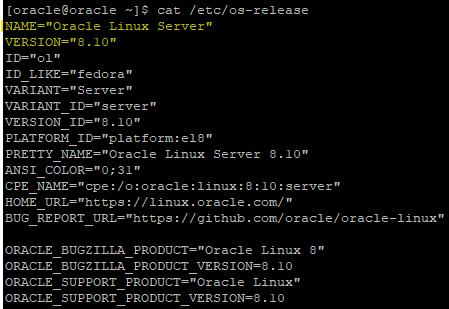
10. After the boot, check the OS-version in /etc/os-release file.

11. Validate repositories in OL8, using (As Root User)
dnf repolist

Check if packages are missing by using,
sudo dnf config-manager --enable ol8_baseos_latest
sudo dnf config-manager --enable ol8_appstream
12. Perform a Update
sudo dnf update -y

13. Validate Oracle Environment, source the .env file (Switch to Oracle User) and validate by
echo $ORACLE_HOME
echo $ORACLE_SID
cat /etc/oratab
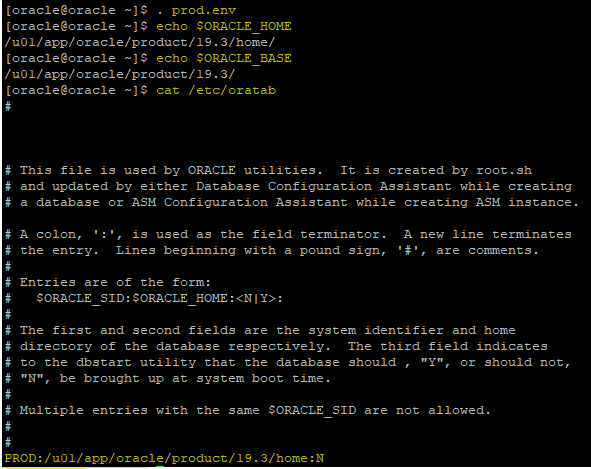
If the service cannot be validated, use the backup we have taken before proceeding to the OS upgrade.
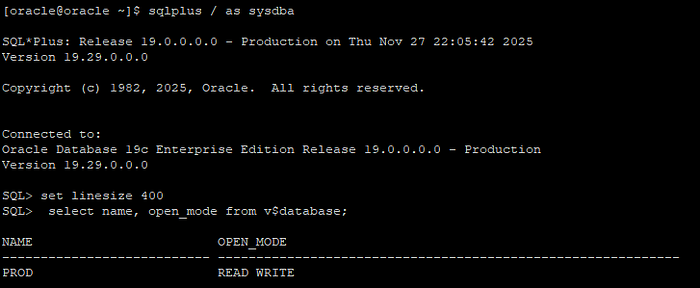
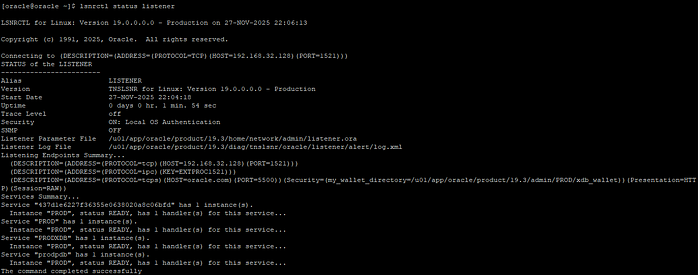
14. Start the Oracle Services.
Press enter or click to view image in full size
15. Check the Invalids in the database using,
SELECT COUNT(*) FROM dba_objects WHERE status='INVALID';

No Invalids are there. If Invalids are present, run the below script to validate the invalids.
@?/rdbms/admin/utlrp.sql
16. Also, Check the SQL Patch Inventory,
$ORACLE_HOME/OPatch/opatch lsinventory
Opatch is Succeeded.
17. Now, the Oracle Services has been validated and everything is perfect.
18. Then, Take a fresh Database Backup.
rman target /
BACKUP DATABASE PLUS ARCHIVELOG;
19. After taking backup, Proceed to do the final Leapp and OEL 8 cache and unwanted file cleanup.
sudo dnf autoremove -y
sudo rm -rf /var/lib/leapp/*
sudo rm -rf /var/log/leapp/*
OEL Upgrade from 7.9 to 8.1 is Completed.
