
AJAX-Dynamic Tooltips & Cascading LOVs in Oracle APEX
Introduction:
In Oracle APEX applications, cascading List of Values (LOVs) are commonly used to filter data based on user selections. However, users often face a limitation: they can only see related data after making a selection.
This creates a usability gap when users want to quickly understand what data is available under each option before selecting it.
Why we need to do :
Problem Details
By default:
- Cascading LOVs refresh only aftera value is selected.
- Users must repeatedly select and change values to explore available data.
- There is no built-in way to preview dependent data on hover.
Impact
- Poor user experience in large datasets
- Increased trial-and-error selections
- Slower form completion
- Lack of context while choosing values
- Higher chance of incorrect selections
How do we solve:
We implement a plugin-free AJAX-based solution using:
- JavaScript
- server.process
- PL/SQL
- Tooltips using the HTML titleattribute
This approach provides:
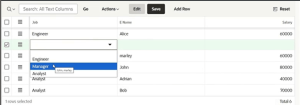
- Instant tooltip preview on hover
- Normal cascading LOV behavior on selection
- Zero third-party dependencies
Two cascading dropdowns:
Use Case Scenario
Two cascading dropdowns:
- Job→ Manager, Analyst, Clerk
- Employee→ Auto-filtered based on selected Job
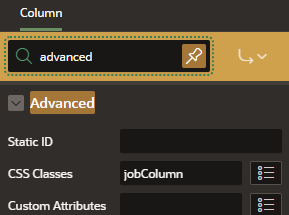
STEP 1: Assign CSS Class to Job LOV
STEP 2: Add JavaScript (Page Load / Dynamic Action)
$(document).on(“click”, “select.jobColumn”, function() {
const sel = $(this);
setTimeout(function(){
sel.find(“option”).each(function(){
const opt = $(this);
const job = opt.text().trim();
apex.server.process(
“GET_EMP_NAMES_BY_JOB”,
{ x01: job },
{ success: function(pData){
opt.attr(“title”, pData.names || “No Employees Found”);
},
error: function(){
opt.attr(“title”, “Error fetching employees”);
} }
);});}, 200);
});
STEP 3: Create APEX Process – GET_EMP_NAMES_BY_JOB
Process Type: Ajax Callback
STEP4 : Declare the PL/SQL process:
DECLARE
l_names VARCHAR2(4000);
BEGIN
SELECT LISTAGG(e_name, ‘, ‘) WITHIN GROUP (ORDER BY e_name)
INTO l_names
FROM test_s
WHERE job = apex_application.g_x01;apex_json.open_object;
apex_json.write(‘names’, NVL(l_names, ‘No Employees Found’));
apex_json.close_object;EXCEPTION
WHEN NO_DATA_FOUND THEN
apex_json.open_object;
apex_json.write(‘names’, ‘No Employees Found’);
apex_json.close_object;
END;
Conclusion:
This solution successfully enhances the standard cascading LOV behavior in Oracle APEX by adding real-time data visibility through dynamic tooltips. By leveraging AJAX callbacks, simple JavaScript, and PL/SQL aggregation, we were able to provide users with instant context before making a selection—without introducing any plugins or additional dependencies.
The approach improves overall usability by reducing unnecessary trial-and-error selections, speeding up form completion, and helping users make more informed choices. At the same time, it keeps the implementation lightweight, maintainable, and fully compatible with existing APEX components.
Most importantly, this design is reusable and scalable. It can be applied to various scenarios such as materials, departments, categories, products, or any master-detail LOV relationships, making Oracle APEX applications more intuitive and user-friendly while maintaining clean architecture and performance efficiency.
