
Shrinking a table in an Oracle database is used to reclaim unused space and optimize storage.
As data is inserted, updated, and deleted over time, tables can become fragmented and retain empty blocks, leading to wasted space and reduced performance.
By shrinking a table, Oracle reorganizes and compacts the data, freeing unused space and improving overall storage efficiency and performance.
- Reclaiming Unused Space
Deleted or updated rows leave unused space inside the table, and shrinking reclaims this space and returns it to the tablespace for reuse.
- Improving Performance
Shrinking reduces fragmentation by compacting rows into fewer blocks, which improves query performance and buffer cache efficiency.
- OptimizingStorage Costs
By reclaiming wasted space, shrinking helps reduce disk usage and avoids the need for additional storage in large databases.
- High Transactional Tables
Tables with frequent inserts, updates, and deletes benefit from shrinking because they accumulate unused and fragmented space.
- Reducing Backup Size
A smaller table size means smaller backups, saving storage space and reducing backup and restore time.
- Reducing Table Scans
Shrinking packs data into fewer blocks, which reduces the number of blocks Oracle needs to scan during queries.
- Freeing Tablespace for Other Objects
Shrinking releases unused space back to the tablespace, allowing other tables or indexes to use it.
When Not to Shrink
Shrinking is not needed for low-activity tables and should be avoided during peak hours in performance-critical systems.
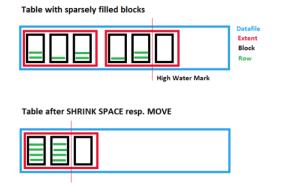
Steps for Table shrink
Step 1. Check whether tablespace uses ASSM
ASSM (Automatic Segment Space Management) allows Oracle to automatically track and manage free space inside table blocks using bitmaps instead of manual freelists.
The SHRINK SPACE operation relies on ASSM to move rows between blocks and reclaim unused space efficiently.
Without ASSM, Oracle cannot reorganize blocks or track free space properly, so shrinking a table is not allowed.
SQL> SELECT tablespace_name, segment_space_management
FROM dba_tablespaces;
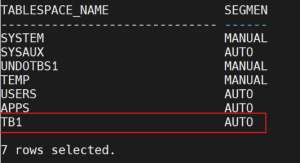
Command to create an ASSM Tablespace
CREATE TABLESPACE TB1
DATAFILE ‘+DATA’
SIZE 1G
SEGMENT SPACE MANAGEMENT AUTO;
Step 2. Create a Table
SQL> CREATE TABLE sales_data
(
sale_id NUMBER,
customer_id NUMBER,
amount NUMBER(10,2),
sale_date DATE
)
TABLESPACE TB1;
Step 3. Insert a Large Volume of Data
SQL> BEGIN
2 FOR i IN 1..1000000 LOOP
3 INSERT INTO sales_data
4 VALUES
(
5 6 i,
MOD(i, 50000),
7 8 ROUND(DBMS_RANDOM.VALUE(100, 10000),2),
9 SYSDATE – DBMS_RANDOM.VALUE(1, 365)
);
10 11
IF MOD(i, 10000) = 0 THEN
COMMIT;
END IF;
END LOOP;
COMMIT;
END;
/
Step 4. Check Table size
SQL> SELECT table_name, blocks, num_rows
FROM user_tables
WHERE table_name = ‘SALES_DATA’;
TABLE_NAME BLOCKS NUM_ROWS
——————– ———- ———-
SALES_DATA 3898 1000000
Step 5. Delete Old Data
Assume the system follows a six-month data retention policy, where all transaction records older than six months are automatically deleted.
SQL> DELETE FROM sales_data
WHERE sale_date < SYSDATE – 180;
SQL> commit;
508842 rows deleted.
Commit complete.
Deleting a large number of records will leave substantial unused space in the table, since many data blocks become empty after the rows are removed.
Step 6. Gather statistics for table
EXEC DBMS_STATS.GATHER_TABLE_STATS(USER, ‘SALES_DATA’);
Step 7. Check Table size (Before Shrink )
SQL> SELECT table_name, blocks, num_rows
FROM user_tables
WHERE table_name = ‘SALES_DATA’;
TABLE_NAME BLOCKS NUM_ROWS
——————– ———- ———-
SALES_DATA 3898 491158
Even though half the data is gone,
Oracle did NOT return the unused space to the tablespace.
This is exactly the space waste that SHRINK SPACE is designed to fix.
Step 8. Enable Row Movement
SQL> ALTER TABLE sales_data ENABLE ROW MOVEMENT;
Table altered.
Step 9. Shrink the Table
SQL> ALTER TABLE sales_data SHRINK SPACE CASCADE;
Table altered.
CASCADE tells Oracle to reorganize and compact all indexes on that table so they remain efficient and don’t waste space.
Step 10. Run Gather statistics Again
EXEC DBMS_STATS.GATHER_TABLE_STATS(USER, ‘SALES_DATA’);
Step 11. Check Space after shrink
SQL> SELECT table_name, blocks, num_rows
FROM user_tables
WHERE table_name = ‘SALES_DATA’;
TABLE_NAME BLOCKS NUM_ROWS
——————– ———- ———-
SALES_DATA 1882 491158
The number of rows will remain the same, but the number of blocks will be significantly reduced, confirming that unused space has been successfully reclaimed.
Step 12 . If you want to disable the row movement
ALTER TABLE sales_data DISABLE ROW MOVEMENT;
Conclusion
Oracle 19c table shrink is a simple and effective way to reclaim unused space after large deletes or updates. It compacts data, reduces fragmentation, improves query performance, and frees space back to the tablespace. When used on high-transaction tables during non-peak hours, SHRINK SPACE helps maintain efficient storage and consistent database performance without affecting data integrity.
