
Introduction:
In Oracle Order Management, We have two Shipping methods post Sales Order creation, Full Shipment and Partial Shipment. They are carried out by specifying the quantity while creating Shipment in OMS (Fusion). In this blog we will see how automate this with Oracle Integration Cloud (OIC) which handles both the shipping scenarios. This solution can also be used in external automation projects to carry out shipment automations as OIC Integrations are exposed as REST API’s.
Cause of the issue:
Shipment creation has multiple API’s. Shipment creation has a different method, Ship confirmation has a different method and Partial shipment has yet another method. Our solution is to identify the shipping method and perform the appropriate operation just with the Shipping Quantity
How do we solve:
Below is the request payload
{
“orderNumber” : 99845,
“lineNumber” : 2,
“quantity” : 5
}
With the order number and line number we have to find the fulfillmentLineId of the particular line that we want to ship via REST API
EndpointURL:
GET – /fscmRestApi/resources/11.13.18.05/salesOrdersForOrderHub?q=OrderNumber= ‘99845’;StatusCode=’OPEN’
Find FulfillmentLineId
Endpoint URL :
GET – /fscmRestApi/resources/11.13.18.05/shipmentLines?q= SourceOrderFulfillmentLineId =’1000002837367789’
Find Shipment and Quantity
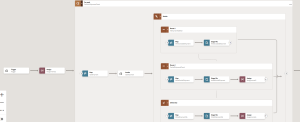
- If a shipment number has already been generated, the line is considered shipped. If no shipment number exists, the line is eligible for shipment creation.
- If the shipped quantity equals the ordered quantity, it is a full shipment; otherwise, it is a partial shipment.
- Based on these conditions, the corresponding fulfillmentLineIds and their shipment numbers must be written to the appropriate output files separately.
PARTIAL SHIPMENT:
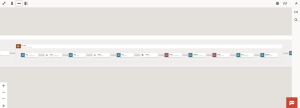
- In this scenario, the lines must be split. If the total ordered quantity is 5 and the shipment quantity is 2, the line should be divided into two separate lines with quantities 2 and 3, respectively.
EndpointURL:
POST – fscmRestApi/resources/11.13.18.05/salesOrdersForOrderHub/action/splitFulfillmentLine
Payload:
{
“processRequestOfflineAfter”: 240,
“splitFulfillmentLineRequest”: [
{
“FulfillLineId”: 300000317414424,
“OrderedQty”: “1”,
“FulfillmentOrganizationCode”: “001”
},
{
“SplitFromFlineId”: 300000317414424,
“FulfillInstanceId”: 1,
“OrderedQty”: “1”,
“FulfillmentOrganizationCode”: “001”
}
]
}
- Once the splitting is completed, these lines can be written to the full-shipment processing file, as they are now eligible to be shipped in full.
FULLSHIPMENT:
- Create Shipments
SOAP – /fscmService/ShipmentLineService?WDSL
Body:
<soapenv:Envelope xmlns:soapenv=”http://schemas.xmlsoap.org/soap/envelope/” xmlns:typ=”http://xmlns.oracle.com/apps/scm/shipping/shipConfirm/deliveries/shipmentLineService/types/”>
<soapenv:Header/>
<soapenv:Body>
<typ:AutocreateShipments>
<typ:apiVersionNumber>1</typ:apiVersionNumber>
<!–Optional:–>
<typ:InitMsgList>T</typ:InitMsgList>
<!–1 or more repetitions:–>
<typ:ShipmentLineList>175396</typ:ShipmentLineList>
</typ:AutocreateShipments>
</soapenv:Body>
</soapenv:Envelope>
- Confirm Shipments
POST – /fscmRestApi/resources/11.13.18.05/shippingTransactions
Body:
{
“Action”: “CONFIRM”,
“Organization”: “001”,
“ShipmentName”: “121203”
}
After shipment creation, the generated shipment numbers are written to the shipment-created file. The final list of shipment numbers is then returned as the response.
Conclusion
Shipment processing is handled through multiple APIs. Shipment creation, ship confirmation, and partial shipment are each executed through separate methods.
Our solution identifies the appropriate shipping method for each fulfillment line and performs the corresponding operation using only the shipping quantity as the driving factor.
