
Introduction:
AI agents are becoming a practical way to build smarter applications that can reason, make decisions, and interact with external systems. For beginners, the idea of an “AI agent” can sound complex, but at its core, an agent is simply a program that knows when to think and when to look things up.
This blog introduces a simple research-oriented AI agent built using Python. The agent accepts a user’s question, decides whether external information is required, and fetches real-time data from the web when needed. Using LangChain, we connect the application to a large language model such as Gemini and extend its abilities with tools like DuckDuckGo Search and Wikipedia.
By the end of this blog, you will have a clear understanding of how basic AI agents work and how to build one step by step, even if you are new to agent-based systems.
Why we need to do / Cause of the issue:
Basic AI models can answer questions only using their existing knowledge and cannot fetch real-time information. This becomes a limitation when users need accurate, updated, or research-based answers.
By building an AI agent that can use external tools like web search and Wikipedia, we enable the model to gather live information, verify facts, and provide more reliable and meaningful responses—making the solution practical for real-world use.
How do we solve:
1.Create a Project with below structure and open in any IDE like pycharm or VS Code.
MyFirstAIAgent/
├main.py
├tools.py
├requirements.txt
└─ .env
2.Add dependencies in requirements.txt
langchain wikipedia langchain-community
langchain-anthropic
python-dotenv
pydantic
duckduckgo-search
langchain_google_genai
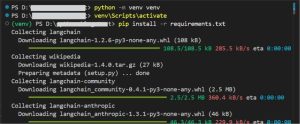
3.Create a virtual environment and install the dependencies by opening a terminal
file_path>python -m venv venv
file_path>venv\Scripts\activate
file_path>pip install -r requirements.txt
4.Add .env variables:
Create a .env file (in the project root) and add your Google API key. (Can be created by logging into https://aistudio.google.com/api-keys)
GOOGLE_API_KEY=“******************************************“
5.Create tools.py
The tools.py file contains simple local tools that the AI agent can call when it needs external information. In this file, we will add implementations for DuckDuckGo web search and Wikipedia summary lookup.
Keeping tool logic in a separate file helps maintain a clear separation between:
Agent orchestration (decision-making and reasoning)
Tool execution (fetching external data)
# tools.py # Import DuckDuckGo search client from duckduckgo_search import DDGS
# Import Wikipedia API wrapper
import wikipedia
def search_tool(query: str) -> str:
“””
Search the web using DuckDuckGo.This tool allows the AI agent to fetch real-time information from the web when the model’s internal knowledge is not enough.
“””
try:
# Create a DuckDuckGo search session
with DDGS() as ddgs:
# Perform a text search and limit results to 3
results = list(ddgs.text(query, max_results=3))
# If no results are found, return a helpful message
if not results:
return f“No search results found for: {query}“
# Format the search results into a readable text block
return “\n\n”.join(
f“Title: {r[‘title’]}\n{r[‘body’]}“ for r in results
)
except Exception as e:
# Catch any unexpected errors and return them as text
return f“Search error: {str(e)}“
def wiki_tool(query: str) -> str:
“””
Fetch a short summary from Wikipedia for a given topic.
This tool is useful when the user asks for definitions,
explanations, or background information.
“””
try:
# Search Wikipedia for related page titles
search_results = wikipedia.search(query, results=5)
# If no pages are found, inform the agent
if not search_results:
return f“No Wikipedia page found for: {query}“
# Use the first matching page title
page_title = search_results[0]
# Fetch a short summary (first 5 sentences)
summary = wikipedia.summary(
page_title,
sentences=5,
auto_suggest=False
)
return summary
except wikipedia.exceptions.DisambiguationError as e:
# This happens when Wikipedia finds multiple possible pages
try:
# Try fetching the summary of the first option
summary = wikipedia.summary(
e.options[0],
sentences=50,
auto_suggest=False
)
return (
f“{summary}\n\n“
f“(Note: This is about ‘{e.options[0]}‘. “
f“Other options included: {‘, ‘.join(e.options[1:4])})”
)
except Exception:
# If summary fetch fails, list available options
return (
“Multiple Wikipedia pages found. Options: “
f“{‘, ‘.join(e.options[:5])}“
)
except wikipedia.exceptions.PageError:
# Page does not exist on Wikipedia
return f“Wikipedia page not found for: {query}“
except Exception as e:
# Catch-all for any other Wikipedia-related errors
return f“Wikipedia error: {type(e).__name__}: {str(e)}“
6.Create main.py
The main.py file contains the core logic that orchestrates how the AI agent works. It is responsible for connecting the language model, tools, and user interaction.
This file performs the following tasks:
- Defines a strict Pydantic output schema (ResearchResponse) to ensure the agent always returns structured and predictable data.
- Creates a prompt that explicitly instructs the LLM to return its response in JSON format.
- Binds external tools (web search and Wikipedia) to the LLM so the agent can request them when needed.
- Runs a two-step execution loop:
- First pass: The model analyzes the query and requests tools if required.
- Second pass: Tool results are injected back into the prompt, and the model is asked to produce the final JSON response.
- Provides user-facing output format.
import argparse import json import re
from pathlib import Path
from dotenv import load_dotenv
from pydantic import BaseModel
from typing import List, Optional
# LangChain + Gemini imports
from langchain_google_genai import ChatGoogleGenerativeAI
from langchain_core.prompts import ChatPromptTemplate
from langchain_core.output_parsers import PydanticOutputParser
from langchain_core.runnables import RunnablePassthrough
# Import local tools
from tools import search_tool, wiki_tool
# Load environment variables (e.g., GOOGLE_API_KEY)
load_dotenv()
# ———- Output schema ———-
# This defines the strict structure the agent must return
class ResearchResponse(BaseModel):
topic: Optional[str] = None
summary: str
sources: List[str]
tools_used: List[str]
# Parser that forces LLM output to match the schema
parser = PydanticOutputParser(pydantic_object=ResearchResponse)
# ———- LLM ———-
# Initialize Gemini model via LangChain
llm = ChatGoogleGenerativeAI(
model=“models/gemini-2.5-flash”,
temperature=0, # deterministic output
)
# ———- Prompt ———-
# System + user prompt telling the model:
# – it can use tools
# – it must return ONLY JSON
prompt = ChatPromptTemplate.from_messages(
[
(
“system”,
“””You are a research assistant.
You may use tools when helpful.
Return ONLY valid JSON in this format:
{format_instructions}
If you ask for tools, do NOT produce the final JSON until tool results are provided.
“””
),
(“human”, “{query}”)
]
).partial(format_instructions=parser.get_format_instructions())
# ———- Bind tools ———-
# Bind DuckDuckGo search and Wikipedia tools to the LLM
llm_with_tools = llm.bind_tools(tools=[search_tool, wiki_tool])
# ———- Chain ———-
# Chain input → prompt → LLM (with tools)
agent_chain = (
{“query”: RunnablePassthrough()}
| prompt
| llm_with_tools
)
# ———- Helpers ———-
# Extract valid JSON from model output (fallback safety)
def extract_json_from_text(text: str):
if not text:
return None
try:
return json.loads(text)
except Exception:
pass
# Try extracting JSON-like block using regex
m = re.search(r‘(\{[\s\S]*\}|\[[\s\S]*\])’, text)
if not m:
return None
candidate = m.group(1)
try:
return json.loads(candidate)
except Exception:
try:
# Fallback for single-quoted JSON
return json.loads(candidate.replace(“‘”, ‘”‘))
except Exception:
return None
# Map model-requested tool names to local Python functions
def call_tool_by_name(name: str, args):
“””Map the tool name the model uses to your python callable and call it.”””
name = (name or “”).lower()
if name in (search_tool.__name__.lower(), “search”):
tool = search_tool
elif name in (wiki_tool.__name__.lower(), “wiki”, “wikipedia”, “wiki_tool”):
tool = wiki_tool
else:
raise RuntimeError(f“Tool ‘{name}‘ not implemented locally. Known: search, wikipedia”)
# Handle arguments coming as string or dict
if isinstance(args, str):
try:
parsed = json.loads(args)
args = parsed
except Exception:
return tool(args)
if isinstance(args, dict):
if “query” in args and len(args) == 1:
return tool(args[“query”])
try:
return tool(**args)
except TypeError:
return tool(args)
return tool(args)
# ———- Output formatters ———-
# Pretty terminal output
def pretty_print_for_blog(result: ResearchResponse):
print(“\n” + “=” * 60)
if result.topic:
print(f“📌 Topic: {result.topic}\n“)
print(“🧠 Summary:”)
print(result.summary + “\n”)
if result.sources:
print(“🔗 Sources:”)
for src in result.sources:
print(f“- {src}“)
if result.tools_used:
print(“\n🛠 Tools Used:”)
for tool in result.tools_used:
print(f“- {tool}“)
print(“=” * 60 + “\n”)
# ———- Agent loop ———-
# Two-step agent execution:
# 1) LLM requests tools
# 2) Tool results are injected back and final JSON is produced
def run_agent(query: str, max_retries: int = 1, debug: bool = False):
# First pass: model may request tools
first_response = agent_chain.invoke(query)
if debug:
print(“=== first_response repr ===”)
print(repr(first_response))
tool_calls = getattr(first_response, “tool_calls”, []) or []
# If no tools requested, return content directly
if not tool_calls:
out = getattr(first_response, “content”, “”) or str(first_response)
return out, []
# Execute requested tools locally
tool_results = []
used_tools = []
for tc in tool_calls:
tname = tc.get(“name”)
targs = tc.get(“args”, {})
if debug:
print(f“Model requested tool ‘{tname}‘ with args: {targs}“)
try:
res = call_tool_by_name(tname, targs)
except Exception as e:
res = f“[Tool ‘{tname}‘ invocation failed: {e}]”
if not isinstance(res, str):
try:
res = json.dumps(res, indent=2)
except Exception:
res = str(res)
tool_results.append((tname, res))
used_tools.append(tname)
# Build follow-up prompt with tool results
tool_text_blocks = []
for name, out in tool_results:
tool_text_blocks.append(f“Tool: {name}\nResult:\n{out}“)
tool_results_text = “\n\n”.join(tool_text_blocks)
format_instructions = parser.get_format_instructions()
followup_base = (
f“{query}\n\n“
“Tool results (provided to help you complete the answer):\n”
f“{tool_results_text}\n\n“
)
for attempt in range(max_retries + 1):
if attempt == 0:
followup_query = (
followup_base
+ “Now produce ONLY the final JSON following the format instructions exactly. “
“Do NOT call any tools; use the provided tool results only.\n\n”
+ format_instructions
)
else:
followup_query = (
followup_base
+ “IMPORTANT: DO NOT call any tools. Use only provided results and produce ONLY final JSON.\n\n”
+ format_instructions
)
final_response = agent_chain.invoke(followup_query)
new_tool_calls = getattr(final_response, “tool_calls”, []) or []
final_text = getattr(final_response, “content”, “”) or str(final_response)
if not new_tool_calls:
return final_text, used_tools
return final_text, used_tools
# ———- Entry point ———-
def main():
parser_arg = argparse.ArgumentParser(description=“Research agent (blog-friendly output).”)
parser_arg.add_argument(“–format”, choices=[“text”, “markdown”, “json”], default=“text”)
parser_arg.add_argument(“–save”, type=str, default=None)
parser_arg.add_argument(“–debug”, action=“store_true”)
args = parser_arg.parse_args()
q = input(“What can I help you research? “).strip()
if not q:
print(“No query provided.”)
Return
final_text, used_tools = run_agent(q, debug=args.debug)
if isinstance(final_text, list):
final_text = “”.join(
item.get(“text”, “”) if isinstance(item, dict) else item
for item in final_text
)
structured = parser.parse(final_text)
data = structured.model_dump()
data[“tools_used”] = data.get(“tools_used”) or used_tools
validated = ResearchResponse.model_validate(data)
if args.format == “json”:
print(validated.model_dump_json(indent=2))
else:
pretty_print_for_blog(validated)
if __name__ == “__main__”:
main()
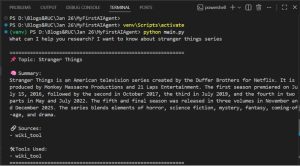
7.Run the Agent and test:
Run the agent using python main.py and test your research agent using any question.
Conclusion:
We have built a simple AI research agent using Python and LangChain that can interact with the Gemini model and dynamically use external tools like web search and Wikipedia. This agent demonstrates how LLMs can go beyond static responses by fetching real-time information and returning structured, reliable outputs.
As a next step, this agent can be enhanced with a user interface (using Streamlit, Flask, or React) and extended for real-world use cases such as research assistance, content summarization, or internal knowledge search. Additionally, many other tools and APIs can be integrated to make the agent more intelligent and task-oriented.
