
Introduction/ Issue:
Developing a custom solution in Oracle Fusion Supply Planning to provide visibility into scheduled production quantities at the item and resource level by creating custom measure and layouts for resource planning analysis.
Why we need to do / Cause of the issue:
In Oracle Fusion Supply Planning, the standard Resource Plan provides resource utilisation details but does not present scheduled production quantities for individual items at the resource level within a single layout. As a result, planners lack clear visibility into which items are consuming resource capacity, making it difficult to analyse resource utilisation at the item level. This limitation impacts effective capacity planning, production analysis, and decision-making. To address this gap, a custom measure and layout were developed to display scheduled resource quantities by item, providing planners with enhanced visibility and enabling more effective production and resource planning.
How do we solve:
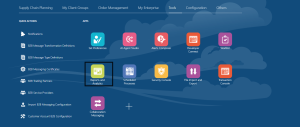
- Login to Oracle Fusion and Navigate to Reports and Analytics under Tools
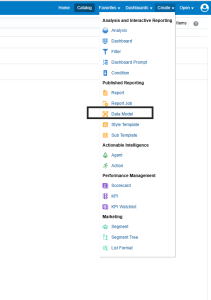
- Click on Browse Catalog. This will open analytics page. Now click on Create and select Data Model
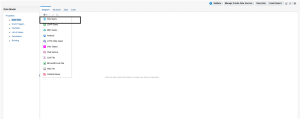
- Click on plus icon and select SQL Query
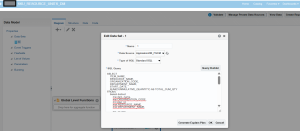
- Select the Data source as ApplicationDB_FSCM and Use the following query
 SELECT
ITEM_NAME,
RESOURCE_NAME,
ORGANIZATION_CODE,
DEPARTMENT_NAME,
START_DATE,
SUM(CUMMULATIVE_QUANTITY) AS TOTAL_CUM_QTY
FROM (
Select distinct
msi.item_name,
msi.ORGANIZATION_CODE,
mrr.plan_id,
mdr.RESOURCE_NAME,
mdr.DEPARTMENT_NAME,
TO_CHAR(
TO_TIMESTAMP_TZ(mrr.START_DATE, ‘YYYY-MM-DD”T”HH24:MI:SS.FF TZH:TZM’),
‘DD-MM-YYYY’
) AS START_DATE,
mrr.SUPPLY_ID,
mrr.CUMMULATIVE_QUANTITY
FROM
MSC_RESOURCE_REQUIREMENTS mrr,
MSC_DEPARTMENT_RESOURCES mdr,
msc_system_items msi
where
msi.INVENTORY_ITEM_ID = mrr.ASSEMBLY_ITEM_ID
AND mdr.RESOURCE_ID = mrr.RESOURCE_ID
AND mdr.DEPARTMENT_ID = mrr.DEPARTMENT_ID
AND mrr.ORGANIZATION_ID = msi.ORGANIZATION_ID
AND msi.plan_id = -1
AND mrr.plan_id = 300000002906003 –supply plan id
AND mrr.PARENT_ID IS NULL
) base
GROUP BY
ITEM_NAME,
RESOURCE_NAME,
ORGANIZATION_CODE,
DEPARTMENT_NAME,
START_DATE
ORDER BY
RESOURCE_NAME, START_DATE
- Click on Data tab and view the data
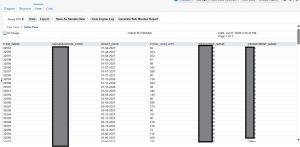
- Save the data model and Create the Report in custom folder under shared folder.
- Developed an Oracle Integration Cloud (OIC) integration to trigger the BI Publisher report, extract scheduled units at the resource and SKU levels, and load the data into the custom measure in Oracle Fusion Supply Planning
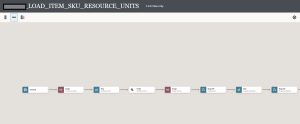
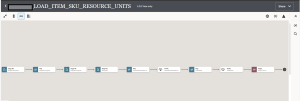
- The ZIP file used to load the measures into Oracle Fusion will be structured as follows
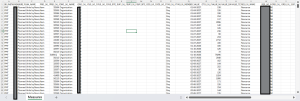
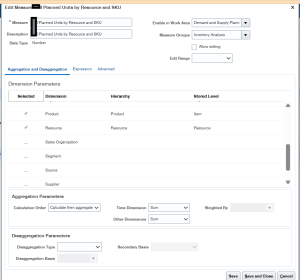
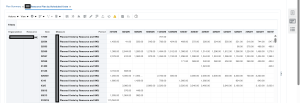
- Created a custom measure and assigned it to a custom layout in supply plan to store item wise planned order quantities at the resource level, enabling data to be loaded from the BI Publisher report into the custom measure through integration
Conclusion:
The custom Resource Requirements solution provides planners with enhanced visibility into item-level scheduled quantities within the Resource Plan. By utilizing custom measures, layouts, and Oracle Integration Cloud (OIC), the solution improves resource planning and capacity analysis, enabling planners to make more informed production planning and resource utilization decisions in Oracle Fusion Supply Planning.
