
VBCS – Exporting Data as CSV File From Database
Introduction:
Oracle Visual Builder Cloud Service – Version: 26.04.2
Exporting data from the database table as a csv file with a click of a button.
Why we need to do:
- The exported data can be shared easily with business users or external teams.
- Users can apply Excel filters, making it easier to analyze and review the data.
- The Excel format provides better visibility and readability compared to raw data.
- Some clients first load the AR Invoice file into Database before processing. The exported file can be used directly as the source file format for that process.
How do we solve:
Step1: In Javascipt tab place the below code. This function will accept json input and download the response at CSV File
PageModule.prototype.downloadJsonAsCsv = function (rows, filename) {
try {
if (typeof rows === “function”) {
rows = rows();
}
if (!Array.isArray(rows) || rows.length === 0) {
console.error(“Invalid JSON array:”, rows);
return;
}
// Collect all headers
const headers = […new Set(rows.flatMap(obj => Object.keys(obj)))];
const csv =
headers.join(“,”) +
“\n” +
rows
.map(row =>
headers
.map(h => `”${String(row[h] ?? “”).replace(/”/g, ‘””‘)}”`)
.join(“,”)
)
.join(“\n”);
const blob = new Blob([csv], { type: “text/csv;charset=utf-8;” });
const url = URL.createObjectURL(blob);
const link = document.createElement(“a”);
link.href = url;
link.download = filename; // ✅ your filename works
link.style.display = “none”;
document.body.appendChild(link);
// Must be synchronous for VBCS
link.click();
document.body.removeChild(link);
URL.revokeObjectURL(url);
} catch (e) {
console.error(“CSV download failed:”, e);
}
};
Step 2: Add a button to the screen -> Add action chain to the button -> Call REST with the Business Object from the Database Table
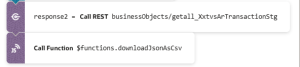
Step 3: Pass the JSON response into the downloadJsonAsCsv JS function.
Conclusion:
The CSV file was downloaded from the Database Table Business Object from Oracle VBCS once the user click on the button created.
