
Increase on-hand quantity interface using miscellaneous receipt
To increase on-hand quantity via a miscellaneous receipt interface, you use an ERP/Inventory system ( to record items found during a physical count that exceed system records, selecting “Miscellaneous Receipt” as the transaction type, entering the item, sub inventory, and the additional quantity, then submitting to update stock and associated accounts.
- Navigate: Go to Inventory Management > Transactions>Miscellaneous Transactions.
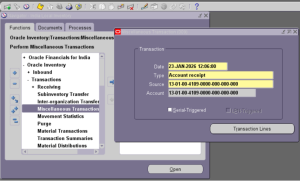
- Select Type: Choose “Miscellaneous Receipt” as the transaction type.
- Add Item: Search for the item and select it, specifying the destination Subinventory and Locator.
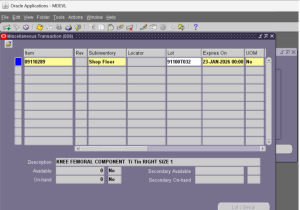

- Enter Quantity: Input the increaseamount (e.g., if you have 500 but counted 1000, enter 500).
- Add Account: Link the transaction to the correct General Ledger (GL) account for inventory adjustment.
- Submit: Finalize the transaction to update the on-hand balance.

Recent Posts