
- Prepare the DPForecasts.csv file
- The file name should not be changed.
- Date format must be “YYYY/MM/DD”.
- If part number has leading zeros, then change the cell to Text.
- Enter the below details.
- Measure Name: Sales Forecast
- PRD_LVL_MEMBER_NAME: <Item Number>
- ORG_LVL_MEMBER_NAME: <Organization code>
- CUS_LVL_NAME: Forecast Group
- CUS_LVL_MEMBER_NAME: <Forecast Group Name>
- TIM_LVL_NAME: Period
- TIM_LVL_MEMBER_VALUE: <Date for which forecast data is being loaded>
- VALUE_NUMBER: Sales Forecast value
- Forecast Group Name (CUST_LVL_MEMBER_NAME) and Item Number (PROD_LVL_MEMBER_NAME) must be present in EBS and must be spelled the same.

- Create ZIP file for DPForecasts.csv file
- Zip file name could be any name
- Save the file on personal computer
- Login to cloud and go to File import/export
- Navigate to Tools -> File import and export
- Click on + icon below
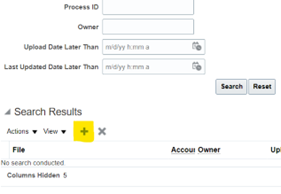
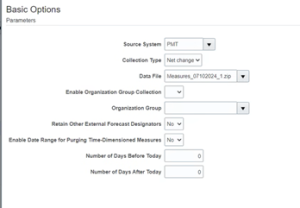
c. Add the zip file that was saved on personal computer
d.Select Account: scm/planningDataLoader/import
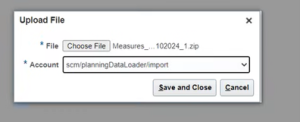
e.Save and Close
4.Navigate to Tools -> Scheduled Processes
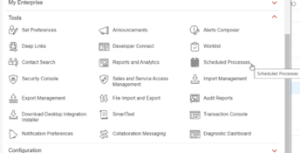
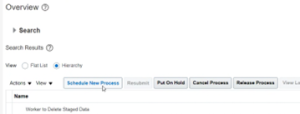
a.Select and click on Schedule New Process
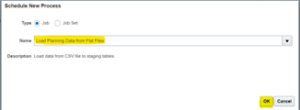
b.Search and Select “Load Planning Data from Flat File” and click on “OK”.
c.Enter below parameters.
Source System = “PMT”
Collection Type = “Net Change”
Data File = Select the zip file uploaded in previous step.
Leave other parameters blank/as is.
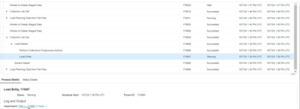
d. Monitor the process and it should complete successfully.
e.Newly uploaded Sales forecast data will be available in the demand plan.
5.Submit and it will trigger multiple processes in Cloud. Monitor the processes and none should complete in warning. If it is in warning, then view the log file to detect issues.
6.Once completed,
a. click on ‘Schedule New Process’.
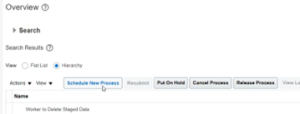
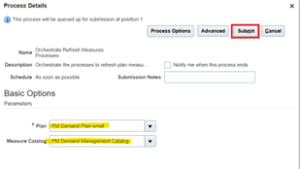
b.Search and Select “Orchestrate Refresh Measures Processes” and click on “OK”.
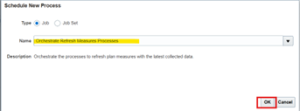
c.Enter below parameters and click on Submit.
Plan = <Demand Plan to be refreshed>
Measure Catalog = <Measure Catalog used in the plan>
