
Introduction/ Issue:
In Oracle E-Business Suite R12 Warehouse Management System (WMS), Cost Group Rules are commonly used to dynamically assign cost groups during inventory transactions. Once a cost group rule is created and assigned to a WMS strategy, the rule definition becomes read-only and the rule columns are greyed out in the WMS rules.
Let’s walk through a controlled method to update an existing cost group rule while maintaining strategy integrity and transactional accuracy.
Why we need to do / Cause of the issue:
In this scenario, a WMS cost group rule was initially designed with a query-based condition that excluded specific item categories and applied the cost group to all other items. Later, the business introduced a new item category that needed to be included in the same logic. However, because the rule was already active and associated with a strategy, the query could not be modified directly.
During inter-organization transfer transactions, this mismatch resulted in a cost commingling error, as WMS attempted to override the intended cost group assignment based on the outdated rule definition.
To resolve this, the rule had to be safely detached from execution, updated, and re-enabled in the correct dependency order so that WMS could re-evaluate transactions using the revised logic.
How do we solve:
Oracle supports updating an existing WMS rule only after it is no longer referenced by an active strategy. The solution follows a controlled disable–edit–enable sequence:
- Disable the Cost Group Rule
- Navigate to the Rules Workbench.
- Disable the relevant cost group rule so it is no longer active.
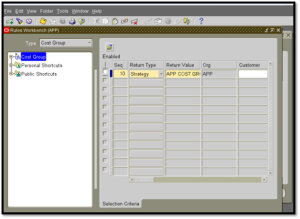
- Disable the WMS Strategy
- Navigate to WMS strategy.
- Identify the strategy where the cost group rule is assigned.
- Disable the strategy.
- This step releases the dependency that prevents rule modification.
- Save the changes.
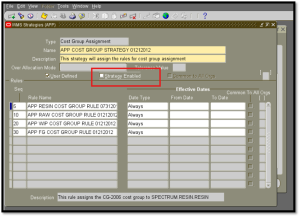
- Edit the Cost Group Rule Query
- Navigate to WMS rules window.
- Query the rule and disable it.
- Modify the query to include the newly introduced item category.
- Save the changes.
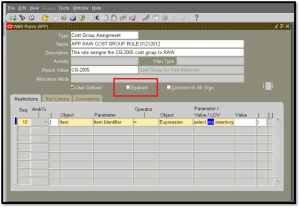
- Re-enable the Rule and Strategy in Order
- Open the disabled cost group rule.
- Enable the updated cost group rule.
- Navigate back to WMS Strategies and re-enable the strategy.
- Finally, confirm the rule is enabled in the Rules Workbench.
Conclusion:
After completing these steps, WMS evaluates transactions using the updated rule definition. When inter-organization transfers are performed, the rule no longer overrides the intended cost group for the newly added item category, and the transaction proceeds without triggering a cost commingling error.
