Stop Writing Fake INSERT Scripts in Oracle Apex during initial development: Generating Realistic Test Data in Oracle APEX with APEX_DG_DATA_GEN
Introduction / Issue
Anyone who’s built in Oracle APEX for more than a few weeks knows this pain: the screens are done, the logic works, and every table is completely empty.
Why We Need to Do This / Root Cause
A handful of common, everyday reasons drive this problem:
- Source systems aren’t ready. Integrations or migrations haven’t been completed yet, so the underlying tables are simply empty.
- Manually creating dummy data doesn’t scale. Writing out sample names, addresses, and dates by hand for every table is tedious, slow, and impractical once you’re dealing with more than a few records.
- Using production data is too risky. Even for a “quick test,” pulling real customer records into a development or QA environment raises serious data privacy and compliance concerns that aren’t worth the risk.
- Manual test data is difficult to manage. Test records created during development are often forgotten and can unintentionally be migrated to QA or production environments.
How Do We Solve It?
Oracle APEX provides a package built specifically for this purpose: APEX_DG_DATA_GEN. It is a built-in data generation engine that produces realistic sample values—names, locations, phone numbers, dates, categories, and more—drawn from predefined domains and generated on the fly, without needing to touch or pre-populate any actual table.
What Is APEX_DG_DATA_GEN?
Think of APEX_DG_DATA_GEN as a library of realistic data domains that you can call directly from SQL whenever you need believable sample values. There’s no need to write INSERT scripts, maintain seed tables, or clean up test data afterward.
It’s designed specifically for non-production environments, making it ideal for:
- Application development
- QA and UAT testing
- Performance testing
- Customer demonstrations
It should not be used for real transactional data or production data migrations.
Scenario 1 – Feeding a Chart or Dashboard Mockup
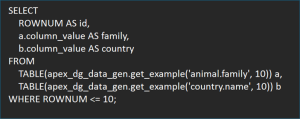
Suppose you’re building a report, interactive chart, or dashboard, but the underlying tables are still empty. Instead of manually inserting sample records, you can generate realistic values on demand using APEX_DG_DATA_GEN.
For example, your report may require fields such as:
- Customer Name
- Area / Region
- Category
With APEX_DG_DATA_GEN, you can generate realistic sample values for these columns directly within your SQL query, allowing you to build and validate your reports long before actual business data becomes available.
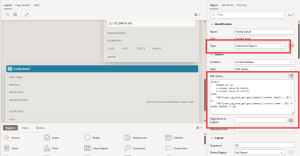
Drop this query directly as the source for an Interactive Report, a chart region, or even a temporary demo page.
Where This Actually Helps in a Project
One of the key benefits of APEX_DG_DATA_GEN is that it enables developers to build and validate application components before real business data becomes available. Interactive Reports, Interactive Grids, Charts, Dashboards, and List of Values (LOVs) can all be developed and tested using realistic sample data. This helps identify issues with layouts, filtering, sorting, and overall report behavior early in the development lifecycle, reducing rework later in the project.
When to Reach for It – And When Not To
Good fit: Early-stage development with no data yet, QA/UAT cycles, performance and load testing, stakeholder demonstrations, and training environments.
Not a fit: Production systems, real data migrations, third-party system integrations, or any scenario involving actual sensitive or regulated information.
Conclusion
For anyone working in Oracle APEX, it’s a small package, but the payoff is real — quicker testing, better-looking demos, and schemas that don’t get messy over time.