Introduction:-
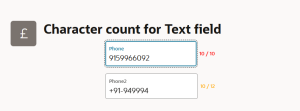
This blog explains how to implement a reusable character counter for normal text fields in Oracle APEX, similar to the built-in character counter available for text areas. It demonstrates how a simple JavaScript-based reusable function can enhance form usability by showing real-time character count feedback to users while typing.
Why we need to do :-
Many business forms require strict character limits (e.g., name, description, remarks, comments).
A reusable approach allows developers to apply the same functionality across multiple pages easily
How do we solve:-
Step 1: Paste the following function code at the page level (Function and Global Variable Declaration), or create a region in the Global Page using the Blank template. In that region, select Source and paste the function code enclosed within <script></script> tags.
function setPostTextCounter(itemId) {
var item = apex.item(itemId);
var inputEl = item.element;
var maxLen = inputEl.attr(“maxlength”) || 100;
var curLen = item.getValue().length;
var counterId = itemId + “_counter”;
var postText = inputEl.siblings(“.t-Form-itemText–post”);
if (postText.length === 0) {
postText = $(‘<span class=”t-Form-itemText t-Form-itemText–post”></span>’);
inputEl.after(postText);
}
if (postText.find(“#” + counterId).length === 0) {
postText.append(‘<span id=”‘ + counterId + ‘” class=”apex-char-counter”></span>’);
}
var counter = $(“#” + counterId);
counter.text(curLen + ” / ” + maxLen);
counter.removeClass(“is-warning is-danger”);
if (curLen >= maxLen) {
counter.addClass(“is-danger”);
} else if (curLen >= maxLen – 2) {
counter.addClass(“is-warning”);
}
}
Step 2: Similarly, paste the following CSS code at the page level (inline CSS), or create a region in the Global Page using the Blank template. In that region, paste the CSS code inside <style></style> tags.
.apex-char-counter {
font-size: 11px;
color: #6a6a6a;
margin-left: 6px;
}
.apex-char-counter.is-warning {
color: orange;
}
.apex-char-counter.is-danger{
color: red;
font-weight: 600;
}
Step 3: Now, in our application, we can call this function on any page by defining it in the Global Page.
Step 4: Create a page item with the Text Field type and set the Maximum Length value, because the JavaScript function reads the maximum length from this attribute.
Step 5: Create an Input Dynamic Action on the required page item, and in the True Action, call the function.
setPostTextCounter(“P19_PHONE”);
Step 6: Alternatively, we can call the function using the Custom Attributes of the page item.
onkeyup=”setPostTextCounter(‘P19_PHONE2’);”
Conclusion:-
The blog concludes that by using a simple reusable JavaScript function, developers can easily add character counters to any text field in Oracle APEX. This approach improves form interaction, prevents user errors, and promotes clean, user-friendly UI design without complex configurations.