
SQL servers’ registration in SSMS
What is server registration in SSMS?
It is one of the features in SQL Server Management Studio (SSMS) which is very useful to have a list of registered servers and databases in SSMS, it will save the time and efforts to store all SQL server instance details in one place for further connectivity and usage.
All SQL server instances at one place: Connection information is stored on the SSMS itself, not locally on the user’s machine, making it a shared and consistent list for all administrators with appropriate permissions.
Multi-Server Queries: we can connect multiple instances and execute queries in one query window, which is useful for tasks like checking backup status,managing configuration, or applying policies across the infrastructure.
- How to register servers?
Before we manager all SQL server instances we must register all instances and databases in SSMS below are the steps to register
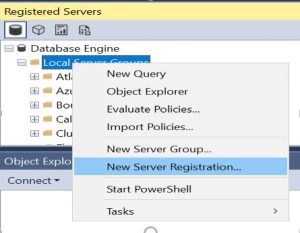
Go to SSMS–> then views–> register servers–>Local server group
As mentioned in below screenshot go with new server registration
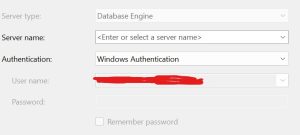
Then enter the details of SQL server instance name and register it
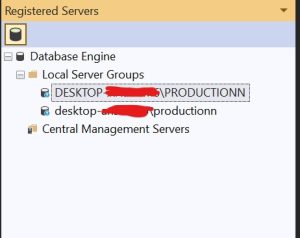
It will save the server details for further usage.
Conclusion:
This blog examines setting up and using registered servers in SSMS.
It will be very useful for connecting repeatedly and executing the query on multiple instances at a time; it will save time and efforts which are repeatedly needed to be done.
