Introduction: –
This document explains the process of creating a custom button inside an Interactive Grid (IG) and dynamically setting the value of another column by using JavaScript and PL/SQL in Oracle APEX.
The following technologies have been used in custom button driven data refresh
- Oracle APEX
- PL/SQL
- Javascript
Why we need to do: –
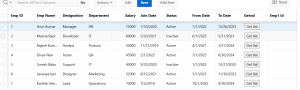
We may need to add a custom button inside each row of an Interactive Grid.When the button is clicked, we want to get related data from another table based on that row.After fetching the data, we want to automatically update some columns in the same Interactive Grid row.Oracle APEX does not give this feature by default.So, we can use HTML and JavaScript to achieve this requirement.
How do we solve:
The following steps will help to create button and set column values dynamically from another table,
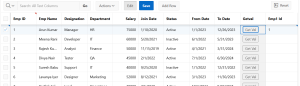
Step 1 : Create Interactive grid and provide static ID, then create HTML button and provide behaviour to that button.
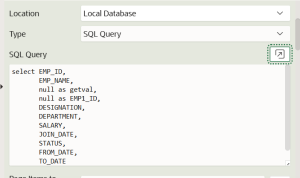
Step 2: Create an HTML Expression for the button column in the Interactive Grid using the following query.
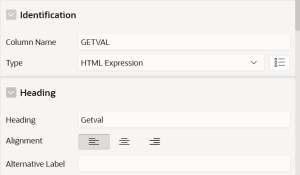
Step 3: Change the column type as html expression.
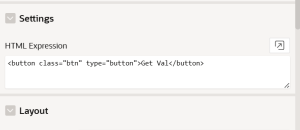
Step 4: Create a dynamic action and write the code in execute JavaScript .
Event: Click
Selection Type: jquery selector
Action: .btn
Code
var ig$ = apex.region(“MYREPORT”).widget();
var grid = ig$.interactiveGrid(“getViews”, “grid”);
var model = grid.model;
var recs = grid.getSelectedRecords();
var rec = recs[0];
var empId = model.getValue(rec,”EMP_ID”);
apex.server.process(“GET_EMP_NAME”,
{ x01: empId },
{
success: function (data) {
if (data && data.EMP_ID) {
model.setValue(rec, “EMP1_ID”, data.EMP_ID);
console.log(“After set, EMP1_ID =”, model.getValue(rec, “EMP1_ID”));
}
}
}
);
Step 5: Create the AJAX Callback Process and give name as GET_EMP_NAME.
Code
DECLARE
l_emp EMPLOYEE_RI%ROWTYPE;
BEGIN
SELECT * INTO l_emp FROM EMPLOYEE_RI
WHERE EMP_ID = apex_application.g_x01;
apex_json.open_object;
apex_json.write(‘EMP_ID’, l_emp.emp_id);
apex_json.close_object;
END;
Conclusion:
By adding a custom button inside an Oracle APEX Interactive Grid, we can make the application more user-friendly and handle business needs that APEX does not support by default. Using JavaScript, we can find the selected row, call a PL/SQL Ajax Callback to get related data from another table, and update the required Interactive Grid columns immediately. With the help of Interactive Grid APIs, apex.server.process, and apex_json, data is exchanged between the page and the database without refreshing the page. This method improves performance, user experience, and data accuracy, and also keeps the application flexible.