
Introduction / Issue
In many Oracle Cloud Infrastructure (OCI) environments, teams often face a common problem: how to securely access private compute instances without exposing them to the internet. Initially, servers are sometimes created with public IPs just for administrative access, which introduces serious security risks. This blog addresses the challenge of securely connecting to private servers in OCI without compromising security.
Cause of the Issue
By default, when a compute instance does not have a public IP and is placed inside a private subnet, it cannot be accessed directly from the internet. Many teams solve this incorrectly by:
- Assigning public IPs to private servers
- Opening SSH (port 22) to the entire internet
- Bypassing network isolation policies
This leads to:
- Increased attack surface
- Security vulnerabilities
- Compliance risks
- Possible unauthorized access
The real issue occurs because administrators still need access to these servers for maintenance, troubleshooting, and deployments — but in a secure way.
How Do We Solve It?
We solve this by introducing a Bastion Host (Jump Server).
Create a compute instance in OCI and name it something like bastion_host_ebs, bastion-host_server, etc
SSH to another server.
After creating bastion server copy the private ip address and add it in the ingress rule of the server (e.g main-ebs-server) want to be ssh –ed via bastion server.

Open moba xsterm connect to the bastion host via private key
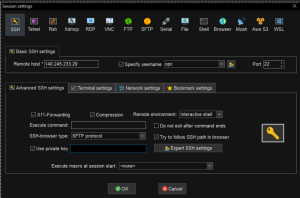
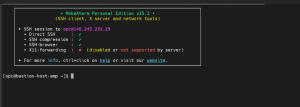
Upload the main-ebs-server private key to moba exterm. Give permission to private key. Other wise you will face this issue.
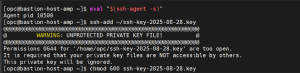
Then add the ssh key to ssh agent

SSH into the main server with ip address

Conclusion
By implementing a Bastion Host architecture, we eliminated direct internet exposure of private servers while still maintaining secure administrative access. This solution significantly improves security posture, follows cloud best practices, and provides a scalable, auditable, and enterprise-grade access model for OCI environments.
