
Introduction/ Issue
Disaster recovery and workload migration are common operational requirements in cloud environments. There are situations where an Azure Virtual Machine (VM) needs to be recreated in another Azure region, either due to regional outages, infrastructure migration, application testing, or business continuity planning.
When Azure Site Recovery or Azure Backup is not part of the environment, administrators can still restore a virtual machine by using an OS disk snapshot. This method provides a straightforward approach to recreate a VM in another region while preserving the operating system and its configuration.
Why we need to do / Cause of the issue
There are several scenarios where restoring a virtual machine to another Azure region becomes necessary:
- Disaster Recovery (DR) preparation.
- Regional service disruption or planned migration.
- Infrastructure modernization across Azure regions.
- Application validation in a secondary region.
- Creating identical environments for testing or business continuity.
Without a recovery mechanism, rebuilding a virtual machine manually involves provisioning a new VM, reinstalling the operating system, configuring applications, restoring configurations, and validating services. This process increases recovery time and introduces the possibility of configuration inconsistencies.
Using an OS disk snapshot simplifies this activity by preserving the existing operating system state, allowing the VM to be recreated with minimal manual effort.
How do we solve
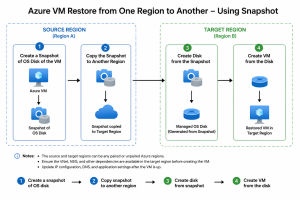
The restoration process consists of four key stages.
Step 1 – Create a Snapshot of the OS Disk
Identify the virtual machine to be restored and create a snapshot of its operating system disk. The snapshot captures the disk contents at a specific point in time and serves as the source for the recovery process.
Verify that the snapshot is successfully created before proceeding to the next step.
Step 2 – Copy the Snapshot to the Target Region
Since snapshots are region-specific resources, the snapshot must be copied to the destination Azure region.
Create an incremental copy or export the snapshot and recreate it in the target region using Azure managed snapshots. Ensure that the copied snapshot is available and in a completed state before continuing.
This step makes the operating system image available within the destination region.
Step 3 – Create a Managed Disk
After the snapshot is available in the destination region, create a managed disk using the copied snapshot as the source.
During disk creation, select:
- Appropriate resource group
- Target region
- Disk type (Standard SSD, Premium SSD, etc.)
- Availability Zone (if required)
The managed disk now represents the operating system disk for the restored virtual machine.
Step 4 – Create the Virtual Machine
Deploy a new Azure Virtual Machine using the managed disk created in the previous step.
While creating the VM, configure the required infrastructure components, including:
- Virtual Network (VNet)
- Subnet
- Network Security Group (NSG)
- Public IP (if applicable)
- Availability Zone or Availability Set
- VM Size
After deployment, verify that the operating system boots successfully and that all expected services are available.
If the workload contains additional data disks, repeat the snapshot and disk creation process for each data disk before attaching them to the restored virtual machine.
Conclusion
Restoring an Azure Virtual Machine from an OS disk snapshot provides a practical and reliable option when Azure Site Recovery or Azure Backup is not being used. By creating a snapshot, copying it to another region, creating a managed disk, and deploying a new virtual machine, administrators can recover workloads efficiently while maintaining the original operating system configuration.
This approach is particularly useful for disaster recovery planning, regional migrations, proof-of-concept environments, and infrastructure testing. Although additional configuration such as networking, DNS, load balancers, and application validation may still be required, the snapshot-based recovery process significantly reduces the effort involved in rebuilding a virtual machine from scratch.
