
Introduction/ Issue
Managing software packages and updates across hundreds or thousands of Red Hat Enterprise Linux (RHEL) servers can quickly become difficult without a structured approach. In many organizations, systems are spread across development, testing, disaster recovery, and production environments, each requiring different levels of stability and change control.
Without proper content management, administrators may encounter inconsistent package versions, unexpected updates, compliance issues, and extended troubleshooting efforts. A server built today may differ from another server deployed next week, even though both are intended to perform the same function. Such inconsistencies increase operational risk and make it harder to maintain standardized environments.
Why we need to do / Cause of the issue
Enterprise environments rarely allow every server to receive newly released packages immediately. Security updates must be applied promptly, but they also need to be validated against business applications before reaching production.
Common operational challenges include:
- Servers downloading different package versions from external repositories.
- Development and production systems drifting out of sync over time.
- Manual repository assignment during server registration.
- Lack of a controlled approval process for operating system updates.
- Difficulty reproducing environments during troubleshooting or disaster recovery.
- Increased compliance risks due to inconsistent patch levels.
For example, a newly released package may work correctly in a development environment but introduce compatibility issues with a production application. If all systems consume content directly from Red Hat repositories, administrators lose the ability to test and approve updates before deployment.
A controlled content management strategy minimizes these risks by separating software validation from software deployment.
How do we solve
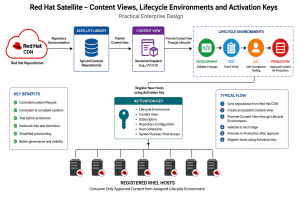
A practical enterprise design combines Content Views, Lifecycle Environments, and Activation Keys to create a controlled software delivery process.
Step 1 – Content Views
A Content View is a curated collection of repositories, packages, and updates. Instead of exposing every available package to every server, administrators publish a specific version of approved content.
Typical Content Views may include:
- RHEL Base Operating System
- Application Streams
- Satellite Client packages
- Organization-specific repositories
- Third-party repositories where required
Once published, a Content View becomes an immutable snapshot. Servers assigned to that version continue using the same approved package set until a newer version is intentionally promoted.
This approach provides predictable deployments and simplifies rollback when necessary.
Step 2 – Lifecycle Environments
Lifecycle Environments represent the promotion path that approved content follows before reaching production.
A common enterprise workflow is:
- Library
- Development
- Test
- User Acceptance Testing (UAT)
- Production
When updates become available, they first enter the library. After validation, the Content View version is promoted sequentially through each environment.
This staged promotion provides several benefits:
- Early detection of application compatibility issues.
- Controlled testing before production deployment.
- Clear approval checkpoints.
- Consistent package versions within each environment.
Instead of every server receiving updates immediately, only servers assigned to the appropriate Lifecycle Environment consume the promoted content.
Step 3 – Activation Keys
Activation Keys simplify host registration by applying predefined settings automatically.
An Activation Key can assign:
- Lifecycle Environment
- Content View
- Subscription
- Repository configuration
- Host collections
- System purpose attributes
For example, a production activation key can automatically register a new server into the Production Lifecycle Environment while associating it with the approved Production Content View.
This eliminates repetitive manual configuration and helps ensure every newly provisioned server follows organizational standards from the moment it is registered.
Step 4 – Putting Everything Together
A practical enterprise workflow typically follows these steps:
- Synchronize repositories from Red Hat into Satellite.
- Publish a new version of the Content View.
- Promote the Content View through Development, Test, and UAT.
- Validate operating system patches and application compatibility.
- Promote the approved version to Production.
- Register new servers using Activation Keys so they automatically receive the correct content.
This model separates testing from deployment while maintaining consistency across the infrastructure.
Conclusion
Content management is more than simply distributing software updates—it is about ensuring stability, repeatability, and governance throughout the operating system lifecycle.
By combining Content Views, Lifecycle Environments, and Activation Keys, Red Hat Satellite provides a structured framework for controlling how software moves from vendor repositories to production systems. Updates are validated before deployment, servers remain aligned with approved baselines, and administrators gain a repeatable process that reduces configuration drift and operational risk.
Organizations adopting this approach benefit from greater consistency, simplified provisioning, improved compliance, and increased confidence when introducing changes into enterprise environments. Rather than treating patching as an isolated task, they establish a controlled software supply chain that supports both operational efficiency and long-term infrastructure reliability.
