

Introduction
One of the biggest misconceptions among SQL Server professionals is assuming that Concurrency and Parallelism mean the same thing.
Many DBAs observe high CPU usage, CXPACKET waits, slow response times, blocking, or deadlocks and immediately change MAXDOP or Cost Threshold for Parallelism without understanding the underlying architecture.
The result?
- Performance becomes worse.
- CPU utilization increases.
- More worker threads become busy.
- Users experience longer response times.
Understanding how SQL Server uses CPU cores, schedulers, worker threads, memory, and the Windows Operating System is essential before changing any server-level settings.
This article explains:
- What Concurrency really is
- What Parallelism means
- Internal SQL Server architecture
- Windows Scheduler interaction
- How SQL Server decides to run a query in parallel
- MAXDOP
- Cost Threshold for Parallelism
- Side effects of changing these settings
Why We Need to Understand This (Cause of the Issue)
Modern SQL Servers contain:
- 8 CPUs
- 16 CPUs
- 32 CPUs
- 64 CPUs
- Even 256 Logical CPUs
A common assumption is:
“More CPUs mean every query will become faster.”
This is incorrect.
SQL Server must decide:
- Should this query use one CPU?
- Should it use 4 CPUs?
- Should it use 16 CPUs?
Using multiple CPUs has its own overhead.
Sometimes a parallel query is actually slower than a serial query.
Likewise, running many small queries simultaneously does not mean SQL Server should parallelize all of them.
Understanding this difference is the foundation of SQL Server performance tuning.
SQL Server Architecture Overview
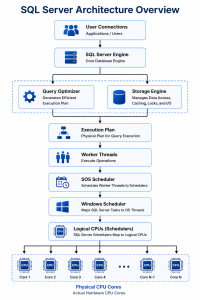
SQL Server does NOT directly execute on CPUs.
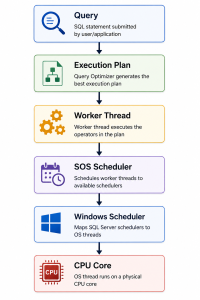
So, every query execution depends on proper scheduling.
Understanding Concurrency
Concurrency means : Multiple users accessing SQL Server at the same time.
Example:
User A → SELECT
User B → INSERT
User C → UPDATE
User D → DELETE
User E → Backup
User F → Index Rebuild
All these operations are happening simultaneously.
This is called Concurrency.
Notice: Each query may still use only one CPU.
Concurrency is about:
- Number of active users
- Number of active requests
- Number of transactions
- Resource sharing
Not about using multiple CPUs.
Example
100 users connect simultaneously.
Each query uses only one CPU.
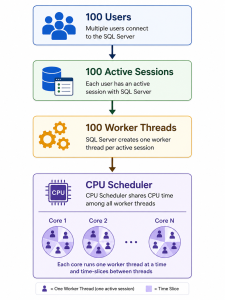
This is high concurrency.
Understanding Parallelism
Parallelism means: One single query uses multiple CPU cores simultaneously.
Example:
SELECT *
FROM Sales
WHERE OrderDate BETWEEN ‘2024-01-01’ AND ‘2024-12-31’
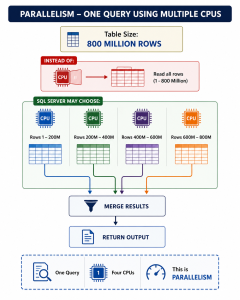
This is Parallelism.
Concurrency vs Parallelism
| Feature | Concurrency | Parallelism |
| Definition | Multiple queries at the same time | One query using multiple CPUs |
| CPU Usage | Usually one CPU per query | Multiple CPUs for one query |
| Focus | More users | Faster execution |
| Goal | Increase throughput | Reduce execution time |
| Controlled by | Worker Threads, Locks | MAXDOP, Cost Threshold |
| Common Waits | LCK, THREADPOOL | CXPACKET, CXCONSUMER |
How SQL Server Decides to Use Parallelism
SQL Server Query Optimizer estimates:
- Number of rows
- CPU cost
- I/O cost
- Memory grant
- Operator cost
If estimated cost exceeds Cost Threshold for Parallelism
AND
Enough CPUs are available
AND
No optimizer restrictions exist
Then SQL Server generates a Parallel Execution Plan.
Execution Plan Example
Notice the Gather Streams operator.
It combines data from multiple CPUs.
What is MAXDOP?
MAXDOP = Maximum Degree of Parallelism
It defines:
Maximum number of CPUs one query can use.
Example:
Server has 32 Logical CPUs – MAXDOP = 8
Then: One Query – Maximum 8 CPUs
Even though 32 CPUs exist.
View Current MAXDOP
SELECT name,
value_in_use
FROM sys.configurations
WHERE name = ‘max degree of parallelism’;
Change MAXDOP
EXEC sp_configure ‘show advanced options’,1;
RECONFIGURE;
EXEC sp_configure ‘max degree of parallelism’,8;
RECONFIGURE;
SSMS Location
Right Click Server – Properties – Advanced – Parallelism – Max Degree of Parallelism
Cost Threshold for Parallelism
This value determines:
When SQL Server should even consider a parallel plan.
Default value: 5
This default was designed decades ago when CPUs had very few cores and workloads were much smaller. On modern servers, a value of 5 often causes many small queries to be parallelized unnecessarily.
View Current Value
SELECT name,
value_in_use
FROM sys.configurations
WHERE name=’cost threshold for parallelism’;
Change Cost Threshold
EXEC sp_configure ‘show advanced options’,1;
RECONFIGURE;
EXEC sp_configure ‘cost threshold for parallelism’,50;
RECONFIGURE;
SSMS Location
Right Click Server – Properties – Advanced – Parallelism – Cost Threshold
Operating System Perspective
SQL Server uses : SOS Scheduler
The SOS Scheduler is SQL Server’s lightweight scheduler that maps worker threads to available logical CPUs before the Windows scheduler ultimately runs those threads on processor cores.
Each scheduler is generally associated with a logical CPU.
Example:
16 Logical CPUs – 16 SOS Schedulers – Worker Threads Assigned
The Windows Operating System ultimately schedules the SQL Server threads on the processor.
Memory Impact of Parallelism
Parallel queries usually require:
- Larger memory grants
- More worker threads
- More exchange buffers
- Additional synchronization between threads
If many parallel queries run together:
CPU Impact
High parallelism can cause:
- Increased context switching
- Higher CPU utilization
- Cache synchronization overhead
- More thread management
Sometimes:
8 CPUs – Working Hard – Slower Query
because the coordination overhead outweighs the benefits.
Common Wait Types
| Wait Type | Meaning |
| CXPACKET | Coordination between parallel worker threads |
| CXCONSUMER | Consumer thread waiting in a parallel plan (often benign) |
| THREADPOOL | Worker threads exhausted |
| SOS_SCHEDULER_YIELD | CPU pressure or cooperative scheduling |
| RESOURCE_SEMAPHORE | Waiting for memory grants |
These waits should always be interpreted in context rather than in isolation.
Recommended MAXDOP Values (General Guidance)
| Logical CPUs | Suggested MAXDOP |
| 1–8 | Equal to CPU count |
| 9–16 | 8 |
| 17–32 | 8 |
| 33–64 | 8–16 (depending on workload and NUMA layout) |
| More than 64 | Follow Microsoft’s NUMA-aware recommendations |
Note: These are starting points. The ideal value depends on workload type (OLTP, DSS, data warehouse), NUMA configuration, SQL Server version, and performance testing.
When Should You Change These Settings?
Consider tuning MAXDOP and Cost Threshold only after collecting evidence such as:
- Consistently high CPU utilization.
- Excessive parallel query plans.
- High CXPACKET/CXCONSUMER waits combined with CPU pressure.
- Long-running analytical queries affecting OLTP workloads.
- Large reporting or ETL jobs competing with transactional workloads.
- Performance baseline comparisons before and after changes.
Avoid changing these settings simply because a blog or forum recommends a particular value.
Effects of Changing MAXDOP and Cost Threshold
Increasing MAXDOP
Advantages
- Faster large table scans.
- Better data warehouse performance.
- Improved reporting query speed.
Disadvantages
- Higher CPU usage.
- More worker threads consumed.
- Larger memory grants.
- Increased synchronization overhead.
Lowering MAXDOP
Advantages
- Better OLTP responsiveness.
- Lower CPU contention.
- Reduced parallel overhead.
- More predictable performance.
Disadvantages
- Large analytical queries may take longer.
Increasing Cost Threshold
Advantages
- Fewer unnecessary parallel plans.
- Reduced CPU overhead.
- Better throughput for transactional workloads.
Disadvantages
- Some genuinely expensive queries may remain serial if the threshold is set too high.
Lowering Cost Threshold
Advantages
- More queries can benefit from parallel execution.
Disadvantages
- Many small queries may become parallel unnecessarily, increasing CPU usage and reducing overall system throughput.
Best Practices
- Understand the workload before making changes.
- Capture a performance baseline.
- Test changes in a non-production environment whenever possible.
- Monitor CPU, waits, memory grants, and execution plans after changes.
- Review NUMA topology on large servers.
- Follow Microsoft’s guidance as a starting point, then tune based on actual workload characteristics.
- Revisit settings after significant hardware or workload changes.
Conclusion
Concurrency and Parallelism solve different problems:
- Concurrency improves the ability of SQL Server to handle many users and transactions at the same time by efficiently scheduling worker threads and managing shared resources.
- Parallelism reduces the execution time of individual resource-intensive queries by distributing work across multiple CPU cores.
Changing MAXDOP or Cost Threshold for Parallelism without understanding SQL Server’s scheduling architecture, execution plans, CPU topology, memory grants, and workload characteristics can degrade performance rather than improve it.
Effective SQL Server tuning requires measuring the workload, understanding the internal engine, and making data-driven configuration changes—not relying on default values or generic recommendations. When applied correctly, concurrency and parallelism settings can significantly improve scalability, throughput, and overall database performance.
