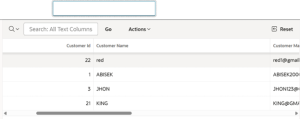
Introduction: –
Interactive Grids are widely used to display and manage large volumes of data efficiently. However, one common challenge users face is handling column widths—especially when data length varies across columns. Manually setting a fixed width for each column can be time-consuming, inflexible, and difficult to maintain as data changes. Dynamically increasing the length of Interactive Grid columns provides a smarter, more adaptive approach, ensuring that content is clearly visible while improving the overall user experience without constant manual adjustments.
The following technologies have been used in custom button driven data refresh
- Oracle APEX
- Javascript
Why we need to do: –
Manually defining column widths in an Interactive Grid can quickly become inefficient, especially when working with dynamic or unpredictable data. Fixed widths may truncate important information, force users to scroll unnecessarily, or require frequent updates as data changes. This not only affects usability but also increases maintenance effort for developers.Dynamically increasing column widths ensures that data is displayed clearly without manual intervention. It allows the grid to automatically adapt to varying content lengths, improving readability and reducing user frustration.
How do we solve:
The following steps explain how to create an Interactive Grid and dynamically adjust its column widths
Step 1 : Create an Interactive Grid and assign a Static ID to it.
Step 2: Add the required JavaScript code in the Execute when Page Loads section.
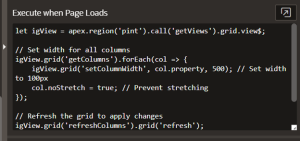
Code
let igView = apex.region(‘pint’).call(‘getViews’).grid.view$;
// Set width for all columns
igView.grid(‘getColumns’).forEach(col => {
igView.grid(‘setColumnWidth’, col.property, 500); // Set width to 100px
col.noStretch = true; // Prevent stretching
});
// Refresh the grid to apply changes
igView.grid(‘refreshColumns’).grid(‘refresh’);
Conclusion:
Dynamically adjusting the width of Interactive Grid columns eliminates the need for repetitive manual configuration and allows the grid to respond intelligently to changing data. This approach not only saves development time but also enhances readability and usability for end users. By letting column widths adapt automatically, applications become more responsive, maintainable, and visually consistent—resulting in a smoother and more efficient data interaction experience.