
Introduction
In many Oracle APEX applications, users edit critical data through forms. However, standard forms do not provide clear feedback about what fields were changed before saving. This can lead to accidental overwrites, incorrect updates, or user hesitation—especially in audit-sensitive or enterprise systems.
All of this is achieved without plugins, using only Dynamic Actions and JavaScript.
Why We Need to Do This
Standard APEX forms:
- Do not indicate which fields were modified
- Do not show old vs new values before save
- Allow users to submit changes blindly
A “smart alert” form:
- Improves user awareness
- Prevents accidental overwrites
- Builds trust in the application
- Enhances overall usability with minimal effort
How Do We Solve This
The solution works in four simple layers:
- Capture original field values on page load
- Detect field-level changes
- Visually highlight changed fields
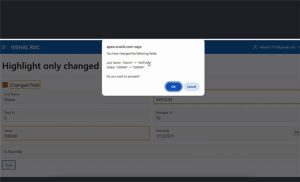
- Show a confirmation popup listing all changes before save
This approach is:
- Reusable across any APEX form
- Plugin-free
- Lightweight and easy to maintain
Step 1: Set Static ID for the Form Region
Where:
APEX Page → Form Region → Static ID
- Example Static ID: FORM
This is optional but recommended for clarity and future extensions.
Step 2: Track Original Values on Page Load
Where:
APEX Page → Dynamic Actions
- Event: Page Load
- Selection Type: Page
- True Action: Execute JavaScript Code
document.querySelectorAll(
‘input[id^=”P”], select[id^=”P”], textarea[id^=”P”]’
).forEach(el => {
el.setAttribute(‘data-original-value’, el.value);
});
What this does:
- Stores the initial value of every page item
- Uses a custom data-original-value attribute
- Works automatically for all page items
Step 3: Highlight Changed Fields in Real Time
Where:
APEX Page → Dynamic Actions
- Event: Change
- Selection Type: jQuery Selector
- jQuery Selector:
input[id^=”P”], select[id^=”P”], textarea[id^=”P”]
- True Action: Execute JavaScript Code
const item = this.triggeringElement;
const originalValue = item.getAttribute(‘data-original-value’) || ”;
const currentValue = item.value || ”;
if (originalValue !== currentValue) {
item.style.outline = ‘2px solid orange’;
} else {
item.style.outline = ”;
}
Result:
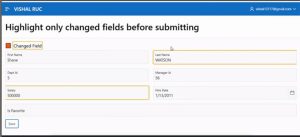
- Changed fields are outlined in orange
- If user reverts the value, highlight is removed
- Immediate visual feedback for users
Step 4: Show All Changes Before Save
Where:
APEX Page → Dynamic Actions
- Event: Click
- Selection Type: Button
- Button: SAVE (or your actual save button)
- True Action: Execute JavaScript Code
const changedFields = [];
document.querySelectorAll(
‘input[id^=”P”], select[id^=”P”], textarea[id^=”P”]’
).forEach(el => {
const itemId = el.id;
const item = apex.item(itemId);
if (item) {
const oldVal = el.getAttribute(‘data-original-value’) || ”;
const newVal = item.getValue() || ”;
if (oldVal !== newVal) {
const label = document.querySelector(`label[for=”${itemId}”]`);
const fieldName = label ? label.innerText.trim() : itemId;
changedFields.push(
`${fieldName}: “${oldVal}” ➝ “${newVal}”`
);
}
}
});
if (changedFields.length > 0) {
const msg =
“📝 You have changed the following fields:\n\n” +
changedFields.join(‘\n’) +
“\n\nDo you want to proceed?”;
if (confirm(msg)) {
apex.submit(‘SAVE’); // replace if needed
}
} else {
apex.submit(‘SAVE’);
Conclusion
This smart form alert approach significantly enhances Oracle APEX form usability by making data changes visible, intentional, and safe. By highlighting modified fields in real time and presenting a clear before-save summary of old and new values, users gain confidence in their actions and avoid accidental updates. Best of all, the solution is completely plugin-free, reusable across forms, and easy to maintain using only Dynamic Actions and JavaScript. For enterprise, audit-sensitive, or critical data entry screens, this pattern adds a powerful layer of control with minimal effort.
