Handling Unsaved Interactive Grid Changes Before Model Navigation in Oracle Apex

Introduction
Interactive Grids (IG) are one of the most powerful components in Oracle APEX, allowing users to edit multiple records in a spreadsheet like interface. However, a common business challenge arises when users update data in an Interactive Grid but need to perform additional actions through a link or button that opens another page or modal dialog before saving their changes.
In our implementation, we addressed a requirement where users can modify values in the first few columns of an Interactive Grid and then click a link in a subsequent column to upload supporting documents or perform additional actions. The solution ensures that unsaved grid changes are automatically saved, required column values are passed to the modal dialog, and the grid is refreshed when the dialog closes.
The following technologies has been used to achieve the same.
- Oracle APEX
- JavaScript
Why we need to do
In business applications, data entry and document management often happen together. Users expect the system to:
Preserve data they have already entered.
Avoid asking them to manually save before every action.
Open related pages or dialog with the required contextual information.
Refresh the parent grid automatically after completing child transactions.
How do we solve
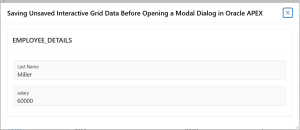
Step1: I have created a region of type interactive grid along with a page item named LAST_NAME and SALARY as like the below.
Make the first_name column as link and NAME column Link Target ,add the JavaScript Method (Modal Dialog)
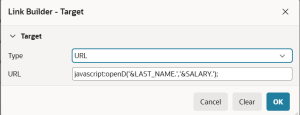
Step 2 : Give the HTML DOM ID for that region as “emp_igg”, where the dom_id newly introduce in 26.1 version .If defined, this is used as the ID for the region, using the substitution string #DOM_ID#, which can be useful if developing custom JavaScript behavior for the region. If this is not defined, the region generates an internal ID.If defined, this is used as the ID for the region, using the substitution string #DOM_ID#, which can be useful if developing custom JavaScript behavior for the region. If this is not defined, the region generates an internal ID.

Step 3: In Function and Global Variable Declaration add the javascript code .
function openD(a, b) {

// Save pending Interactive Grid changes
    var region = apex.region("emp_igg");
    if (region) {
        var ig$ = region.widget();
        var view = ig$.interactiveGrid("getViews", "grid");
        var model = view.model;

// Save any unsaved changes in the Interactive Grid
        if (model) {
            model.save();
        }
    }

// Call Ajax Callback process to store values in session state
    apex.server.process(
    "SET VALUE SESSION STATE",
    {
        x01: a,

        x02: b
    },
    {

// Executes after Ajax process completes successfully
        success: function() {
            apex.navigation.redirect(
    "f?p=&APP_ID.:20:&APP_SESSION.::NO:"
);
}
 }
);
}
Step 4: create ajax call back process

BEGIN
    apex_util.set_session_state(
        p_name  => 'P20_LAST_NAME',
        p_value => apex_application.g_x01
    );
 apex_util.set_session_state(
        p_name  => 'P20_SALARY',
        p_value => apex_application.g_x02
    );
    htp.p('{"status":"success"}');
END;
Conclusion
In Oracle APEX applications, it is common for users to update Interactive Grid data and immediately perform related actions such as document uploads or child record maintenance. Without proper handling, unsaved grid changes can be lost when navigating to another page or opening a modal dialog. By implementing automatic Interactive Grid save functionality, passing selected row values to the modal dialog, updating child records, and refreshing the parent grid after dialog closure, we can create a seamless and user-friendly experience.
This approach ensures data consistency, improves usability, and supports complex business processes where parent and child transactions must work together efficiently. The solution has proven highly effective in scenarios involving file uploads, document management, workflow approvals, and other business operations that require users to transition between Interactive Grid editing and modal dialog interactions without losing their work.
Before saving the salary value

I have changed the michel salary as 2000 and click the link the value get saved

Getting the old value salary in model dialog page