Kanban Board Implementation in Oracle APEX
Introduction
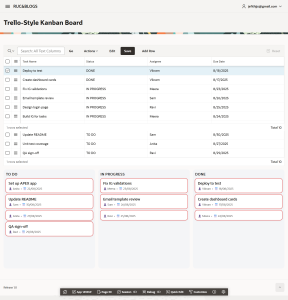
This document explains how to build a dynamic Kanban Board in Oracle APEX using JavaScript, SortableJS, and AJAX Callbacks. A Kanban Board is a visual way of managing work where tasks are shown as cards and moved across different stages such as TO DO, IN PROGRESS, and DONE to reflect their current status. This Kanban board allows users to drag and drop tasks between columns while updating the database in real time.
The following technologies has been used to achieve the same.
• Oracle APEX
• JavaScript
Why We Need to Do This?
- Visual Task Tracking:
Provides a clear visual representation of task progress. - Easy Workflow Management:
Drag-and-drop functionality simplifies task updates. - Real-Time Updates:
Task status changes are saved instantly in the database. - Improved User Experience:
More interactive than traditional reports or forms. - Project Transparency:
Helps teams track progress and deadlines efficiently.
How Do We Solve It?
Below are the step-by-step instructions to implement the Kanban board in Oracle APEX.
Step 1: Include SortableJS Library
Add the following URL under File URLs in the application properties to enable drag-and-drop functionality:
https://cdn.jsdelivr.net/npm/sortablejs@1.15.2/Sortable.min.js
Step 2: Create Kanban Static Region
Create a Static Content region and set the Static ID as KANBAN_REGION. This region will act as the container for the Kanban board.
Step 3: Build Kanban Columns Using JavaScript
JavaScript dynamically builds the Kanban columns (TO DO, IN PROGRESS, DONE) when the page loads. This ensures flexibility and easy maintenance.
Execute when page loads:(Javascript Code)

(function () {
  const STATUSES = ["TO DO", "IN PROGRESS", "DONE"];

 function buildSkeleton() {
    const region = document.getElementById("KANBAN_REGION");
    region.innerHTML = `
<div class="kanban-board">
        ${STATUSES.map(s => `
<div class="kanban-col" data-status="${s}">
<div class="kanban-col-header">${s}</div>
<div class="kanban-list" id="list-${slug(s)}"></div>
</div>
        `).join('')}
</div>`;
  }

 function slug(s) { return s.toLowerCase().replace(/\s+/g, '-'); }

 function dueClass(isoDate) {
    if (!isoDate) return "";
    const today = new Date(); today.setHours(0,0,0,0);
    const due   = new Date(isoDate); due.setHours(0,0,0,0);
    const diffDays = Math.round((due - today) / (1000*60*60*24));
    if (diffDays < 0)  return "due-overdue";
    if (diffDays <= 3) return "due-soon";
    return "due-later";
  }


  function cardHTML(t) {
    const klass = dueClass(t.due);
    const due   = t.due ? new Date(t.due).toLocaleDateString() : '-';
    return `
<div class="kanban-card ${klass}" data-id="${t.id}">
<div class="card-title">${apex.util.escapeHTML(t.title)}</div>
<div class="card-meta">👤 ${apex.util.escapeHTML(t.assignee || '-')}  •  📅 ${due}</div>
</div>`;
  }


  function renderTasks(tasks) {
    // Clear lists
    STATUSES.forEach(s => {
      const list = document.getElementById(`list-${slug(s)}`);
      if (list) list.innerHTML = "";
    });


    // Populate
    tasks.forEach(t => {
      const status = STATUSES.includes(t.status) ? t.status : "TO DO";
      const list = document.getElementById(`list-${slug(status)}`);
      if (list) list.insertAdjacentHTML('beforeend', cardHTML(t));
    });
  }


  function enableDnD() {
    document.querySelectorAll("#KANBAN_REGION .kanban-list").forEach(list => {
      Sortable.create(list, {
        group: "kanban",
        animation: 120,
        onAdd: function (evt) {
          const card = evt.item;                       // moved DOM node
          const id = card.dataset.id;                  // task ID
          const newStatus = evt.to.closest(".kanban-col").dataset.status;


          apex.server.process(
            "UPDATE_TASK_STATUS",
            { x01: id, x02: newStatus },
            {
              dataType: "json",
              success: function () {
                // Optional: flash or notify
                // apex.message.showPageSuccess("Task moved to " + newStatus);
              },
              error: function (req, status, err) {
                console.error(err);
                // Revert UI on error
                evt.from.insertBefore(card, evt.from.children[evt.oldIndex] || null);
                apex.message.alert("Could not update status. Please try again.");
              }
            }
          );
        }
      });
    });
  }


  function fetchAndRender() {
    apex.server.process(
      "FETCH_TASKS",
      {},
      {
        dataType: "json",
        success: function (tasks) {
          buildSkeleton();
          renderTasks(tasks || []);
          enableDnD();
        },
        error: function (req, status, err) {
          console.error(err);
          document.getElementById("KANBAN_REGION").innerHTML = "<p>Failed to load tasks.</p>";
        }
      }
    );
  }


  // Initial render
  fetchAndRender();


  // Bonus: Keep Kanban in sync when IG refreshes
  // Create a Dynamic Action: Event = After Refresh, Selection Type = Region, Region = your IG
  // True Action: Execute JavaScript Code -> fetchAndRender();
  window.fetchAndRenderKanban = fetchAndRender; // so DA can call it


})();
Step 4: Fetch Tasks Using AJAX Callback
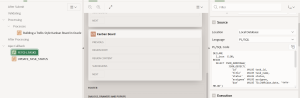
An AJAX Callback (FETCH_TASKS) retrieves task data from the PROJECT_TASKS table and returns it in JSON format. JavaScript renders tasks into their respective status columns.
Ajax Call Back 1 :
DECLARE
l_json  CLOB;
BEGIN
SELECT JSON_ARRAYAGG(
JSON_OBJECT(
'id'       VALUE task_id,
'title'    VALUE task_name,
'status'   VALUE status,
'assignee' VALUE assignee,
'due'      VALUE TO_CHAR(due_date, 'YYYY-MM-DD')
)
)
INTO l_json
FROM project_tasks;

owa_util.mime_header('application/json', FALSE);
htp.p('Cache-Control: no-cache');
owa_util.http_header_close;

htp.p(COALESCE(l_json, '[]'));
END;
Ajax Call Back 2:
BEGIN
UPDATE project_tasks
SET status = apex_application.g_x02
WHERE task_id = TO_NUMBER(apex_application.g_x01);
COMMIT;
owa_util.mime_header('application/json', FALSE);
htp.p('Cache-Control: no-cache');
owa_util.http_header_close;
htp.p('{"ok":true}');
END;
Step 5: Enable Drag & Drop and Update Status
SortableJS enables drag-and-drop between Kanban columns. When a task is moved, another AJAX Callback (UPDATE_TASK_STATUS) updates the task status in the database. If the update fails, the UI change is reverted.
Conclusion
This Kanban Board implementation enhances task management within Oracle APEX by providing an interactive and user-friendly interface. By combining JavaScript, SortableJS, and AJAX Callbacks, we achieve real-time updates, improved usability, and a scalable solution that can be extended with additional features such as filters, priorities, and notifications.
Output