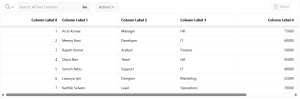
Introduction: –
This document explains how to dynamically change column labels on page load for an Interactive Grid (IG) in Oracle APEX using JavaScript. This approach helps when column names need to be customized at runtime based on business rules, user preferences, or dynamic conditions.
The following technologies have been used in custom button driven data refresh
- Oracle APEX
- Javascript / Jquery
Why we need to do: –
In some applications, Interactive Grid column labels need to change dynamically based on the logged-in user’s role or language, the selected context or data source, or other dynamic conditions and user preferences. Oracle APEX does not provide a direct declarative option to modify column labels at runtime. However, this requirement can be achieved by using JavaScript after the Interactive Grid is initialized. Once the grid has fully loaded, JavaScript can be used to access the grid model and update the column headings dynamically, allowing the labels to reflect the required conditions without reloading or redesigning the page.
How do we solve:
The following steps are used in Dynamically Change Column Label on Page Load for Interactive Grid
Step 1 : Create Page Components
Create a page containing an Interactive Grid (IG) in your APEX application.

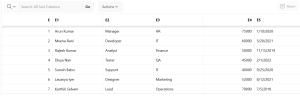
Step 2: Assign a Static ID to the Interactive Grid
To reference the grid in JavaScript, assign a Static ID to the IG region.
Select the IG Region → Go to Advanced section → Set Static ID = IG.
Step 3: Add JavaScript Code
Place the following JavaScript code in ‘Execute when Page Loads’:
Code
let gridView = apex.region(‘IG’).widget().interactiveGrid(“getViews”, “grid”);
let columns = gridView.getColumns();
columns.forEach(function(colNames,idx){
if(colNames.heading == ‘E’||idx)
{
colNames.heading = `Column Label ${idx}`;
colNames.heading.width=100;
colNames.width=200;
}
}
)
gridView.refreshColumns();
gridView.refresh();
console.log(apex.region(“IG”).call(“option”,”config”)
);
console.log(gridView);
apex.region(“IG”).call(“getActions”).get(“edit”);
Conclusion:
By using JavaScript, Oracle APEX developers can update Interactive Grid column labels dynamically at runtime without modifying the underlying data model. This method offers greater flexibility and improves the user experience by allowing the interface to adapt easily to changing conditions such as user roles, language settings, or individual preferences. It is an effective and practical approach for building dynamic and user-centric applications in Oracle APEX.