Introduction:-
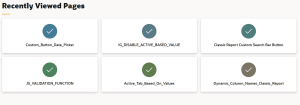
To improve user experience in Oracle APEX by implementing a Recently Visited Pages dashboard. By using APEX activity logs, it demonstrates how to track user navigation and dynamically display the most recently accessed pages, enabling faster navigation and a more personalized user experience.
Why we need to do :–
Improve navigation efficiency: By reducing the time users spend searching through long menus.
Enhance productivity: APEX applications with many pages. Provide a personalized user experience, showing each user their own recently accessed pages.
Reduce cognitive load: Allowing users to focus more on work rather than remembering navigation paths.
Create a dynamic and smart dashboard that adapts in real time based on user activity.
How do we solve:-
Step 1: Create a new Dynamic List from Shared Components.
Navigate to: Shared Components > Lists > Create > Dynamic.
Step 2: Choose SQL Query as the source option.
Step 3: Paste the following query:
SELECT
NULL AS c1_level,
PAGE_TITLE AS c2_name_for_label,
‘f?p=’ || :APP_ID || ‘:’ || PAGE_ID || ‘:’ || :APP_SESSION AS c3_target_url,
NULL AS c4_is_current,
CASE
WHEN PAGE_ID = 10 THEN ‘fa fa-id-card’
ELSE ‘fa fa-check’ — Add more icons if needed
END AS c5_icon_name,
VIEW_CNT AS c6_badge
FROM (
SELECT
p.PAGE_TITLE,
p.PAGE_ID,
COUNT(*) AS VIEW_CNT
FROM APEX_WORKSPACE_ACTIVITY_LOG l
JOIN APEX_APPLICATION_PAGES p
ON p.APPLICATION_ID = l.APPLICATION_ID
AND p.PAGE_ID = l.PAGE_ID
WHERE l.APPLICATION_ID = :APP_ID
AND l.VIEW_DATE >= SYSDATE – 3
AND l.APEX_USER = UPPER(:APP_USER)
AND p.PAGE_ID NOT IN (9999, 1, 39)
AND p.PAGE_MODE = ‘Normal’
GROUP BY
p.PAGE_TITLE,
p.PAGE_ID
ORDER BY
VIEW_CNT DESC
)
WHERE ROWNUM < 15; — Adjust the limit as needed
Step 4: Go to the Home Page and create a List Region (choose from the Region Type options) using the Content Block template. If we want a smaller region tile, use the template options three sizes are available: Small, Medium, Large.
Step 5: Under the Source property of the region, select the Dynamic List we created.
Step 6: In the List Region Attributes section, APEX provides several appearance options such as Badge List, Cards, Tabs, etc. Choose Cards and configure the following settings under Card Appearance:
General – Use Template Defaults & Apply Theme Colors
Style – Featured
Icons – Display Icons
Layout – 3 Columns (or any layout we prefer)
Body Text – Hidden (we don’t need additional content)
Icon Shape – Circle
Animation – Color Fill (Raise Card is also available)
Step 7: Run the application, navigate through a few pages, and return to the Home Page. Recently Viewed Pages dashboard will now display automatically based on our activity.
Conclusion:-
To implementing a dynamic Recently Used Pages dashboard in Oracle APEX greatly enhances application usability. By utilizing workspace activity logs and dynamic lists, developers can build a real-time, personalized navigation experience. This approach results in faster access, better productivity, and improved overall UX, making it highly valuable for users who frequently navigate across multiple pages in APEX applications.