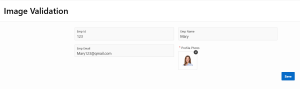
Image Validation in Oracle APEX
Introduction
Oracle APEX provides a Image Upload page item that allows users to upload files easily. However, in real-time applications such as profile management, it is essential to validate uploaded images before submission.This document explains how to implement client-side image validation in Oracle APEX using JavaScript and Dynamic Actions. The validation ensures that only valid images are uploaded by checking file type, file size, and image dimensions.
The following technologies has been used to achieve the same.
• Oracle APEX
• JavaScript
Why We Need to Do This?
1. Restrict Invalid File Formats
Users may attempt to upload unsupported file types such as PDFs or documents. Validating the file type ensures that only image files (JPG / PNG) are accepted.
2. Control File Size
Large image files can impact database storage and application performance. File size validation prevents oversized uploads.
3. Maintain Image Dimension Standards
Applications often require consistent image dimensions for UI alignment. Dimension validation ensures uniform profile photos across the application.
4. Improve User Experience
Client-side validation provides immediate feedback to users instead of server-side errors after submission.
5. Reduce Server Load
By validating images on the client side, invalid files are stopped before reaching the server, improving overall performance.
How Do We Solve It?
Below are the step-by-step instructions to implement image validation in Oracle APEX.
Step 1: Create Image Upload Page Item
Page Item Name: P9_PROFILE_PHOTO
Type: Image Upload
Step 2: Create Global JavaScript Function
function clearFileAfterOk(message) {
    apex.message.alert(message, function () {
        $('.a-FileDrop-remove').click();
    });
}
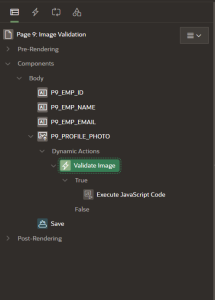
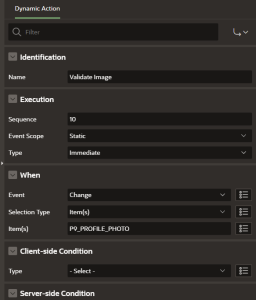
Step 3: Create Dynamic Action
Event: Change
Selection Type: Item
Item: P9_PROFILE_PHOTO
True Action: Execute JavaScript Code
JavaScript Code:-
(function () {
 var item = apex.item("P9_PROFILE_PHOTO");
 var fileInput = document.getElementById(item.id);
 If (!fileInput || !fileInput.files || fileInput.files.length === 0) {
 return;
 }

      var file = fileInput.files[0];
var allowedTypes = ["image/jpeg", "image/png"];
If (!allowedTypes.includes(file.type)) {
 clearFileAfterOk("Only JPG, JPEG and PNG images are allowed.");
      return;
}
var maxSize = 20000; // bytes
if (file.size > maxSize) {
 clearFileAfterOk("Image size must be less than or equal to 20 KB.");
 return;
}

    var img = new Image();
Img.onload = function () {
If (this.width < 300 || this.height < 300) {
        clearFileAfterOk("Image dimensions must be at least 300 × 300 pixels.");
}
    URL.revokeObjectURL(img.src);
};

   img.onerror = function () {
 clearFileAfterOk("Invalid image file.");
  };
  img.src = URL.createObjectURL(file);
})();
Conclusion
Client-side image validation in Oracle APEX ensures data quality, improves user experience, and enhances application performance. This reusable approach can be applied to profile photos and similar upload requirements across applications.
Output
The image upload will be restricted if the image does not satisfy the required conditions.

The image upload will be permitted when the image satisfies all the required conditions.