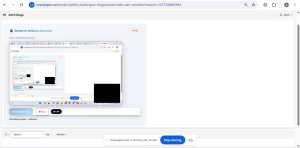
Introduction / Issue
Oracle APEX applications often need a way to capture a tutorial, a support issue, or a walkthrough directly from the browser, with the presenter’s webcam visible alongside the screen similar to a standard screen-recording tool. The requirement was to achieve this as a single merged video, rather than two separate recordings, without relying on any third-party software.
Why We Need to Do / Cause of the Issue
Recording the screen and webcam as two separate MediaRecorder streams produces two separate files, not the single combined video that is actually needed. Visually overlaying the webcam element on top of the screen element using CSS does not solve this either, because the MediaRecorder API only captures the exact stream it is given it has no awareness of what is layered on top in the DOM. As a result, the webcam appears on screen but never appears in the recorded file.
A second challenge appeared while saving the recorded video to an Oracle table. Ajax Callback processes do not auto-commit, base64 video payloads exceed the character limit of standard VARCHAR2 parameters, and direct DML against apex_collections is not permitted. Left unaddressed, these issues cause the save step to fail silently or produce incomplete records.
How Do We Solve
The solution is to draw both the screen and webcam video sources onto a single HTML canvas element in real time, and record the canvas itself instead of the original streams. On the database side, the recording is saved through a chunked upload flow instead of a single call. The steps below outline the implementation.
Step 1: Build the page markup a Static Content region with a canvas element for the merged output, two hidden video elements to feed the canvas, and Start / Stop / Download / Save controls.
HTML
<div id="screenWebcamRec" class="t-Form--stretchInputs">

  <div class="rec-panel">

    <div class="rec-panel-header">

      <h3>Screen and Webcam Recorder</h3>

      <span id="recBadge" class="rec-badge" style="display:none;">

        <span class="rec-dot"></span> REC

      </span>

    </div>


    <div class="video-card">

      <label class="t-Form-label">Live / Recorded Preview</label>

      <div class="video-player">

        <canvas id="mixCanvas" width="1280" height="720"></canvas>

        <video id="webcamRaw" autoplay muted playsinline style="display:none;"></video>

        <video id="screenRaw" autoplay muted playsinline style="display:none;"></video>

      </div>

    </div>


    <div id="recordedCard" class="video-card fade-in" style="display:none;">

      <label class="t-Form-label">Recorded Clip</label>

      <div class="video-player">

        <video id="playback" controls></video>

      </div>

    </div>


    <div class="t-ButtonRegion t-ButtonRegion--noBorder">

      <button id="btnStart" type="button" class="t-Button t-Button--hot">Start Recording</button>

      <button id="btnStop" type="button" class="t-Button t-Button--stop" disabled>Stop</button>

      <span id="timer">00:00</span>

    </div>


    <div id="postButtons" class="t-ButtonRegion t-ButtonRegion--noBorder fade-in" style="display:none;">

      <button id="btnDownload" type="button" class="t-Button t-Button--ghost">Download</button>

      <button id="btnSave" type="button" class="t-Button t-Button--primary">Save to Database</button>

      <button id="btnRetry" type="button" class="t-Button t-Button--danger">Retry</button>

    </div>


    <div id="progressWrap" style="display:none;">

      <div id="progressBar"></div>

    </div>


    <div id="status"></div>

  </div>

</div>

Step 2: Style the region with a simple panel layout and a recording indicator.

CSS

#screenWebcamRec {

  --accent: #185FA5;

  --accent2: #4FB8E8;

  --success: #0F6E56;

  --danger: #E24B4A;

  font-family: -apple-system, 'Segoe UI', Roboto, sans-serif;

}


.rec-panel {

  background: linear-gradient(135deg, #f4f8fc 0%, #eef2f9 100%);

  border-radius: 20px;

  padding: 28px 32px;

  box-shadow: 0 8px 30px rgba(24, 95, 165, 0.08), 0 1px 3px rgba(0,0,0,0.04);

  border: 1px solid rgba(24, 95, 165, 0.08);

  max-width: 900px;

}


.rec-panel-header {

  display: flex;

  align-items: center;

  justify-content: space-between;

  margin-bottom: 18px;

}


.rec-badge {

  display: inline-flex;

  align-items: center;

  gap: 6px;

  background: #fff0f0;

  color: #d21f1f;

  font-weight: 700;

  font-size: 12px;

  padding: 5px 12px;

  border-radius: 20px;

  border: 1px solid #ffd2d2;

}


.rec-dot {

  width: 8px;

  height: 8px;

  background: #ff3b3b;

  border-radius: 50%;

  display: inline-block;

  animation: dotPulse 1s ease-in-out infinite;

}


@keyframes dotPulse {

  0%, 100% { transform: scale(1); opacity: 1; }

  50% { transform: scale(1.4); opacity: .5; }

}


.video-player {

  position: relative;

  width: 100%;

  max-width: 720px;

  aspect-ratio: 16 / 9;

  background: #0a0e14;

  border-radius: 16px;

  overflow: hidden;

  box-shadow: 0 10px 40px rgba(0,0,0,0.18);

}


.video-player.is-recording {

  animation: recordGlow 1.8s ease-in-out infinite;

}


@keyframes recordGlow {

  0%, 100% { box-shadow: 0 0 0 0 rgba(226,75,74,0), 0 10px 40px rgba(0,0,0,0.18); }

  50% { box-shadow: 0 0 0 4px rgba(226,75,74,.35), 0 10px 40px rgba(0,0,0,0.18); }

}


.t-Button {

  border: none;

  border-radius: 10px;

  padding: 10px 20px;

  font-weight: 600;

  cursor: pointer;

  transition: transform .15s ease, box-shadow .2s ease;

}


.t-Button:hover:not(:disabled) {

  transform: translateY(-2px);

  box-shadow: 0 6px 16px rgba(0,0,0,0.14);

}


.t-Button--hot {

  background: linear-gradient(135deg, var(--accent), var(--accent2));

  color: #fff;

}


.t-Button--primary {

  background: linear-gradient(135deg, var(--success), #14a37f);

  color: #fff;

}


#progressBar {

  height: 100%;

  width: 0%;

  background: linear-gradient(90deg, var(--accent), var(--accent2));

  transition: width .2s ease;

  border-radius: 8px;

}
Step 3: Capture the screen stream (getDisplayMedia) and webcam stream (getUserMedia), and continuously draw both onto the canvas using requestAnimationFrame the screen as the background and the webcam as a small overlay box.
Step 4: Convert the canvas into its own stream with canvas.captureStream(), add the audio tracks from both sources onto it, and record that combined stream using MediaRecorder.
Step 5: On stop, assemble the recorded data into a video file and load it into a preview player for download or upload.
JavaScript
(function () {

  const canvas = document.getElementById('mixCanvas');

  const ctx = canvas.getContext('2d');

  const screenRaw = document.getElementById('screenRaw');

  const webcamRaw = document.getElementById('webcamRaw');

  const playback = document.getElementById('playback');

  const recordedCard = document.getElementById('recordedCard');

  const btnStart = document.getElementById('btnStart');

  const btnStop = document.getElementById('btnStop');

  const btnSave = document.getElementById('btnSave');

  const btnRetry = document.getElementById('btnRetry');

  const btnDownload = document.getElementById('btnDownload');

  const postButtons = document.getElementById('postButtons');

  const statusEl = document.getElementById('status');

  const timerEl = document.getElementById('timer');

  const progressWrap = document.getElementById('progressWrap');

  const progressBar = document.getElementById('progressBar');

  const recBadge = document.getElementById('recBadge');

  const videoPlayer = document.querySelector('#screenWebcamRec .video-player');


  let screenStream, webcamStream, canvasStream;

  let mediaRecorder, chunks = [];

  let drawLoopId, timerInterval, startTime;

  let lastRecording = { blob: null, url: null, mime: null, durationMs: 0, filename: null };


  function formatMs(ms) {

    const s = Math.floor(ms / 1000);

    return String(Math.floor(s/60)).padStart(2,'0') + ':' + String(s%60).padStart(2,'0');

  }


  function setStatus(msg, cls) {

    statusEl.className = cls || '';

    statusEl.textContent = msg;

  }


  function drawFrame() {

    ctx.drawImage(screenRaw, 0, 0, canvas.width, canvas.height);

    const pipW = 300, pipH = 220, x = canvas.width - pipW - 24, y = canvas.height - pipH - 24;

    ctx.save();

    ctx.beginPath();

    if (ctx.roundRect) ctx.roundRect(x, y, pipW, pipH, 12);

    else ctx.rect(x, y, pipW, pipH);

    ctx.clip();

    ctx.drawImage(webcamRaw, x, y, pipW, pipH);

    ctx.restore();

    ctx.strokeStyle = '#ffffff';

    ctx.lineWidth = 3;

    ctx.strokeRect(x, y, pipW, pipH);

    drawLoopId = requestAnimationFrame(drawFrame);

  }


  async function startRecording() {

    try {

      screenStream = await navigator.mediaDevices.getDisplayMedia({ video: true, audio: true });

      screenRaw.srcObject = screenStream;


      webcamStream = await navigator.mediaDevices.getUserMedia({

        video: { facingMode: 'user', width: { ideal: 640 }, height: { ideal: 480 } },

        audio: true

      });

      webcamRaw.srcObject = webcamStream;


      drawFrame();


      canvasStream = canvas.captureStream(30);

      screenStream.getAudioTracks().concat(webcamStream.getAudioTracks()).forEach(function(t) {

        canvasStream.addTrack(t);

      });


      chunks = [];

      let options = { mimeType: 'video/webm;codecs=vp8,opus' };

      try { mediaRecorder = new MediaRecorder(canvasStream, options); }

      catch (e) { mediaRecorder = new MediaRecorder(canvasStream); }


      mediaRecorder.ondataavailable = function(e) { if (e.data.size > 0) chunks.push(e.data); };

      mediaRecorder.onstop = onStopHandler;

      mediaRecorder.start(500);


      startTime = Date.now();

      timerEl.textContent = '00:00';

      timerInterval = setInterval(function() {

        timerEl.textContent = formatMs(Date.now() - startTime);

      }, 200);


      btnStart.disabled = true;

      btnStop.disabled = false;

      setStatus('Recording screen and webcam...');

      postButtons.style.display = 'none';

      recordedCard.style.display = 'none';

      progressWrap.style.display = 'none';

      recBadge.style.display = 'inline-flex';

      videoPlayer.classList.add('is-recording');


      screenStream.getVideoTracks()[0].onended = stopRecording;


    } catch (err) {

      setStatus('Permission denied or cancelled: ' + err.message, 'error');

    }

  }


  function onStopHandler() {

    const blob = new Blob(chunks, { type: mediaRecorder.mimeType || 'video/webm' });

    const url = URL.createObjectURL(blob);

    lastRecording = {

      blob: blob,

      url: url,

      mime: blob.type,

      durationMs: Date.now() - startTime,

      filename: 'screen_webcam_' + Date.now() + '.webm'

    };


    clearInterval(timerInterval);

    playback.src = url;

    recordedCard.style.display = '';

    postButtons.style.display = '';

    setStatus('Recording ready. Download or Save.');

  }


  function stopRecording() {

    cancelAnimationFrame(drawLoopId);

    if (mediaRecorder && mediaRecorder.state !== 'inactive') mediaRecorder.stop();

    screenStream && screenStream.getTracks().forEach(function(t) { t.stop(); });

    webcamStream && webcamStream.getTracks().forEach(function(t) { t.stop(); });

    btnStart.disabled = false;

    btnStop.disabled = true;

    recBadge.style.display = 'none';

    videoPlayer.classList.remove('is-recording');

  }


  function downloadRecording() {

    if (!lastRecording.blob) { apex.message.alert('Nothing recorded yet.'); return; }

    const a = document.createElement('a');

    a.href = lastRecording.url;

    a.download = lastRecording.filename;

    document.body.appendChild(a);

    a.click();

    document.body.removeChild(a);

  }


  function blobToBase64(blob) {

    return new Promise(function(resolve, reject) {

      const reader = new FileReader();

      reader.onloadend = function() { resolve(reader.result); };

      reader.onerror = reject;

      reader.readAsDataURL(blob);

    });

  }


  async function saveRecording() {

    if (!lastRecording.blob) { apex.message.alert('Nothing to save yet.'); return; }


    btnSave.disabled = true;

    progressWrap.style.display = '';

    progressBar.style.width = '0%';

    setStatus('Preparing upload...');


    const base64 = await blobToBase64(lastRecording.blob);

    const payload = base64.split(',')[1];

    const CHUNK_SIZE = 28000;

    const totalChunks = Math.ceil(payload.length / CHUNK_SIZE);


    try {

      await apex.server.process('SAVE_VIDEO_INIT', {

        x01: lastRecording.filename,

        x02: lastRecording.mime,

        x03: String(lastRecording.durationMs)

      }, { dataType: 'json' });


      for (let i = 0; i < totalChunks; i++) {

        const chunk = payload.substr(i * CHUNK_SIZE, CHUNK_SIZE);

        await apex.server.process('SAVE_VIDEO_CHUNK', { x01: chunk }, { dataType: 'json' });

        const pct = Math.round(((i + 1) / totalChunks) * 100);

        progressBar.style.width = pct + '%';

        setStatus('Uploading... ' + pct + '%');

      }


      const result = await apex.server.process('SAVE_VIDEO_FINALIZE', {}, { dataType: 'json' });


      if (result.status === 'ok') {

        setStatus('"' + lastRecording.filename + '" saved successfully to database.', 'success');

        postButtons.style.display = 'none';

        recordedCard.style.display = 'none';

        progressWrap.style.display = 'none';

      } else {

        setStatus('Save failed: ' + result.message, 'error');

      }


    } catch (err) {

      setStatus('Upload failed: ' + (err.message || err), 'error');

    } finally {

      btnSave.disabled = false;

    }

  }


  function retry() {

    lastRecording.url && URL.revokeObjectURL(lastRecording.url);

    playback.removeAttribute('src');

    recordedCard.style.display = 'none';

    postButtons.style.display = 'none';

    progressWrap.style.display = 'none';

    setStatus('');

    timerEl.textContent = '00:00';

  }


  btnStart.addEventListener('click', startRecording);

  btnStop.addEventListener('click', stopRecording);

  btnSave.addEventListener('click', saveRecording);

  btnDownload.addEventListener('click', downloadRecording);

  btnRetry.addEventListener('click', retry);


})();
Step 6: Create the target table and three Ajax Callback processes INIT to start a temporary collection, CHUNK to append each piece of the video to a CLOB, and FINALIZE to convert the CLOB to a BLOB, insert the row, and commit.
Step 7: From the client, convert the recording to base64, send it in small chunks to the CHUNK process, and call FINALIZE once complete.
SQL / PL-SQL
CREATE TABLE screen_webcam_capture (

  id NUMBER GENERATED ALWAYS AS IDENTITY PRIMARY KEY,

  filename VARCHAR2(255),

  mime_type VARCHAR2(100),

  blob_content BLOB,

  duration_ms NUMBER,

  created_by VARCHAR2(100),

  created_on DATE DEFAULT SYSDATE

);
— Process 1: SAVE_VIDEO_INIT
BEGIN

  IF apex_collection.collection_exists('VIDEO_UPLOAD') THEN

    apex_collection.delete_collection('VIDEO_UPLOAD');

  END IF;

  apex_collection.create_collection('VIDEO_UPLOAD');


  apex_collection.add_member(

    p_collection_name => 'VIDEO_UPLOAD',

    p_c001 => apex_application.g_x01,

    p_c002 => apex_application.g_x02,

    p_c003 => apex_application.g_x03,

    p_clob001 => EMPTY_CLOB()

  );


  apex_json.open_object;

  apex_json.write('status', 'ok');

  apex_json.close_object;

EXCEPTION

  WHEN OTHERS THEN

    apex_json.open_object;

    apex_json.write('status', 'error');

    apex_json.write('message', SQLERRM);

    apex_json.close_object;

END;


-- Process 2: SAVE_VIDEO_CHUNK

DECLARE

  l_clob CLOB;

  l_seq NUMBER;

  l_c001 VARCHAR2(4000);

  l_c002 VARCHAR2(4000);

  l_c003 VARCHAR2(4000);

BEGIN

  SELECT seq_id, clob001, c001, c002, c003

  INTO l_seq, l_clob, l_c001, l_c002, l_c003

  FROM apex_collections

  WHERE collection_name = 'VIDEO_UPLOAD'

    AND seq_id = (SELECT MIN(seq_id) FROM apex_collections WHERE collection_name = 'VIDEO_UPLOAD');


  IF l_clob IS NULL THEN

    l_clob := apex_application.g_x01;

  ELSE

    l_clob := l_clob || apex_application.g_x01;

  END IF;


  apex_collection.update_member(

    p_collection_name => 'VIDEO_UPLOAD',

    p_seq => l_seq,

    p_c001 => l_c001,

    p_c002 => l_c002,

    p_c003 => l_c003,

    p_clob001 => l_clob

  );


  apex_json.open_object;

  apex_json.write('status', 'ok');

  apex_json.close_object;

EXCEPTION

  WHEN OTHERS THEN

    apex_json.open_object;

    apex_json.write('status', 'error');

    apex_json.write('message', SQLERRM);

    apex_json.close_object;

END;


-- Process 3: SAVE_VIDEO_FINALIZE

DECLARE

  l_blob BLOB;

  l_filename VARCHAR2(255);

  l_mime VARCHAR2(100);

  l_duration NUMBER;

  l_clob CLOB;

BEGIN

  SELECT c001, c002, c003, clob001

  INTO l_filename, l_mime, l_duration, l_clob

  FROM apex_collections

  WHERE collection_name = 'VIDEO_UPLOAD'

    AND seq_id = (SELECT MIN(seq_id) FROM apex_collections WHERE collection_name = 'VIDEO_UPLOAD');


  l_blob := apex_web_service.clobbase642blob(l_clob);


  INSERT INTO screen_webcam_capture (filename, mime_type, blob_content, duration_ms, created_by)

  VALUES (l_filename, l_mime, l_blob, l_duration, v('APP_USER'));


  COMMIT;


  apex_collection.delete_collection('VIDEO_UPLOAD');


  apex_json.open_object;

  apex_json.write('status', 'ok');

  apex_json.close_object;

EXCEPTION

  WHEN OTHERS THEN

    ROLLBACK;

    apex_json.open_object;

    apex_json.write('status', 'error');

    apex_json.write('message', SQLERRM);

    apex_json.close_object;

END;
Conclusion
Drawing both video sources onto a canvas and recording canvas.captureStream() instead of the original streams reliably merges the screen and webcam into one video with both audio tracks intact. Combined with a chunked, multi-step database save process, this approach delivers a fully working screen-and-webcam recorder inside Oracle APEX, with recordings saved directly to the database without any external tools.
Output :