

Highlight Important Dates in Oracle APEX Modal Dialog Date Picker Using JavaScript
Introduction
Oracle APEX provides a built-in Date Picker component that makes date selection simple and user-friendly. In many enterprise applications, however, certain dates require special attention, such as holidays, maintenance schedules, inspection dates, delivery deadlines, or production milestones.
Highlighting important dates on a standard Oracle APEX page is relatively straightforward. However, achieving the same functionality inside an Oracle APEX Modal Dialog is more challenging because the Date Picker popup is rendered in the parent (top) window instead of within the modal dialog itself. As a result, traditional jQuery selectors cannot directly access the calendar.
This article demonstrates a lightweight and reusable solution using JavaScript, top.$(), MutationObserver, and dynamic CSS injection to highlight important dates inside an Oracle APEX Modal Dialog Date Picker. The solution requires no plugins and automatically reapplies highlights whenever the calendar is refreshed.
Why Highlight Important Dates?
Highlighting dates in an Oracle APEX Date Picker provides several benefits:
- Improved Data Visibility: Important dates are immediately noticeable.
- Better User Experience: Users can quickly identify holidays, deadlines, maintenance schedules, or special events.
- Works Inside Modal Dialogs: Correctly accesses the Date Picker rendered in the parent window.
- Automatic Refresh: Highlights remain visible even after navigating between months or years.
- Reusable Solution: The same JavaScript can be reused across multiple Oracle APEX pages.
- Lightweight Implementation: No plugins or third-party libraries are required.
Challenges with Oracle APEX Modal Dialog Date Picker
Unlike a standard page, the Date Picker inside a Modal Dialog is created in the top window. Because of this:
- Normal jQuery selectors cannot locate the calendar.
- The calendar is rebuilt every time users change the month or year.
- Any custom formatting is lost after each refresh.
To solve these challenges, we use top.$() to access the parent window and MutationObserver to automatically reapply the highlighting whenever the Date Picker is recreated.
How the Solution Works
The solution combines JavaScript, CSS, and the MutationObserver API.
Step 1 – Add Custom CSS Create CSS classes that define the appearance of highlighted dates.
Step 2 – Access the Date Picker Use top.$() to access the Date Picker rendered in the parent window.
Step 3 – Highlight Required DatesLocate calendar cells using the data-date attribute and apply custom CSS classes.
Step 4 – Monitor Calendar ChangesUse the MutationObserver API to detect whenever Oracle APEX rebuilds the Date Picker.
Step 5 – Automatically Reapply Highlights Whenever the calendar changes.
Step 6 – Highlight When the Date Picker Opens Trigger the highlighting function whenever the Date Picker receives focus or is clicked.
JavaScript (Execute on Page Load)
// Add CSS once
if (!top.$("#dateHighlightStyle").length) {
    top.$("head").append(`
        <style id="dateHighlightStyle">
            .orange-date span {
                background: orange !important;
                color: #fff !important;
                border-radius: 50%;
                display: inline-block;
                width: 28px;
                height: 28px;
                line-height: 28px;
                text-align: center;
            }

            .red-date span {
                background: red !important;
                color: #fff !important;
                border-radius: 50%;
                display: inline-block;
                width: 28px;
                height: 28px;
                line-height: 28px;
                text-align: center;
            }
        </style>
    `);
}

// Highlight dates
function highlightDates() {
    top.$("td").removeClass("orange-date red-date");

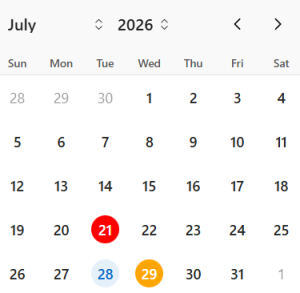
    top.$('td[data-date="2026-07-29"]').addClass("orange-date");
    top.$('td[data-date="2026-07-21"]').addClass("red-date");
}

// Create observer only once
if (!window.dpObserver) {
    window.dpObserver = new MutationObserver(highlightDates);

    window.dpObserver.observe(top.document.body, {
        childList: true,
        subtree: true
    });
}

// Highlight whenever the Date Picker opens
$(document).on("focus click", "#P8_DATE", function () {
    setTimeout(highlightDates, 100);
});
Real-Time Scenario
Consider a production planning application where users schedule manufacturing dates through an Oracle APEX Modal Dialog.
The organization wants to visually identify important dates:
- Orange – Planned machine maintenance.
- Red – Plant holidays or machine shutdowns.
When the user opens the Date Picker, these dates are highlighted automatically. If the user switches to another month or year, the highlights remain because the MutationObserver detects the calendar refresh and reapplies the formatting.
This helps users avoid selecting unavailable production dates, minimizes scheduling mistakes, and improves the overall user experience.
Benefits of This Approach
- Works seamlessly inside Oracle APEX Modal Dialogs.
- No plugins or external libraries required.
- Automatically updates highlighted dates after every calendar refresh.
- Easy to customize with additional colors or business rules.
- Can highlight holidays, maintenance dates, inspection schedules, delivery deadlines, or company events.
- Reusable across multiple Oracle APEX applications.
Output
Frequently Asked Questions (FAQ)
Does this solution work only in Modal Dialogs?
No. It can also be adapted for standard Oracle APEX pages. The use of top.$() is specifically required for Modal Dialogs because the Date Picker is rendered in the parent window.
Why is MutationObserver used?
Oracle APEX recreates the Date Picker whenever users navigate between months or years. MutationObserver detects these changes and reapplies the date highlighting automatically.
Can I highlight multiple dates?
Yes. Simply add additional data-date selectors and assign the required CSS class.
Does this require any plugins?
No. This solution uses only built-in Oracle APEX functionality, JavaScript, CSS, and the MutationObserver API.
Conclusion
Highlighting important dates inside an Oracle APEX Modal Dialog Date Picker requires a different approach because the calendar is rendered in the parent window and recreated whenever users navigate between months or years.
By combining top.$(), MutationObserver, and dynamic CSS injection, this solution provides a reliable, lightweight, and reusable method for highlighting important dates using JavaScript. It improves usability, reduces date-selection errors, and works seamlessly with Oracle APEX without requiring plugins or modifications to the built-in Date Picker component.
Whether you need to highlight holidays, maintenance schedules, inspection dates, production milestones, or delivery deadlines, this technique offers a practical solution for enhancing the Oracle APEX user experience.
