
Introduction: Oracle APEX Classic Reports provide a single row of column headers by default. However, in some business scenarios, it is necessary to group related columns under a common heading to improve readability. For example, columns related to vehicle information, stock details, registration, insurance, and passing stamp can be visually organized using multi-level headers.
Since Classic Reports do not provide a built-in option for grouped column headers, a custom solution is required.
Why we need to do: In reports containing many columns, users may find it difficult to understand which columns belong to the same category. This becomes more noticeable when multiple attributes are related to a single business object.
For example:
- Vehicle details may contain multiple columns.
- Stock information may consist of several related fields.
- Registration and insurance details are independent sections.
Without grouped headers:
- Reports become harder to read.
- Users spend more time identifying related columns.
- The report looks less organized.
Adding an additional header row improves the user experience by clearly categorizing related columns.
How do we solve: A simple JavaScript solution can be used to insert an additional header row into the Classic Report table.
JavaScript Code:
apex.jQuery(this.triggeringElement).find("thead").prepend(`

<tr id="tab-group-heading">

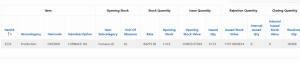
    <th class="t-Report-colHead" align="center" colspan="4">Item</th>

    <th class="t-Report-colHead" align="center" colspan="2">Opening Stock</th>

    <th class="t-Report-colHead" align="center" colspan="2">Stock Quantity</th>

    <th class="t-Report-colHead" align="center" colspan="2">Issue Quantity</th>

    <th class="t-Report-colHead" align="center" colspan="2">Rejection Quantity</th>

    <th class="t-Report-colHead" align="center" colspan="2">Closing Quantity</th>

</tr>

`);
Steps
1. Create a Classic Report.
2. Ensure the report contains the required columns in the same order as the grouped headers.
3. Create a Dynamic Action on Page load.
4. Add the above JavaScript in the Execute JavaScript Code action.
5. Refresh the page to view the additional grouped header.
Real-Time Scenario:
Example: Suppose the report contains the following columns:
Conclusion: Using a small JavaScript snippet, Oracle APEX developers can easily create multi-level grouped headers in Classic Reports without modifying the report query or template. This approach enhances report readability, provides better visual organization, and offers a simple, reusable solution for reports with multiple related columns.
