
Introduction
Every Oracle APEX developer has hit this wall: the app “lives” inside one sprawling SQL export. Reviewing a change, debugging with AI, or handing the app to a security auditor all mean scrolling through machine-generated SQL that barely reflects what actually changed.
Take a freelance-marketplace style app with pages for browsing projects, posting work, proposals, messaging, payments, and reviews. Tweaking one validation rule on a single page still meant the committed change touched the entire app export and over a year of updates, the repo history ends up technically complete but practically useless for understanding why anything changed. Oracle APEX 26.1 fixes this with APEXlang, a new open, declarative format for representing an application.
Why We Need to Do This
The root cause: the classic APEX export bundles the whole app into one monolithic SQL script, no matter how small the change. This causes:
- Unreadable code reviews thousands of auto-generated lines mean reviewers rubber stamp changes, letting regressions like a dropped validation slip through.
- Weak AI assistance a flat SQL dump gives AI tools too little structure to reason about.
- Slow audit security reviewers dig through the whole export just to find authorization rules.
- Fragile pipelines CI/CD import steps fail with cryptic ORA errors and no indication of the cause.
- Slow onboarding new developers can’t understand the app’s shape from source control alone.
How Do We Solve It
APEXlang restructures an app into a file-per-component project, like source code in any other language.
- Package structure. Exporting Nexlance in APEXlang produces:
nexlance/
├── pages/
│ ├── p00001-home.apx
│ ├── p00110-dashboard.apx
│ ├── p00112-post-a-project.apx
│ ├── p00121-browse-projects.apx
│ ├── p00150-submit-work.apx
│ ├── p00160-payment.apx
│ └── …
├── shared-components/
│ ├── authentications.apx
│ ├── lists.apx
│ ├── breadcrumbs.apx
│ └── static-files/
├── deployments/default.json
├── .apex/apexlang.json
└── application.apx
Each page is its own .apx file, shared components (auth, LOVs, lists) get their own files, and deployments/default.json holds the app ID (67591). A diff on p00112-post-a-project.apx now shows exactly what changed on that page nothing else.
- Choose the export type.
| Export Type | Includes | Best for |
| Standard | Comments, no runtime data | Source control, daily dev |
| Runtime | Run-only, no comments | Deploy to test/prod |
| Full | Runtime data + audit info | Environment migration |
| Custom | Flashback + per-setting toggles | Fine-grained control |
Standard is the right choice for Git Full unnecessarily bloats the repo with runtime data.
- Set up tooling.
Open the project in VS Code and install the Oracle SQL Developer Extension for syntax highlighting, code completion, and a Problems panel that flags errors before you import.
- Connect to the database.
In the Oracle SQL Developer panel, click Add Connection and enter host, port, service name, and credentials for the Nexlance schema. Name connections clearly (nexlance-dev, nexlance-test) and test before saving.
Set up one connection per environment rather than editing a single one repeatedly. If Nexlance runs on an Autonomous Database, use a wallet based connection instead of plain credentials.
- Read the syntax. A handful of constructs cover everything:
| Symbol | Meaning |
| ( ) | Wraps a component — page, region, item |
| { } | A property group — source, layout, appearance |
| name: | Property name, value after the colon |
| “`…“` | Multi-line block for SQL, PL/SQL, JS, or HTML |
| @name | Reference to another component |
| [ ] | A list of values for one attribute |
A real region from Nexlance’s
p00121-browse-projects.apx:
region breadcrumb (
name: Breadcrumb
type: breadcrumb
source {
breadcrumb: @breadcrumb
}
appearance {
template: @/title-bar
templateOptions: [
#DEFAULT#
t-BreadcrumbRegion–useBreadcrumbTitle
]
cssClasses: browse-filter-bar
}
)
@breadcrumb and @/titlebar reference shared components;
templateOptions: […] is a list of values;
cssClasses shows a single value without brackets.
HTML embeds the same way as SQL, in triple-backtick fences:
source {
html: “`
<div class=”empty-state”>
<p>No open projects match your filters.</p>
</div>
}
- Validate, then import.
- apex validate – input ./nexlance apex import -input ./nexlance
Validation catches errors before touching the workspace; import errors now point to the exact file and line instead of a generic ORA code. Both commands drop cleanly into CI/CD, and apex generate can scaffold a new project from the CLI.
- Pick your workflow.
APEX Builder for the familiar export/import and a read only APEXlang view in Page Designer; VS Code for daily editing and validation; SQLcl for automation. Most teams use all three.
Conclusion
Oracle APEX never lacked structure the export format just hid it inside one large file. APEXlang exposes that structure: one file per page, one per component, readable and diffable on its own terms.
Code review, AI-assisted debugging, security audits, and CI/CD all get something legible to work with instead of a wall of SQL a structural shift worth adopting in APEX 26.1.
Output
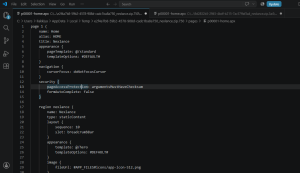
Note: If you’re working with an Oracle Cloud Infrastructure (OCI) Autonomous Database, you can connect directly to it from VS Code using the Oracle SQL Developer Extension. Once connected, you can import this APEXlang package (.apx files) straight into your APEX workspace on that database no need to go back to App Builder to do it manually. Just remember: OCI Autonomous Database connections require a wallet file, not just a username/password, so download the wallet from your OCI console first and point the extension to it when creating the connection.
