
Introduction
Anyone who’s built a Cards region in Oracle APEX has run into the same limitation. You can wire up an action on the Full Card, the Title, the Subtitle, or the Media area but the moment you want that click to do something beyond a plain redirect, like show a confirmation, set a page item, or fire custom logic, there was no clean, declarative path to get there. The usual workaround was writing raw JavaScript inside link targets, building hidden-button hacks, or manually binding jQuery selectors to the card markup functional, but scattered outside Page Designer where nobody could see it at a glance.
Why We Need to Do This
The root cause was structural: before APEX 26.1, Card actions (Full Card, Title, Subtitle, Media) gave you a click surface, but not a logic engine behind it. Dynamic Actions the declarative event/action framework APEX developers already use everywhere else simply weren’t exposed on these card-level actions. That gap caused a few recurring problems:
- Logic ended up outside Page Designer.
Any real behavior on a card click meant writing JavaScript by hand, so the app’s interactivity was split between what’s visible in Dynamic Actions and what’s buried in custom code. - No per – row context without extra work.
Getting the value of the row a user actually clicked (the job title, the row’s ID) required manually reading DOM attributes rather than a built-in mechanism. - Common feedback patterns were needlessly manual.
Something as simple as a success toast on click meant hand- writing apex.message.showPageSuccess(…) instead of using a declarative action.
- The Media area was often ignored entirely.
Card images or icons either triggered the same full-card redirect or did nothing at all there was no way to give the image its own distinct behavior.
How Do We Solve It?
Oracle APEX 26.1 introduces Triggered Actions for Cards, allowing Dynamic Actions to be attached directly to individual card elements. This eliminates the need for custom JavaScript for many common interactions.
Full Card Action
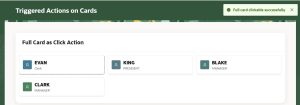
Navigate to Cards Region → Attributes → Actions → Full Card → Triggered Actions and create a Dynamic Action. Add a Show Success Message True Action with the message “Full card clicked successfully.” Clicking anywhere on the card now displays a toast message without any JavaScript.
Subtitle Action
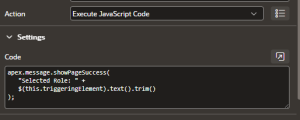
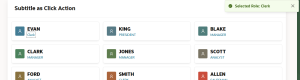
Under Actions → Subtitle → Triggered Actions, create a Dynamic Action and add an
Excute JavaScript Code action:
apex.message.showPageSuccess(“Selected Role: ” + $v(“JOB”));
Each card displays its own JOB value at runtime. Alternatively, use the declarative Show Success Message action with the message:
Selected Role: &JOB.
Title Redirect
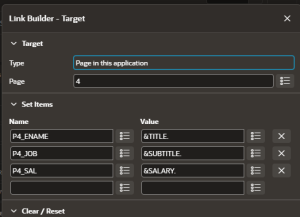
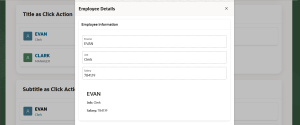
To navigate to another page, configure the Title action using Link Builder. Set the target page and map items such as:
- P4_ENAME = &TITLE.
- P4_JOB = &SUBTITLE.
- P4_SAL = &SALARY.
For production applications, pass the primary key (for example, EMPNO) instead of display values.
Media Action
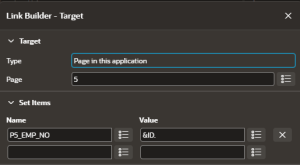
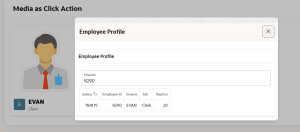
The Media section can now have its own action. Configure a separate redirect under Actions→ Media, allowing the image and title to perform different actions.
Output
Conclusion
What used to require custom JavaScript, hidden buttons, or manual jQuery bindings on a Cards region is now a native part of Page Designer. Full Card, Title, Subtitle, and Media each get their own Triggered Actions node, running on the same Dynamic Action engine developers already know from buttons and page items. Paired with new declarative actions like Show Success Message, most of the one-off JavaScript that used to sit outside Page Designer can now be removed entirely leaving the interactivity of a Cards region visible, declarative, and easy to debug, right where the rest of an APEX page’s logic already lives.
