
Introduction
When working with data-dense Oracle APEX Interactive Grids, users often struggle with standard filter menus—especially when navigating complex datasets with multiple columns. Traditional UI filtering requires users to manually select columns, operators, and values, which can slow down daily operations.
While integrating generative AI (APEX_AI / Cohere) to convert plain-English prompts (e.g., “Salary greater than 3000”) into SQL filter conditions solves the input problem, applying these dynamic SQL filter strings to an Interactive Grid in real time often fails. Developers frequently hit two major roadblocks:
DOM ID / Region Lookup Failures: Encountering Uncaught TypeError or APEX is not defined when attempting to refresh the grid via JavaScript (apex.region().refresh()).
“No Data Found” or Stale Grid State: The SQL condition generates properly (e.g., SAL > 3000), but standard static SQL query sources treat session variables as string literals, resulting in an unchanged grid or zero rows returned.
Why we need to do
This issue occurs due to how APEX handles standard region rendering, session state synchronization, and SQL compilation:
Static ID Mismatches in the DOM: APEX frequently generates internal template IDs (e.g., id=”R21466663429298114321_ig”). If the region template does not explicitly evaluate static ID substitutions, apex.region(“your_static_id”) evaluates to null, throwing standard JavaScript execution errors.
Static SQL Query Limitations: Standard Interactive Grid SQL source queries cannot directly evaluate raw dynamic strings like :P10_WHERE_CLAUSE in a WHERE clause without turning them into static string literals (e.g., WHERE ‘SAL > 3000’). This causes Oracle SQL engine evaluation to return zero rows.
Asynchronous Session State Execution: If the JavaScript refresh fires before the server-side PL/SQL process finishes setting the target page item in session state, the grid re-queries using the previous or empty state.
How do we solve
We solve this using a 3-part architecture: clean PL/SQL prompt sanitization, a dynamic PL/SQL region query source, and a bulletproof DOM-based JavaScript refresh.
Step 1: Configure the Dynamic PL/SQL Region Source
Instead of a static SELECT query, change the Interactive Grid source to evaluate dynamic SQL safely.
Open Page Designer and select your Interactive Grid region (Employee Directory).
Under Source:
Set Type: PL/SQL Function Returning a SQL Query
Set Page Items to Submit: P10_WHERE_CLAUSE
Enter the following PL/SQL function body:
DECLARE
v_where VARCHAR2(4000) := NVL(TRIM(:P10_WHERE_CLAUSE), ‘1=1’);
v_sql VARCHAR2(4000);
BEGIN
— Ensure fallback if empty
IF v_where IS NULL OR v_where = ” THEN
v_where := ‘1=1’;
END IF;
— Construct the dynamic SQL query
v_sql := ‘SELECT EMPNO, ENAME, JOB, MGR, HIREDATE, SAL, COMM, DEPTNO FROM EMP WHERE ‘ || v_where;
RETURN v_sql;
END;
Step 2: Implement AI Filter Generation (Dynamic Action 1)
Create a Dynamic Action on your Apply AI Filter button with an Execute Server-side Code action:
Items to Submit: P10_PROMPT
Items to Return: P10_WHERE_CLAUSE
Wait for Result: Yes (Crucial for synchronous execution)
PL/SQL Code:
DECLARE
v_user_prompt VARCHAR2(2000) := :P10_PROMPT;
v_ai_prompt CLOB;
v_ai_response CLOB;
v_clean_where VARCHAR2(4000);
BEGIN
IF v_user_prompt IS NULL THEN
:P10_WHERE_CLAUSE := ‘1=1’;
RETURN;
END IF;
v_ai_prompt :=
‘Table: EMP (columns: EMPNO, ENAME, JOB, MGR, HIREDATE, SAL, COMM, DEPTNO). ‘ ||
‘Return ONLY a valid Oracle SQL WHERE clause filter condition. ‘ ||
‘Rules: Do NOT include the word WHERE. Do NOT use markdown or code blocks. ‘ ||
‘User prompt: ‘ || v_user_prompt;
v_ai_response := APEX_AI.GENERATE(
p_prompt => v_ai_prompt,
p_service_static_id => ‘COHERE_SERVICE’
);
— Clean markdown formatting and line breaks
v_clean_where := TRIM(v_ai_response);
v_clean_where := REGEXP_REPLACE(v_clean_where, ‘^“`sql\s*|^“`\s*|“`$’, ”);
v_clean_where := REGEXP_REPLACE(v_clean_where, ‘^WHERE\s+’, ”, 1, 1, ‘i’);
v_clean_where := REPLACE(REPLACE(v_clean_where, CHR(10), ‘ ‘), CHR(13), ‘ ‘);
IF LENGTH(v_clean_where) > 0 THEN
:P10_WHERE_CLAUSE := v_clean_where;
ELSE
:P10_WHERE_CLAUSE := ‘1=1’;
END IF;
END;
Step 3: DOM-Safe JavaScript Refresh (Dynamic Action 2)
Add a second action (Execute JavaScript Code) immediately following the PL/SQL execution step:
// Force item session state sync and locate IG dynamically via class selector
apex.item(“P10_WHERE_CLAUSE”).setValue(apex.item(“P10_WHERE_CLAUSE”).getValue());
var $ig = apex.jQuery(“.a-IG”);
if ($ig.length > 0) {
// Extract internal region wrapper ID dynamically
var regionId = $ig.closest(“.a-IG-region, .t-Region”).attr(“id”) || $ig.attr(“id”).replace(“_ig”, “”);
apex.region(regionId).refresh();
} else {
apex.event.trigger(document, “apexrefresh”);
}
Step 4: Adding a “Clear Filter” Option
To allow users to reset the view back to all records:
Create a button named BTN_CLEAR_FILTER.
Attach a Dynamic Action on click with an Execute JavaScript Code action:
// Reset items
apex.item(“P10_PROMPT”).setValue(“”);
apex.item(“P10_WHERE_CLAUSE”).setValue(“1=1”);
// Refresh Grid
var $ig = apex.jQuery(“.a-IG”);
if ($ig.length > 0) {
var regionId = $ig.closest(“.a-IG-region, .t-Region”).attr(“id”) || $ig.attr(“id”).replace(“_ig”, “”);
apex.region(regionId).refresh();
}
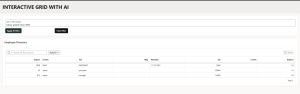
OUTPUT:
Conclusion
By shifting the region source to a PL/SQL Function Returning a SQL Query and querying the Interactive Grid dynamically via apex.jQuery(‘.a-IG’), we resolved the UI state sync and runtime JavaScript errors completely.
This approach provides a robust, reusable pattern for integrating Generative AI (APEX_AI) natural language querying across Oracle APEX applications—and extends naturally to Classic Reports, Cards, and JET Charts!
