
Introduction/ Issue:
In Oracle APEX, application pages and reports may contain sensitive or confidential information that should be clearly identified when viewed by users. One way to indicate such information is by displaying a watermark such as CONFIDENTIAL, DRAFT, or INTERNAL USE ONLY across the page or report.
Oracle APEX does not provide a direct built-in option to display this type of watermark over a report region. However, this requirement can be achieved by using CSS to create a watermark overlay without modifying the underlying report data or affecting the user’s interaction with the report.
The following technologies have been used to achieve the same:
Oracle APEX
CSS
Why we need to do / Cause of the issue:
In a real-time scenario, an Oracle APEX application may contain reports that display sensitive or confidential information. To make users aware that the information should be handled securely, a CONFIDENTIAL watermark can be displayed across the report.
Since Oracle APEX does not provide a direct option to add this type of watermark, CSS can be used to create an overlay on the report region. The watermark remains visible while users view the data, without affecting their ability to sort, filter, click links, or perform other report actions.
This approach provides a simple way to visually identify sensitive information while keeping the existing report functionality unchanged.
How do we solve:
We can create the watermark using a CSS pseudo-element and apply it to an Oracle APEX region.
Step 1: Create an Interactive Report
Create a page with an Interactive Report region.
Step 2: Assign a Static ID to the Region
In Page Designer:
- Select the Interactive Report region.
- Go to Advanced.
Set the Static ID to:

Using a Static ID is important because it provides a stable CSS selector for the region.
Step 3: Add the Watermark CSS
Select the Page node in Page Designer.
Go to:
CSS → Inline
Add the following CSS:
#emp_report {
position: relative;
}
#emp_report::before {
content: “CONFIDENTIAL”;
position: absolute;
inset: 0;
display: flex;
align-items: center;
justify-content: center;
font-size: 6rem;
font-weight: 700;
letter-spacing: .4rem;
color: rgba(31, 58, 92, .12);
transform: rotate(-25deg);
pointer-events: none;
z-index: 5;
white-space: nowrap;
user-select: none;
}
Run the page.
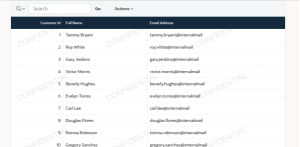
The word CONFIDENTIAL will now appear as a faded watermark across the report.
Creating a Repeating Watermark
Use the following CSS:
#emp_report {
position: relative;
}
#emp_report::before {
content: “”;
position: absolute;
inset: 0;
z-index: 5;
pointer-events: none;
background-image: url(“data:image/svg+xml;utf8,<svg xmlns=’http://www.w3.org/2000/svg’ width=’300′ height=’180′><text x=’10’ y=’100′ fill=’rgba(0,0,0,0.08)’ font-size=’26’ font-family=’sans-serif’ transform=’rotate(-25 150 90)’>CONFIDENTIAL</text></svg>”);
background-repeat: repeat;
OUTPUT :
Conclusion:
By using CSS, we successfully added a watermark to an Oracle APEX report without changing the report data or affecting its existing functionality. The watermark remains visible while users can continue to sort, filter, navigate, and interact with the report normally.
