
Introduction: –
In enterprise environments, users expect seamless access to applications without repeatedly entering their credentials. Oracle APEX supports this through Single Sign-On (SSO) by integrating with Active Directory (LDAP) using HTTP Header Variable Authentication.
Instead of displaying a login page, the web server authenticates the user and passes the username to Oracle APEX through an HTTP header. Oracle APEX then retrieves the user’s LDAP information, validates Active Directory group membership, assigns application roles dynamically, and logs every login attempt.
Technologies used: Oracle APEX, Oracle Database, PL/SQL, Oracle Web Toolkit (OWA_UTIL), Active Directory (LDAP), HTTP Header Variable Authentication, IIS / Reverse Proxy / Web Server, Oracle Packages.
Why we need to do: –
Most enterprise applications require:
- Centralized authentication
- No separate application passwords
- Role-based authorization
- Automatic user provisioning
- Audit logging
Maintaining users separately inside Oracle APEX becomes difficult because:
- Passwords must be managed independently.
- User roles require manual maintenance.
- Employee onboarding/offboarding is time-consuming.
- Security policies become harder to enforce.
A better solution is integrating Oracle APEX directly with Active Directory (LDAP), eliminating separate credentials and manual role maintenance while improving security and auditability.
How do we solve: –
Oracle APEX supports HTTP Header Variable Authentication. The authentication flow is:
- User logs into the corporate network.
- IIS/Web Server authenticates the user.
- Web Server sends the username in the HTTP Header (Network_User_Name).
- Oracle APEX reads the username.
- A PL/SQL package fetches LDAP user information.
- AD Groups are retrieved.
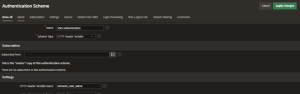
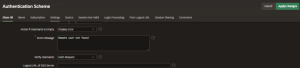
Step 1: Configure the Authentication Scheme
- Scheme Type: HTTP Header Variable
- HTTP Header Variable Name: Network_User_Name
- Action if Username is Empty: Display Error
- Error Message: Remote user not found
- Verify Username: Each Request
Step 2: Create the Application Process
- Process Point: Ajax Callback
- Process Name: Set_Application_Items_App_User
- Type: Execute Code
This process is responsible for retrieving LDAP details and initializing user-specific application items after successful authentication.
Step 3: Read the logged-in user and fetch LDAP details
lv_v_remote_user := OWA_UTIL.get_cgi_env('Network_User_Name');
l_user_tab_row := pk_ldap_auth_group.fn_chk_ad_group(
    iv_v_remote_user => lv_v_remote_user
);
The package returns LDAP attributes such as given Name, sn, mail, SAMAccountName, and memberOf. These are looped through and stored in Application Items (:FIRST_NAME, :LAST_NAME, :EMAIL, etc.).
AD Groups are retrieved from memberOf and combined into a colon-separated list,
e.g. GROUP_ADMIN:GROUP_REPORTING_MANAGER:GROUP_PROJECT_MANAGER.
Step 4: Validate groups and determine the highest role
Before allowing access, the process checks whether any of the user’s Groups exist in the application’s role mapping table (tb_adgroup_role_dtls). If no matching group exists, the user is denied access with a clear error message.
The package pk_user_high_role.fn_get_user_role determines the user’s highest applicable role from all matched groups and stores it in :APP_USER_ROLE.
| Group | Application Role |
| GROUP_ADMIN | Administrator |
| GROUP_REPORTING_MANAGER | Reporting Manager |
| GROUP_PROJECT_MANAGER | Project Manager |
Every login attempt (success/failure) is recorded via pr_ins_access_log, capturing URL, remote user, timestamp, status, and error details.
The highest applicable role is stored in:
:APP_USER_ROLE
This role is later used for authorization and access control throughout the application.
Access Logging
Every login attempt is recorded.
For successful logins:
pr_ins_access_log(
Login_Status => 'Success'
);
For failed logins:
pr_ins_access_log(
Login_Status => 'Failure'
);
The log captures:
- Application URL
- Remote User
- Login Time
- Login Status
- Error Details
This provides a complete audit trail for security and compliance.
Source Code
PK_LDAP_AUTH_GROUP — Package Specification
create or replace PACKAGE pk_ldap_auth_group
AS

/* Description : Package for Checking Groups in LDAP Server
Author, Version : Version 1.0
Date of Creation : 25-jul-2026 */

--Reason for modification Version Modified by Modified Date

l_ldap_host     VARCHAR2 (256) := 'ldap.yourcompany.com';
l_ldap_port     VARCHAR2 (256) := '3268';
l_ldap_base     VARCHAR2 (256) := 'DC=yourcompany,DC=com';
l_ldap_user     VARCHAR2 (256) := 'yourdomain\svc_account';
l_ldap_passwd   VARCHAR2 (256) := '<ldap_service_account_password>';

TYPE usr_rec_type IS RECORD (
user_login      VARCHAR2 (50),
user_fullname   VARCHAR2 (50),
user_id         VARCHAR2 (50)
);

TYPE usr_attr_type IS RECORD (
ID      NUMBER (20),
login   VARCHAR2 (256),
attr    VARCHAR2 (256),
val     VARCHAR2 (256)
);

TYPE usr_tab_type IS TABLE OF usr_rec_type;

TYPE usr_tab_attr IS TABLE OF usr_attr_type;

FUNCTION fn_chk_ad_group (iv_v_remote_user IN VARCHAR2)
RETURN usr_tab_attr;

PROCEDURE pr_ins_access_log (
iv_v_app_url        IN   VARCHAR2,
iv_v_remote_user    IN   VARCHAR2,
iv_d_date_time      IN   DATE,
iv_v_login_status   IN   VARCHAR2,
iv_v_error_dtls     IN   VARCHAR2
);
END pk_ldap_auth_group;
PK_LDAP_AUTH_GROUP — Package Body
create or replace PACKAGE BODY pk_ldap_auth_group
AS
/* Description : Package for Checking Groups in LDAP Server
Author, Version : Version 1.0
Date of Creation : 25-jul-2026 */

--Reason for modification Version Modified by Modified Date

FUNCTION fn_chk_ad_group (iv_v_remote_user IN VARCHAR2)

RETURN usr_tab_attr

IS
user_tab_row    usr_tab_attr                := usr_tab_attr ();
user_row        usr_attr_type;
counter         NUMBER                      := 0;
l_filter        VARCHAR2 (256)              := iv_v_remote_user;
l_retval        PLS_INTEGER;
l_session       DBMS_LDAP.SESSION;
l_attrs         DBMS_LDAP.string_collection;
v_entry_id      NUMBER (12);
l_message       DBMS_LDAP.MESSAGE;
l_entry         DBMS_LDAP.MESSAGE;
l_attr_name     VARCHAR2 (256);
l_ber_element   DBMS_LDAP.ber_element;
l_vals          DBMS_LDAP.string_collection;

CURSOR c1
IS
SELECT ad_group_name
FROM tb_adgroup_role_dtls;

BEGIN

FOR adgroup_rec IN c1
LOOP

DBMS_LDAP.use_exception := TRUE;
l_session :=
DBMS_LDAP.init (hostname      => l_ldap_host,
portnum       => l_ldap_port);
l_retval :=
DBMS_LDAP.simple_bind_s (ld          => l_session,
dn          => l_ldap_user,
passwd      => l_ldap_passwd
);

l_attrs (1) := 'sn';
l_attrs (2) := 'givenName';
l_attrs (3) := 'memberOf';
l_attrs (4) := 'sAMAccountName';
l_attrs (5) := 'mail';
l_retval :=

DBMS_LDAP.search_s
(ld            => l_session,
base          => l_ldap_base,
SCOPE         => DBMS_LDAP.scope_subtree,
filter        =>    '(&(objectClass=*)(mail='
|| iv_v_remote_user
|| '))',
attrs         => l_attrs,
attronly      => 0,
res           => l_message
);

IF DBMS_LDAP.count_entries (ld => l_session, msg => l_message) > 0
THEN
l_entry :=
DBMS_LDAP.first_entry (ld       => l_session,
msg      => l_message);

<<entry_loop>>
v_entry_id := 0;

WHILE l_entry IS NOT NULL
LOOP
v_entry_id := v_entry_id + 1;

-- Get all Attributes of the Entry

l_attr_name := DBMS_LDAP.first_attribute (ld => l_session,
ldapentry      => l_entry,
ber_elem       => l_ber_element
);

<<attributes_loop>>

WHILE l_attr_name IS NOT NULL

--AND l_attr_name  IN('sAMAccountName','employeeNumber','displayName')

LOOP

l_vals :=

DBMS_LDAP.get_values (ld   => l_session,
ldapentry      => l_entry,
attr           => l_attr_name
);

<<values_loop>>

user_row.login := NULL;

FOR i IN l_vals.FIRST .. l_vals.LAST
LOOP

IF l_attr_name = 'sAMAccountName' THEN

user_row.login := l_vals (i);

ELSE

user_row.login := NULL;

END IF;

user_row.ID := v_entry_id;
user_row.attr := l_attr_name;
user_row.val := l_vals (i);
user_tab_row.EXTEND;
counter := counter + 1;
user_tab_row (counter) := user_row;
END LOOP values_loop;

l_attr_name :=

DBMS_LDAP.next_attribute (ld      => l_session,
ldapentry      => l_entry,
ber_elem       => l_ber_element
);

END LOOP attributes_loop;

l_entry :=

DBMS_LDAP.next_entry (ld       => l_session,
msg      => l_entry);
END LOOP entry_loop;
END IF;

-- Close Connection to LDAP Server

l_retval := DBMS_LDAP.unbind_s (ld => l_session);

RETURN user_tab_row;

END LOOP;

END fn_chk_ad_group;

PROCEDURE pr_ins_access_log (
iv_v_app_url        IN   VARCHAR2,
iv_v_remote_user    IN   VARCHAR2,
iv_d_date_time      IN   DATE,
iv_v_login_status   IN   VARCHAR2,
iv_v_error_dtls     IN   VARCHAR2
)
AS

PRAGMA AUTONOMOUS_TRANSACTION;
lv_n_log_id   NUMBER;

BEGIN
BEGIN
lv_n_log_id := sq_log_id.NEXTVAL;

EXCEPTION WHEN OTHERS THEN

raise_application_error

(-20002,'PK_LDAP_AUTH_GROUP.pr_ins_access_log  - Error in selecting log id '|| SQLERRM);

END;

BEGIN

INSERT INTO tb_access_log(log_id, url, remote_user, date_time,login_status, error_details)

VALUES (lv_n_log_id, iv_v_app_url, iv_v_remote_user, iv_d_date_time,iv_v_login_status, iv_v_error_dtls);

EXCEPTION WHEN OTHERS THEN
raise_application_error(-20002,'PK_LDAP_AUTH_GROUP.pr_ins_access_log  - Error in tb_access_log table insert '|| SQLERRM);

END;

COMMIT;

END pr_ins_access_log;

END pk_ldap_auth_group;
/
PK_USER_HIGH_ROLE — Package Specification
create or replace PACKAGE pk_user_high_role
AS

/* Description : Package for Central User Authorization
Author, Version : Version 1.0
Date of Creation : 25-jul-2026 */

--Reason for modification Version Modified by Modified Date

FUNCTION fn_get_user_role (
iv_v_ad_group   IN       VARCHAR2,
iv_n_app_id     IN       NUMBER,
ov_v_error      OUT      VARCHAR2
)
RETURN VARCHAR2;

END pk_user_high_role;
/
PK_USER_HIGH_ROLE — Package Body
create or replace PACKAGE BODY pk_user_high_role
AS
/* Description : Package for Central User Authorization
Author : Version 1.0
Date Of Creation : 25-jul-2026 */

--Reason for modification Version Modified by Modified Date

FUNCTION fn_get_user_role (
iv_v_ad_group   IN       VARCHAR2,
iv_n_app_id     IN       NUMBER,
ov_v_error      OUT      VARCHAR2
)
RETURN VARCHAR2
IS
lv_v_stage                   VARCHAR2 (500);
lv_v_inserted_role           VARCHAR2 (100);
lv_v_prior_role              VARCHAR2 (30);
lv_v_ad_group_name           VARCHAR2 (200);
lv_d_created_date   CONSTANT DATE           := SYSDATE;

BEGIN

lv_v_stage := 'User Role selection';

BEGIN

SELECT a.app_roles

INTO lv_v_prior_role

FROM tb_adgroup_role_dtls a

WHERE app_id = iv_n_app_id

AND roles_hierarchy =

(SELECT MAX (b.roles_hierarchy)

FROM tb_adgroup_role_dtls b

WHERE app_id = iv_n_app_id

AND b.app_roles != 'ROLES ADMIN'

AND UPPER (b.ad_group_name) IN (
SELECT UPPER (REGEXP_SUBSTR (iv_v_ad_group,'[^:]+',1,LEVEL)) FROM DUAL
CONNECT BY REGEXP_SUBSTR (iv_v_ad_group,'[^:]+',1,LEVEL) IS NOT NULL));

EXCEPTION WHEN NO_DATA_FOUND THEN

BEGIN

BEGIN

SELECT ad_group_name INTO lv_v_ad_group_name FROM tb_adgroup_role_dtls

WHERE app_roles = 'ROLES ADMIN' AND app_id = iv_n_app_id;

EXCEPTION

WHEN NO_DATA_FOUND

THEN

ov_v_error :='Roles Admin is not defined in local application.';

END;

BEGIN

SELECT 1 INTO lv_v_inserted_role FROM DUAL
WHERE UPPER (lv_v_ad_group_name) IN (
(SELECT     UPPER (REGEXP_SUBSTR (iv_v_ad_group,'[^:]+',1,LEVEL))FROM DUAL
CONNECT BY REGEXP_SUBSTR (iv_v_ad_group,'[^:]+',1,LEVEL) IS NOT NULL));

EXCEPTION WHEN NO_DATA_FOUND
THEN

ov_v_error :='Sorry, Role is not defined for your account in AD Directory';

END;

IF lv_v_inserted_role = 1

THEN

lv_v_prior_role := 'ROLES ADMIN';

END IF;

END;

pk_error_log.pr_ins_error_log
(iv_n_app_id            => iv_n_app_id,
iv_v_error_code        => SQLCODE,
iv_v_error_text        => SQLERRM,
iv_v_user_id           => -1,
iv_v_stages            => lv_v_stage,
iv_d_created_date      => SYSDATE
);

WHEN OTHERS THEN
ov_v_error :='Application Error: Priority role selection. ' || SQLERRM;

pk_error_log.pr_ins_error_log
(iv_n_app_id            => iv_n_app_id,
iv_v_error_code        => SQLCODE,
iv_v_error_text        => SQLERRM,
iv_v_user_id           => -1,
iv_v_stages            => lv_v_stage,
iv_d_created_date      => SYSDATE
);

END;
RETURN lv_v_prior_role;
END fn_get_user_role;
END pk_user_high_role;
/
Output: –
A completely password-less, single sign-on login experience for enterprise Oracle APEX applications:
- User is automatically authenticated via Windows/AD credentials — no APEX login screen.
- User’s name, email, and login are auto-populated into Application Items.
- User’s AD Group membership determines their application role automatically.
- Unauthorized users (no matching AD Group) are blocked with a clear message.
- Every login attempt — successful or failed — is logged for audit and compliance.
